Key details for this exam, checked against the published exam outline
Each question shows the correct answer and an explanation of why it is right
Refer to the exhibit.
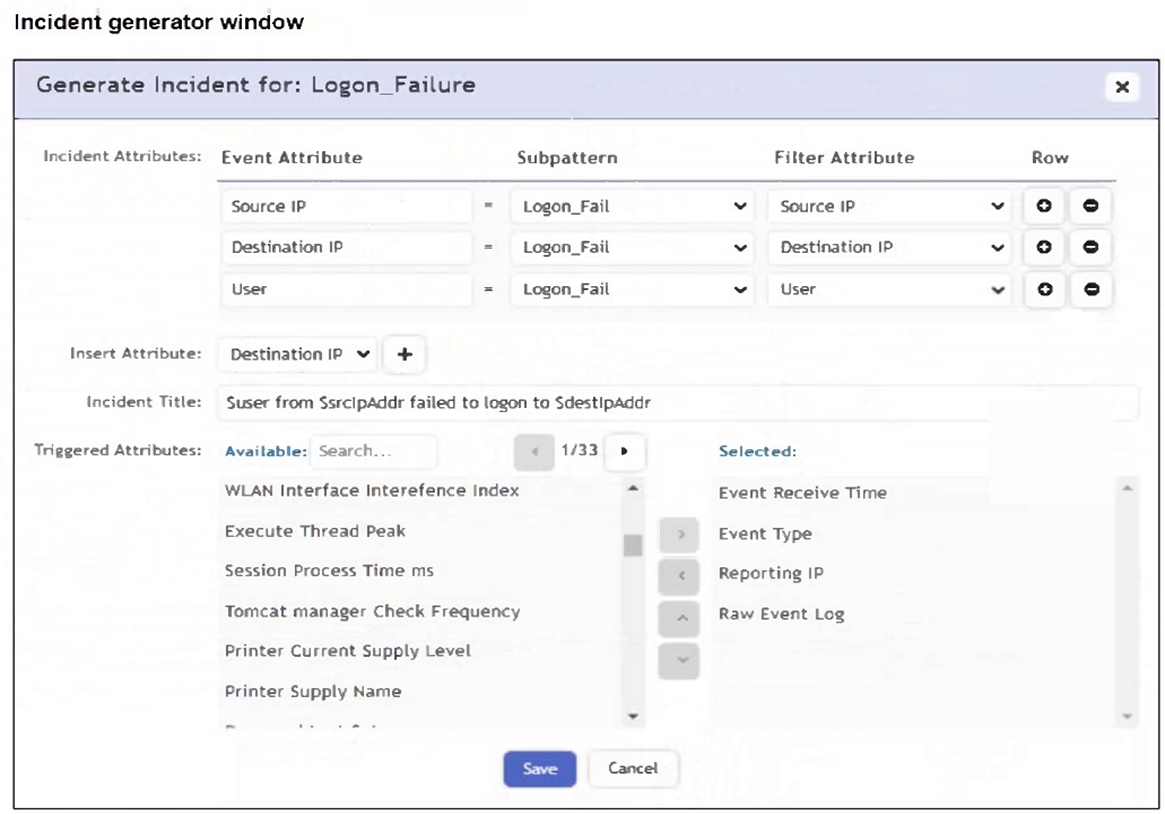
An analyst is trying to generate an incident with a title that includes the Source IP, Destination IP, User, and Destination Host Name. They are unable to add Destination Host Name as an incident attribute.
What must be changed to allow the analyst to select Destination Host Name as an attribute?
The attribute must be selected as a Triggered Attribute so that it becomes available for incident generation and incident-title substitution. In the FortiSIEM Study Guide's rule action configuration section, FortiSIEM separates incident attributes from triggered attributes. Triggered attributes are taken from the events that cause the rule to trigger and are then available for incident display and incident context. The guide explains that the rule action step is where an analyst defines the incident generated by a rule and chooses which attributes are carried forward. If Destination Host Name is not selected in the Triggered Attributes list, FortiSIEM cannot use it as an incident attribute in the generated incident title. Option B is wrong because aggregate items are used for calculations such as COUNT, AVG, or SUM, not for making a text attribute available in the incident title. Option C is wrong because Destination Host Name is an event attribute, not an event type. Option D is unrelated; removing Destination IP would not make Destination Host Name selectable.
Refer to the exhibit.
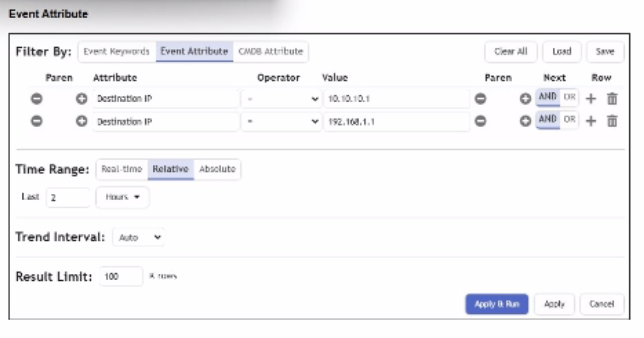
A FortiSIEM analyst is investigating an issue by examining events to two destination IP addresses. However, the analyst is not getting any results from the search.
Based on the selected filter shown in the exhibit, why is the search returning no results?
The correct answer is B because the analyst is searching for events to either of two destination IP addresses, but the filter uses the wrong Boolean relationship. The FortiSIEM Study Guide explains structured searches with multiple conditions and states that ''when you use multiple conditions, you must specify the next logical operator between conditions.'' It gives a direct example: when searching for events from two specific devices, the first condition is one IP address, the second condition is another IP address, and ''the next logical operator between the two conditions is an OR operator, because the search is for events from condition 1 OR condition 2.'' The same logic applies here. A single event cannot usually have Destination IP equal to 10.10.1.1 and Destination IP equal to 192.168.1.1 at the same time. Using AND requires both conditions to be true simultaneously, so no results are returned. The correct operator between the two Destination IP conditions is OR.
Which two data areas can you use for user and entity behavior analytics (EBA) machine learning models? (Choose two.)
The correct answers are A. Process and C. Resources. FortiSIEM UEBA/EBA analytics uses endpoint and behavior-related telemetry to identify abnormal activity. The Study Guide explains that the UEBA incident dashboard shows incidents that the AI module creates based on alerts received from FortiInsight. The UEBA attribute list includes the incident name, host, application, user, tag, and activity. This aligns with process-oriented activity monitoring from endpoint agents. The performance and baseline lessons also explain that FortiSIEM collects performance and availability data from devices and applications, including resource-utilization metrics, and uses that information to build baselines and detect anomalous activity. Resource behavior includes CPU, memory, disk, I/O, and similar utilization patterns, which are valid behavioral-model inputs. Location and Network are important FortiSIEM context areas, but in this question's EBA machine learning model choices, the valid model areas are process behavior and resource behavior. Process reflects what is running or being executed; Resources reflects system or application utilization behavior. Together, these are the two data areas used for EBA machine learning models.
Refer to the exhibit.
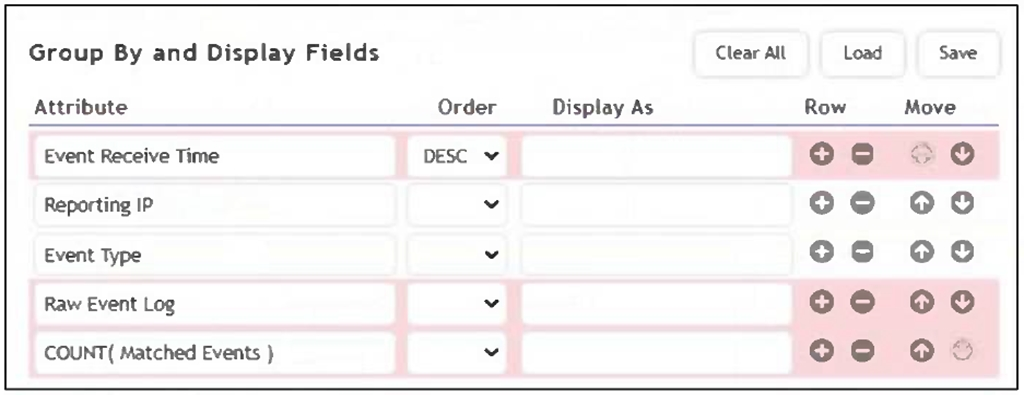
As shown in the exhibit, why are some of the fields highlighted in red?
The fields are highlighted in red because unique values such as Event Receive Time and Raw Event Log cannot be used in group-by operations. Grouping requires aggregatable or consistent values across events, while these fields are unique to each event, making them incompatible for grouping.
The correct answer is A because the highlighted fields are not valid for that grouped/aggregated display configuration. The FortiSIEM 7.4 User Guide notes that some event attributes, functions, and queries are not supported in specific analytics result-filter and display contexts. It lists date fields, including examples such as Event Receive Time, and also lists Raw Event Log and Binary Raw Event Log among unsupported fields for that context. The reason is practical: grouping requires stable values that can combine multiple events into meaningful grouped rows. Attributes such as Event Receive Time and Raw Event Log are highly specific to individual events. If every event has its own receive timestamp or unique raw log content, grouping by those fields defeats aggregation and can create one row per event rather than meaningful grouped output. COUNT(Matched Events) itself is a valid aggregate expression when used correctly. Event Receive Time is available in logs, but it is not appropriate as a grouped field in the configuration shown. Therefore, the red highlighting indicates invalid grouped fields caused by unique/non-groupable values.
Refer to the exhibit.
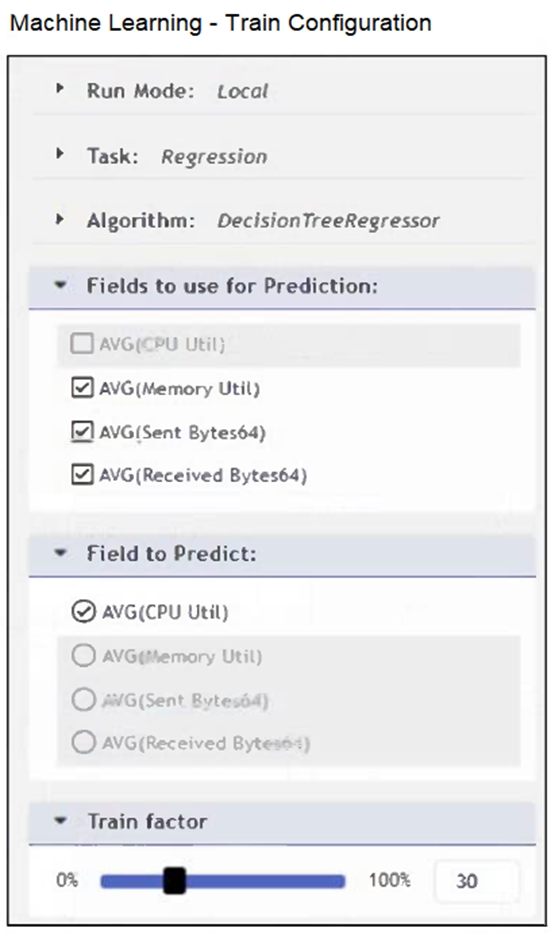
The configuration shown in the exhibit is incorrect.
What must you change to allow this configuration to be successfully applied to FortiSIEM?
The correct answer is A. In FortiSIEM machine learning training, the Train factor controls how much of the prepared dataset is used for training and how much is reserved for testing. The FortiSIEM 7.4 User Guide states in the regression training procedure that the analyst must choose the Train factor and that it ''should be greater than 70%.'' It also explains the meaning of the value: 70% of the data is used for training and 30% is used for testing. This directly supports option A. Option B is incorrect because the supported running modes include Local, Local Auto, and AWS; ''ML'' is not the required run mode. Option C is incorrect because regression can use multiple fields for prediction; the guide instructs the user to choose the fields to use for prediction and the field to predict. Option D is incorrect because prediction input fields and target field should not be the same. Regression builds a model to predict a target field based on other fields, so the configuration must use a valid Train factor rather than matching predictor and target fields.
Refer to the exhibit.
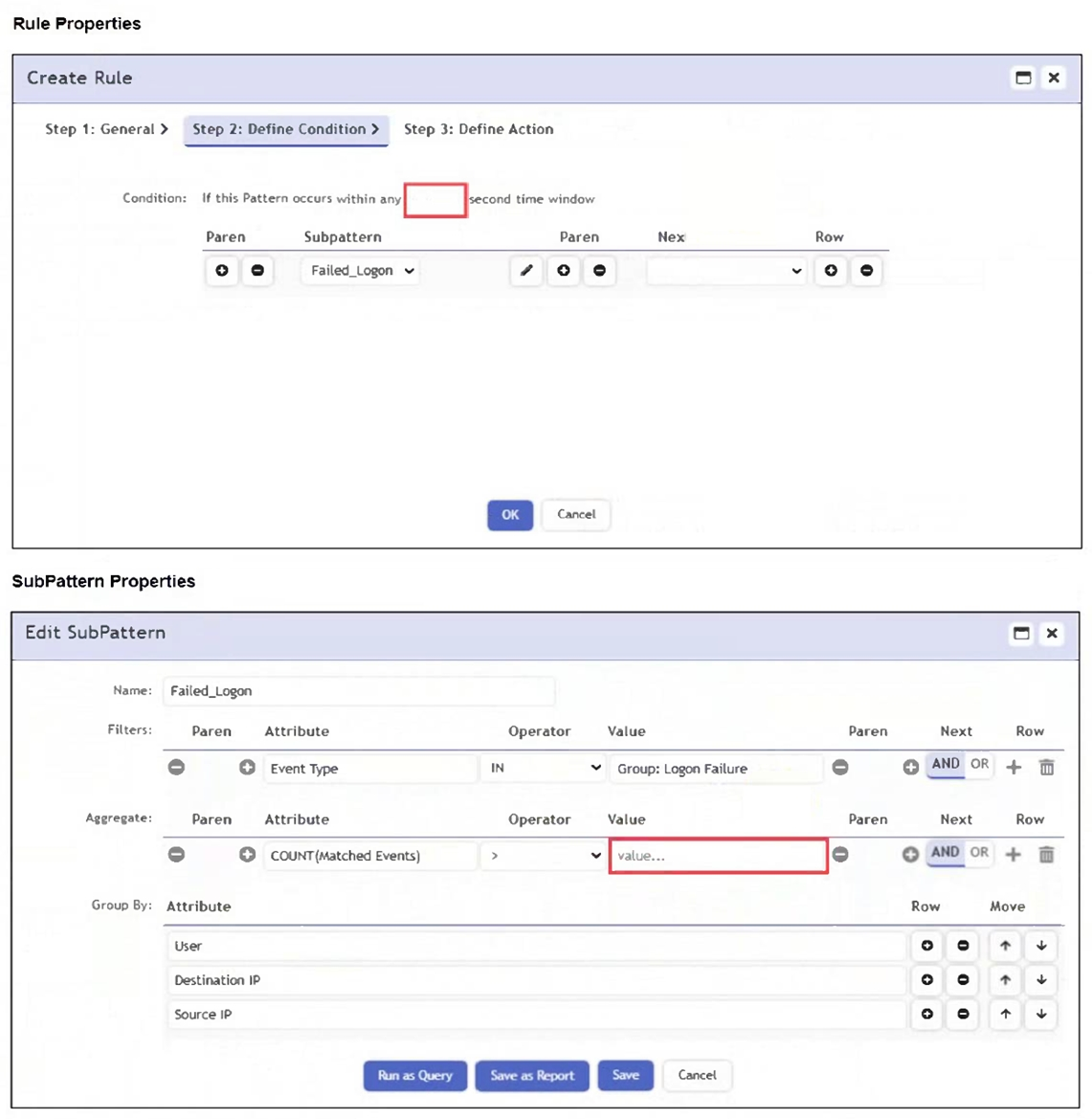
An analyst wants the rule shown in the exhibit to trigger when three failed login attempts occur within three minutes.
What should the values be for the condition time window and aggregate count?
To detect three failed login attempts within three minutes, you must set the aggregate count to 3 in the subpattern and the time window to 180 seconds in the rule condition. This ensures the rule triggers only if three or more failed logins occur in that timeframe.
The correct answer is A because three minutes equals 180 seconds, and the aggregate threshold must be set to three matching events. The FortiSIEM Study Guide explains that rule conditions specify event attributes and thresholds that trigger the rule and create an incident. It further states that the time window defines the period within which the subpattern must match for the rule condition to be satisfied. The Study Guide's single-subpattern rule example shows the same principle: the condition has a configured time window, and the Aggregate section uses a function such as COUNT(Matched Events) to require a minimum number of matching events. In this question, the analyst wants the rule to trigger when three failed login attempts happen within three minutes. Therefore, the rule condition time window must be 180 seconds, and the aggregate count must be 3. A 90-second window would detect only events inside one and a half minutes, not the required three minutes. An aggregate count of 2 would trigger too early because the requirement is three failed attempts.
Exam domains verified against: Official Fortinet NSE6_FSM_AN-7.4 exam guide, last checked October 2026.
Build queries from search results and events. Apply group by and data aggregation on search results. Perform configuration management database (CMDB) and lookup table queries. Perform nested query lookups.
Configure communication control policy. Configure security policies. Configure playbooks. Explain Fortinet Cloud Service (FCS).
Sample question from this domain above: Q3
Identify various rule components. Utilize rule subpatterns, aggregation, and group by. Configure FortiSIEM analytics rules.
Sample question from this domain above: Q1
Manage and tune incidents. Configure notification policies. Configure remediation options.
Sample question from this domain above: Q4
Configure machine learning (ML) configuration tasks. Integrate user and entity behavior analytics (UEBA) data into rules and dashboards. Describe how to integrate zero trust network access (ZTNA) into FortiSIEM operations.
Sample question from this domain above: Q5
Common questions about the exam itself

