Key details for this exam, checked against the published exam outline
Each question shows the correct answer and an explanation of why it is right
Which two requirements must be met to set up an N+1 HA cluster? (Choose two.)
TheN+1 High Availability (HA)architecture was introduced in FortiNAC-F version 7.6 to provide a more scalable and flexible redundancy model compared to the traditional 1+1 active/passive setup. In an N+1 configuration, a single secondary (standby) appliance can provide coverage for multiple primary (active) Control and Application (CA) appliances.
To set up an N+1 HA cluster, there are two fundamental structural requirements:
A FortiNAC-F Manager (FortiNAC-M):Unlike standard 1+1 HA, which can be configured directly between two CAs, N+1 management is centralized. The FortiNAC-M acts as the orchestrator that manages the failover groups, monitors the health of the primaries, and coordinates the promotion of the secondary server if a primary fails.
A FortiNAC-F device designated as a Secondary:The cluster must have one appliance explicitly configured with theSecondary failover role. This device remains in a standby state, receiving database replications from all N primaries in its group until it is called upon to take over the functions of a failed unit.
While a cluster can support multiple primaries (D), it does not strictly require 'at least two' to function as an N+1 group; it simply requires N primaries (where N 1). Additionally, N+1 is typically a Layer 3 managed solution via the Manager, meaning it does not mandate a 'dedicated VLAN' for synchronization like some Layer 2 HA deployments.
'In FortiNAC-F 7.6,FortiNAC-Mfunctions as a manager to manage the N+1 Failover Groups... enabling N+M high availability for CAs. To create an N+1 Failover group, you should add thesecondary CAto the FortiNAC-M first, then add the primary CAs. The secondary CA is designed to take over the functionality of any single failed primary component.' ---FortiNAC-F 7.6.0 N+1 Failover Reference Manual.
Refer to the exhibit.
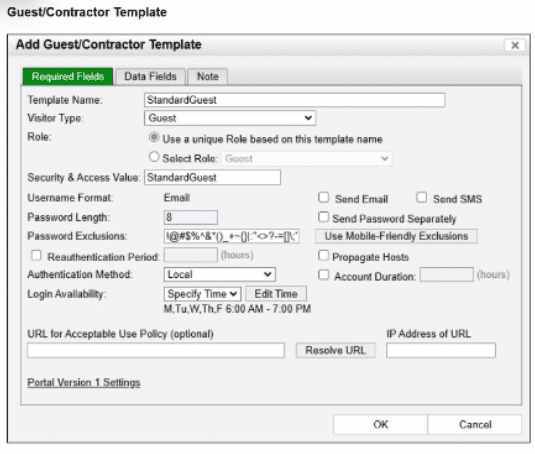
What will happen to the host of a guest user created from this template if the time of connection is 8:00 PM?
In FortiNAC-F, theGuest & Contractor Templateis a configuration object that defines the parameters for accounts created by sponsors or through self-registration. One of the critical security controls within this template is theLogin Availabilitysetting. This setting restricts the specific days and times during which a guest or contractor is permitted to authenticate and access the network.
As shown in the exhibit, the 'StandardGuest' template hasLogin Availabilityset to'Specify Time', with a schedule defined asMon-Fri, 6:00 AM to 7:00 PM. If a guest user attempts to connect or authenticate at8:00 PM, which is outside of the permitted window, FortiNAC-F's policy engine will automatically deny the authentication request. When an authentication attempt is denied due to schedule restrictions, the system does not move the host into the 'Authenticated' or 'Registered' state required for production access. Instead, the host ismarked as non-authenticatedin the adapter or host view.
This behavior ensures that even if a guest possesses valid credentials, their access is strictly bound by the organizational policy for visitor hours. The host will typically remain in its current isolation or registration VLAN, and the user will see a message on the captive portal indicating that their account is not currently authorized for login. It is important to distinguish this from 'at-risk' (C), which relates to security scan failures, or 'rogue' (B), which typically refers to unknown devices that have not yet been associated with a valid account or profiling rule.
'Login Availabilitydefines the timeframe during which the guest or contractor account is valid for network access. This schedule is enforced at the time of authentication. If a user attempts to log in outside of the designated window, the authentication is rejected by the system. Consequently, the host record will reflect anon-authenticatedstatus, and the device will remain restricted to the isolation or registration network until a valid login window is reached.' ---FortiNAC-F Administration Guide: Guest and Contractor Templates Section.
A healthcare organization is integrating FortiNAC-F with its existing MDM. Communication is failing between the systems.
What could be a probable cause?
The integration between FortiNAC-F and Mobile Device Management (MDM) platforms (such as Microsoft Intune, VMware Workspace ONE, or Jamf) is a critical component for providing visibility into mobile assets that do not connect directly to the managed infrastructure via standard wired or wireless protocols.
According to theFortiNAC-F MDM Integration Guide, the communication between the FortiNAC-F appliance and the MDM server is handled throughREST APIcalls. FortiNAC-F acts as an API client, periodically polling the MDM server to retrieve device metadata, compliance status, and ownership information. If communication is failing, it is most likely because the API credentials (Client ID/Secret) are incorrect, the MDM's API endpoint is unreachable from the FortiNAC-F service port, or the SSL certificate presented by the MDM is not trusted by the FortiNAC-F root store.
While SSH (B) is used for switch CLI management and the Security Fabric (A) uses proprietary protocols for FortiGate synchronization, neither is the primary vehicle for MDM data exchange. SOAP API (D) is an older protocol that has been largely replaced by REST in modern FortiNAC integrations.
'FortiNAC integrates with MDM systems by utilizingREST APIcommunication to query the MDM database for device information. To establish this link, administrators must configure the MDM Service Connector with the appropriateAPI URLand authentication credentials. If the 'Test Connection' fails, verify that the FortiNAC can reach the MDM provider via theREST APIport (usually HTTPS 443).' ---FortiNAC-F Administration Guide: MDM Integration and Troubleshooting.
How can an administrator configure FortiNAC-F to normalize incoming syslog event levels across vendors?
FortiNAC-F serves as a central manager for security events originating from a diverse ecosystem of third-party security appliances, such as FortiGate, Check Point, and Cisco. Each vendor utilizes its own internal scale forseverity levelswithin syslog messages (e.g., Check Point uses a 1--5 scale, while others may use 0--7). To provide a consistent response regardless of the source, FortiNAC-F usesSeverity Mappingsto normalize these incoming values.
According to theFortiNAC-F Administration Guide, severity mappings allow the administrator to translate vendor-specific threat levels into standardizedFortiNAC Security Levels(such as High, Medium, or Low Violation). When a syslog message arrives, the parser extracts the vendor's severity code, and the system immediately references theSecurity Event Severity Level Mappingstable to determine how that event should be categorized internally. This normalization is vital because it allows a singleSecurity Alarmto be configured to respond to any 'High Violation' event, whether it was reported as a 'Critical' by one vendor or a 'Level 5' by another. Without these mappings, the administrator would have to create separate, redundant security rules for every vendor to account for their different naming conventions and numerical scales.
'Each vendor defines its own severity levels for syslog messages. The following table shows the equivalent FortiNAC security level... To normalize these events, configure theSeverity Level Mappingsfound in the device integration guides. This allows FortiNAC to generate a consistent security event that can then trigger an alarm regardless of the reporting vendor's specific terminology.' ---FortiNAC-F Administration Guide: Vendor Severity Levels and Syslog Management.
When creating a device profiling rule, what is an advantage of modeling the endpoint as a device in the inventory view?
The correct answer is B. When a device profiling rule classifies an endpoint, the Register as setting can place the device in the host view, the topology/inventory view, or both. The study guide explains that if the profiled endpoint is registered into the topology view, the administrator must select a topology container.
The advantage of modeling the endpoint as a device in the inventory view is that it can be treated as a pingable device, where FortiNAC-F can use Contact Status settings. The guide explains that a modeled pingable device has contact status controls that allow polling to be enabled or disabled, the polling interval to be set, and the last successful and last attempted poll to be displayed.
Option A and option C are not the best answers because connection logs are associated with host connection tracking, not the key advantage of placing a profiled endpoint into inventory as a modeled device. Option D is wrong because user association applies more naturally to hosts or BYOD ownership workflows; it is not the main benefit of inventory modeling. The tested benefit is scheduled reachability monitoring through contact status polling.
An administrator manages a corporate environment where all users log into the corporate domain each time they connect to the network. The administrator wants to leverage login scripts to use a FortiNAC-F agent to enhance endpoint visibility. Which agent can be deployed as part of a login script?
The Passive Agent is the agent specifically associated in the FortiNAC-F 7.6 curriculum with domain login/logoff scripts. The Study Guide states that the Passive Agent is ''deployed by a login/logoff script'' and is designed to register and scan Windows endpoints joined to a domain when a domain user logs in.
The administrator places the Passive Agent executable in a user-accessible location, such as SYSVOL, configures the FortiNAC-F server information through administrative templates, and invokes the executable through the domain controller's login/logoff scripts. This allows FortiNAC-F to obtain endpoint information and track users without requiring interactive installation by the user. Passive Agent configurations can register the user and associated host, perform compliance scanning if configured, and track login/logout activity.
The Administration Guide reinforces this workflow by specifying GPO User Configuration > Windows Settings > Scripts (Logon/Logoff) and using the Passive Agent with -logon and -logoff parameters.
Therefore, the exam-specific answer is Passive Agent.
Study Guide Reference: Identification and Classification of Rogues Passive Agent, pp. 125--126.
Refer to the exhibit.
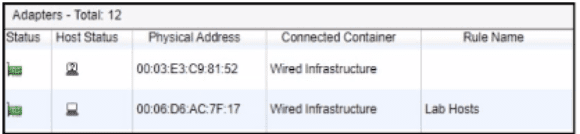
After a successful layer 2 poll, two hosts were learned on the same port The port is a member of the Role-Based Access and Forced Registration groups. The switch has been configured to leverage a single isolation VLAN.
How will FortiNAC-F manage this port?
The correct answer is A. The exhibit shows two adapters learned on the same wired port: one appears as a rogue/unknown host, and the other is associated with the Lab Hosts rule. The port is in both Role-Based Access and Forced Registration. FortiNAC-F state-based control takes precedence over policy-based provisioning, and the study guide states that when a rogue host connects to a port in the Forced Registration group, FortiNAC-F isolates that host by moving it into the registration captive network. The guide also explains that the Isolation network can be used as a single network for abnormal host states while still presenting state-specific portal pages.
Because this is a wired switch port using VLAN-based control, FortiNAC-F cannot put one host on the production VLAN and the other host on the isolation portal VLAN at the same time on the same access port. The VLAN change applies to the port, not independently to each MAC address behind that port. Therefore, the presence of the rogue host on a Forced Registration port causes the port to be provisioned to the isolation network. Option B is technically unrealistic for this access-port scenario. Option C is wrong because two MAC addresses alone do not make the port an uplink; FortiNAC-F uses uplink logic for infrastructure-device MACs, manually marked uplinks, or a threshold such as more than 20 MAC addresses. Option D is unrelated because Access Point Management is not triggered by learning two wired hosts on a port.
Exam domains verified against: Official Fortinet NSE6_FNC_AD-7.6 exam guide, last checked October 2026.
Model and organize infrastructure devices to establish baseline network visibility. Learn key features of FortiNAC-F architecture, information gathering capabilities, and how to use groups for logical organization of network elements.
Sample question from this domain above: Q7
Configure security automation and access control using modeled devices, portal pages, and host inventory management. Set up FortiNAC-F security policies for user and host profiles, integrate into the Fortinet Security Fabric, and configure high availability in hot standby or N+ mode.
Integrate with third-party devices through syslog and SNMP trap input for automated response. Deploy FortiNAC-F Manager in distributed environments and configure FortiGate VPN session management and MDM integration.
Configure guest and contractor administration, explain device profiling concepts including classified devices and rogue detection. Troubleshoot network devices using administrative visibility views, logs, and database information to determine host status and connectivity issues.
Sample question from this domain above: Q6
Common questions about the exam itself

