Key details for this exam, checked against the published exam outline
Each question shows the correct answer and an explanation of why it is right
An administrator wants to configure and manage multiple objects in the FortiManager database and give access to other users who work in the same database.
To stay in control of the changes made to firewall policies by other team members, the administrator needs a setup where all modifications go through a central check before they can be installed.
How can the administrator create this setup?
Enabling workflow mode along with the ADOM lock feature ensures that all configuration changes go through a centralized review and approval process before installation, allowing controlled and coordinated management of firewall policies by multiple administrators.
Refer to the exhibit.
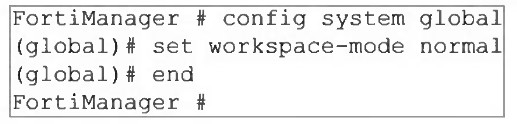
What are two results from the configuration shown in the exhibit? (Choose two.)
The command set workspace-mode normal enables Workspace (ALL ADOMs). The study guide states that in this mode ''All ADOMs can be locked'' and workspace mode lets administrators lock ADOMs, devices, policy packages, and objects. The lab guide then gives the exact behavior for ungraceful session closure: ''If a session is not closed gracefully ... FortiManager does not close the administrator session until it times out or the session is deleted. Until this time, the ADOM remains in a locked state.'' That directly proves A.
C is also verified by the lab guide statement: ''If an administrator locked one or more ADOMs, and then logs out of FortiManager, all of those ADOMs are unlocked.'' The phrase ''one or more ADOMs'' confirms the same administrator can lock multiple ADOMs at once.
D is a workflow mode approval concept, not workspace normal.
An administrator notices that CLI scripts are failing on some FortiGate devices because they use different FortiOS versions.
Which two actions should the administrator take to fix the failing CLI scripts? Choose two answers.
The most strongly supported answer is A. The study guide explicitly states: ''In the case of having multiple FortiOS firmware versions on the same ADOM, it is recommended to use separate ADOMs instead.'' It also says: ''When you organize managed FortiGate devices, it is highly recommended that you group them based on their FortiOS firmware version. This is because valid command syntax varies by firmware version, which affects script compatibility.''
D is the other practical fix supported by FortiManager workflow. The study guide states that FortiManager can run scripts on multiple managed devices at once, and device groups let you run scripts on multiple devices instead of a single device. Combined with the firmware-version compatibility rule above, the correct operational approach is to keep version-specific scripts and apply them only to the matching device sets. B and C are not supported by the uploaded study guide as the recommended fix.
Refer to the exhibit.
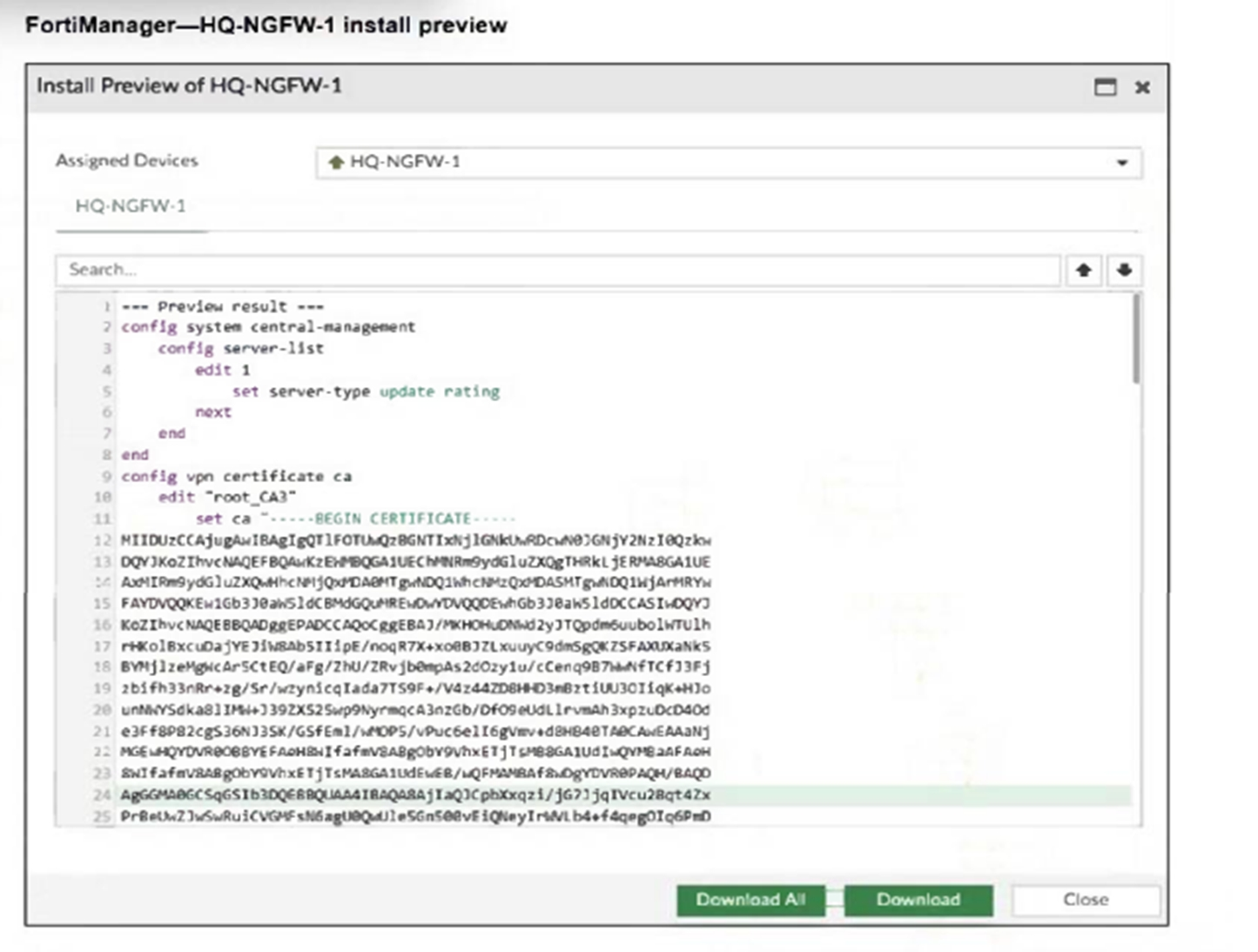
An administrator assigned a new policy package to FortiGate HQ-NGFW-1. In the installation preview, they noticed some settings they did not modify and are unsure about the changes.
Based on the exhibit, which two things will happen if they continue with the installation? (Choose two.)
The configuration includes a server-list with server-type set to 'update rating,' which enables FortiGate HQ-NGFW-1 to contact FortiManager as a FortiGuard Distribution Server (FDS) for FortiGuard updates.
The installation includes a root_CA3 certificate, which FortiManager will install on FortiGate HQ-NGFW-1 to authenticate FGFM tunnel connections between the devices.
Refer to the exhibits.
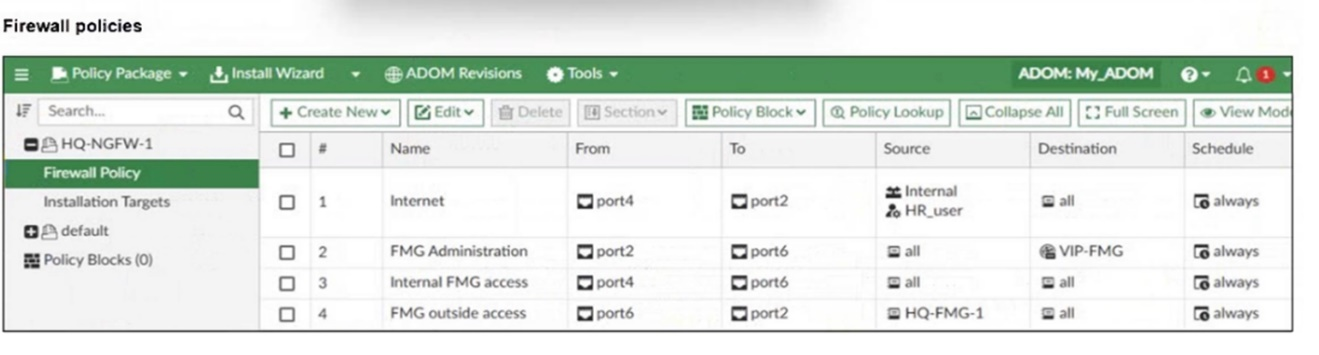

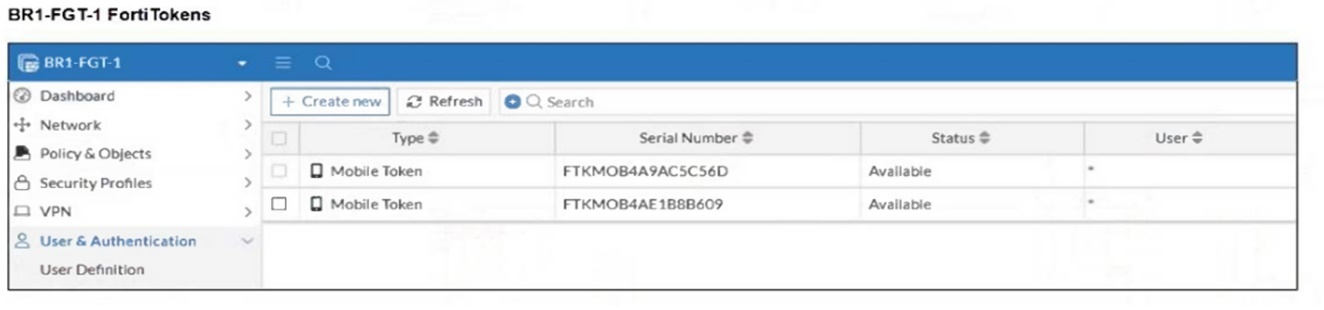
An administrator needs to push a FortiToken Mobile to assign it to HR_user in the HQ-NGFW-1.
However, when installing the policy package, they receive the following error message:
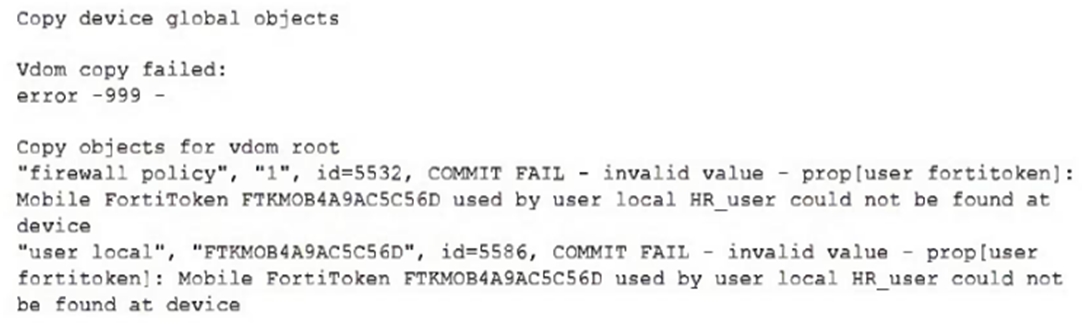
Why is the administrator not able to install the FortiToken on the HQ-NGFW-1 firewall?
The error occurs because the FortiToken used (FTKM0B4A9AC5C56D) must already exist and be registered on the FortiGate device HQ-NGFW-1. FortiManager cannot push or create new FortiTokens on the device; the token must be valid and present on the FortiGate before it can be assigned to a user.
What allows FortiManager to run CLI scripts on FortiGate devices without prompting for SSH authentication each time?
The correct answer is B. The FortiManager 7.6 Administrator Study Guide explicitly states: ''CLI scripts use the FGFM tunnel and the FGFM tunnel is authenticated using the FortiManager and FortiGate serial numbers.'' It also states: ''Tcl scripts do not run through the FGFM tunnel like CLI scripts do. Tcl scripts use SSH to tunnel through FGFM and they require SSH authentication to do so.''
This is the exact reason CLI scripts can run without prompting for SSH authentication every time: they use the existing secure FGFM management tunnel, not a separate interactive SSH login. The FGFM section of the study guide also confirms that this is a secure communication tunnel established between FortiManager and managed FortiGate devices.
So the enabler is not legacy login, script location, or the ''Remote FortiGate Directly'' option by itself. It is the FGFM secure management tunnel.
Which two conditions trigger FortiManager to create a new revision history? (Choose two.)
The correct answers are A and C. The FortiManager 7.6 Administrator Study Guide gives the exact extract: ''FortiManager creates a configuration revision when: FortiGate is added to FortiManager, Device changes are installed from FortiManager, FortiGate configuration is retrieved from FortiManager, A local change on FortiGate causes an automatic update''.
This exactly proves A, because device changes are installed from FortiManager, and C, because a local change on FortiGate causes an automatic update. The guide also states: ''By default, all changes made on a managed FortiGate device are automatically updated on FortiManager and reflected in revision history''.
B and D only modify the FortiManager device-level database status to Modified. They do not, by themselves, create a new revision history until an install, retrieve, or auto-update occurs.
Exam domains verified against: Official Fortinet NSE6_FMG_AD-7.6 exam guide, last checked October 2026.
Master FortiManager features including administrative domains, API functionality, and initial configuration. This section covers ADOM operation modes, administrator profiles, workspace mode, and backup/restoration procedures for managing multiple administrative environments across your infrastructure.
Learn to register and organize devices within ADOMs using template provisioning and discovery methods. Covers FortiGate HA cluster management, device groups, FGFM communication protocol, and strategies for handling device lifecycle operations from registration through configuration management.
Work with policy packages, object configurations, and dynamic objects across ADOMs. Includes policy workflow, installation targets, meta fields, policy locking mechanisms, and workspace mode permissions to ensure secure policy deployment and change management across managed devices.
Configure FortiManager high availability, FortiGuard services, and global database ADOMs for distributed management. Covers HA synchronization, firmware caching, antivirus and IPS service management, and shared global policies to support large-scale security deployments.
Diagnose and resolve import, installation, and device-level issues using logs and configuration analysis. Includes database integrity checks, device and ADOM database comparison, system resource troubleshooting, and recovery from common deployment scenarios like NAT traversal problems.
Common questions about the exam itself

