
Fortinet NSE6_EDR_AD-7.0 Practice Exam Questions & Answers
Fortinet NSE6_EDR_AD-7.0 Exam Details
Key details for this exam, checked against the published exam outline
- Exam Code
- NSE6_EDR_AD-7.0
- Full Name
- Fortinet NSE 6 - FortiEDR 7.0 Administrator
- Issuing Body
- Fortinet
- Question Format (Our Bank)
- Multiple Choice
- Delivery
- Pearson VUE test center or OnVUE online proctored
- Eligibility
- No strict prerequisites, but Fortinet recommends 3 years of endpoint security experience and 1 year of network security experience
- Full Question Set
- 39 questions Get All Questions
Free NSE6_EDR_AD-7.0 Practice Questions
Each question shows the correct answer and an explanation of why it is right
Question 1 Domain 2 FortiEDR security settings and policies
You find third-party software on a user's computer that does not appear in the application list on the communication control console. Which two statements are true about this situation? (Choose two answers)
The best answers are A and D, but be careful: A is directly verified by the guide; D is the only remaining statement that can be true in policy context, but it is weaker than A.
The FortiEDR 7.0.0 Administration Guide states that the Communication Control tab identifies communicating applications detected in the organization. More specifically, the Applications page lists ''all communicating applications detected in your organization that have ever attempted to communicate.'' Therefore, if software exists on a user's computer but does not appear in the Communication Control application list, the most direct explanation is that it has not attempted external communication.
The guide also explains that FortiEDR Communication Control reduces the scope of administration because Security/IT only needs to handle applications that communicate externally. It also states that non-authorized applications can still execute, and only their outgoing communication is prevented. This confirms that the Communication Control application list is not a full software inventory; it is a list of applications that have communicated or attempted communication.
Option B is not correct. If an application were blocked due to FortiEDR security-policy enforcement after a connection attempt, FortiEDR would generate security-event visibility in the Incidents workflow, not simply hide the application from Communication Control. FortiEDR Collectors send communication-related data for Communication Control, and security events are sent for enforcement/monitoring purposes.
Option C is also wrong. Reputation score affects policy decisions and application risk evaluation, but it does not cause an application to be ignored or excluded from the application list. The guide says each application in the Applications page shows a reputation indicator, which proves reputation is displayed for listed applications rather than used to hide them.
For option D, if the application has never attempted communication, Communication Control has no observed communication event to list. In exam logic, this can be interpreted as the application is not currently being denied by Communication Control policies. However, the stronger technical truth is this: Communication Control does not list installed software; it lists applications that have attempted to communicate.
Question 2 Domain 1 FortiEDR system
Refer to the Exhibit:

Based on the incident details shown in the exhibit, which two statements about this incident are true? (Choose two answers)
The correct answers are A and C.
The exhibit shows an audit/response action stating that IP address 74.125.235.20 was added to malicious IP addresses on firewall FortiGate. This matches the FortiEDR playbook action Block address on Firewall. The guide states that this action ensures connections to remote malicious addresses associated with the security event are blocked, and that a firewall connector must already be configured for this action. It also explains that a checkmark in a classification column means communication with the affected destination is automatically blocked when a security event with that classification is triggered.
Option C is the second best answer because FortiEDR events are initially classified by FortiEDR detection logic/Core, and the guide states that classifications are initially determined by the Core but can later be changed automatically by FortiEDR Cloud Service or manually. The exhibit shows ''Classification Changed To: Suspicious (By Fortinet)'', but it does not say the event was manually classified by an administrator. So the event classification process is FortiEDR-driven, with later Fortinet/FCS-style automatic classification possible.
Option B is wrong. The exhibit shows one raw-data row with device cwinserv-32 +2, which indicates more than one affected device/raw item is represented in the aggregation. So it did not occur on only one device.
Option D is wrong because the incident rows clearly show Unhandled. The guide states that security events are initially marked as unread and unhandled, and the unread/unhandled status helps users track whether anyone has read and handled the event.
Question 3 Domain 3 Events, forensics, and threat hunting
Refer to the Exhibit:
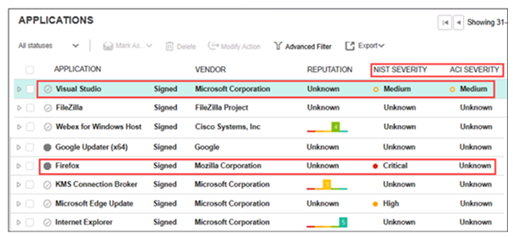
A FortiEDR analyst is prioritizing response efforts. One application has a vulnerability score of Critical but an Unknown ACI rating, while another has a Medium vulnerability score with active ACI evidence of adversary targeting. Which application must be addressed first? (Choose one answer)
The correct answer is D.
The FortiEDR 7.0.0 Administration Guide explains that FortiEDR displays two severity ratings for applications: NIST Severity and ACI Severity. NIST Severity is based on FortiEDR's vulnerability scoring system using the NIST Cybersecurity Framework. ACI Severity, however, is Adversary Centric Intelligence provided by FortiRecon and FortiGuard Threat Analysts, covering dark web, open-source, and technical threat intelligence, including threat actor insights. This helps administrators proactively assess risk, respond faster to incidents, understand attackers, and protect assets.
The guide also states that FortiEDR helps analysts prioritize alerts and incidents using risk factors such as severity of vulnerabilities, relevance of threat intelligence feeds, and severity of affected endpoints, so effort is focused on the most significant organizational risks.
Therefore, the application with Medium NIST severity but active ACI evidence of adversary targeting should be prioritized over an application with Critical NIST severity but Unknown ACI rating, because active adversary-centric intelligence indicates current attacker interest or exploitation relevance. In plain terms: a theoretical critical vulnerability matters, but an actively targeted vulnerability is the fire you put out first.
Option B is tempting but incomplete because it relies only on NIST/CVSS severity. FortiEDR's ACI rating exists specifically to add adversary context to prioritization. Option A is wrong because FortiEDR does not treat all vulnerable applications equally. Option C is wrong because asset criticality can matter, but the guide does not say prioritization depends only on asset criticality.
Get the complete NSE6_EDR_AD-7.0 question set
$20$40
Question 4 Domain 3 Events, forensics, and threat hunting
Refer to the Exhibit:

Based on the FortiEDR status output shown in the exhibit, what are two reasons for the degraded state? (Choose two answers)
The correct answers are B and C.
The exhibit shows:
FortiEDR Service: Up FortiEDR Driver: Up FortiEDR Status: Degraded (no configuration)
This means the local Collector service and driver are running, but the Collector has not received valid configuration. In FortiEDR, a Collector must register and communicate with the FortiEDR Aggregator to receive its configuration. The guide states that the Collector initially sends registration information to the FortiEDR Aggregator using SSL, sends ongoing health/status/security-event information, and receives its configuration from the Aggregator.
During installation, a non-customized Windows Collector requires the correct Aggregator address, Aggregator port 8081, and registration password. The guide explicitly states that the Aggregator port should be specified as 8081, and that the registration password must be entered during installation.
Therefore, an incorrect registration password or incorrect port number can prevent proper registration/configuration retrieval, resulting in a degraded/no-configuration state.
Option A is not the best answer because Windows Firewall being enabled by itself does not automatically cause this FortiEDR status; only if it blocks required FortiEDR communication would it matter, and the option is too generic. Option D is also not correct as written because the Collector receives configuration from the Aggregator, not directly from the Central Manager. The guide describes Collector-to-Aggregator communication for registration and configuration.
Question 5 Domain 3 Events, forensics, and threat hunting
You are asked to create a playbook to isolate a device with a collector. Which action category does isolating a device with a collector fall under? (Choose one answer)
The correct answer is A. Investigation.
The FortiEDR 7.0.0 Administration Guide states that Investigation actions enable administrators to isolate a device or assign it to a high-security Collector Group for further investigation of the device's activity. Under the Investigation section, the guide lists the available investigation action types, including ''Isolate device with Collector,'' ''Isolate device with NAC,'' and ''Move device to High Security Group.''
For Isolate device with Collector, the guide explains that the action blocks communication to and from the affected Collector, and it applies only to endpoint Collectors. If the Playbook policy is configured to isolate a device for a malicious event, then when a malicious security event is triggered, the device is isolated from communicating with the outside world for both sending and receiving.
So, this is not a Remediation, Custom, or Notification action. In FortiEDR Playbook policy terminology, Isolate device with Collector belongs under Investigation.
Question 6 Domain 3 Events, forensics, and threat hunting
Refer to the Exhibit:
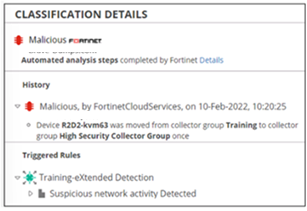
Based on the event shown in the exhibit, which two statements about the event are true? (Choose two answers)
The correct answers are A and B.
The exhibit shows the event classification as Malicious, classified by FortinetCloudServices, and the history states that device R2D2-kvm63 was moved from the Training Collector Group to the High Security Collector Group. This is a Playbook action. The FortiEDR guide explains that after classification changes, the Overview pane displays the history of automatic FortiEDR actions, including Playbook policy-related actions.
The guide specifically lists Move device to High Security Group under Investigation actions in Playbook policies. It states that a checkmark in a classification column means the device is automatically moved to the High Security Collector Group when a security event with that classification is triggered. So the exhibit proves that Playbooks are configured for this event.
The second correct answer is B because the triggered rule is under Training * Extended Detection. The FortiEDR guide states that the eXtended Detection Policy logs events and displays them in the Incidents tab, but no blocking options are provided for this policy.
Option C is wrong because moving a device to the High Security Collector Group is not the same as isolating the device. Isolation would block communication to/from the affected Collector. The exhibit shows a Collector Group move, not isolation.
Option D is wrong because Extended Detection does not block. The guide explicitly says Extended Detection events are logged and displayed, with no blocking options provided.
Question 7 Domain 4 FortiEDR integration
Refer to the exhibit.
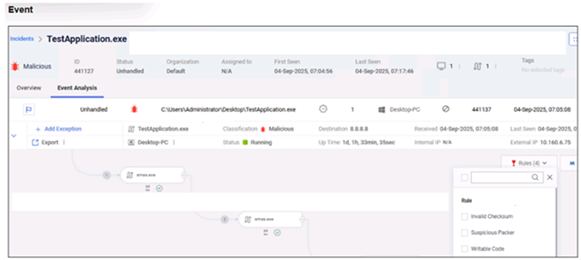
Based on the event shown in the exhibit, which two statements about the event are true? (Choose two answers)
The correct answers are B and C.
The exhibit shows the event classification as Malicious. In FortiEDR, event classification can be performed by the Core and later updated by FortiEDR Cloud Service (FCS). The guide states that the audit history shows the classification chronology and includes details when FCS reclassifies a security event after the Core's initial classification. It also states that notifications can be based on either Core or FCS classification depending on whether FCS classification is received within the timeout period.
The exhibit also shows TestApplication.exe with Status: Running. That means the process was launched and is currently running on the endpoint. Therefore, C is correct.
Option A is wrong because the exhibit clearly shows Status: Unhandled, not Handled. The guide states that FortiEDR security events are initially marked as unread and unhandled, and users can later mark them handled through the incident handling workflow.
Option D is wrong because the exhibit shows rule indicators such as Invalid Checksum, Suspicious Packer, and Writable Code, but it does not prove that TestApplication.exe is ''sophisticated malware.'' FortiEDR classifies the event as malicious, but the guide's Malicious classification means the event is verified to have malicious capability, is intended to harm the infected device, and has no commercially viable use; the exhibit alone does not justify the stronger claim ''sophisticated malware.''
What the Fortinet NSE6_EDR_AD-7.0 Exam Covers
Exam domains verified against the Official Fortinet NSE6_EDR_AD-7.0 exam guide, last checked October 2026.
Domain 1 FortiEDR system
Understand FortiEDR architecture and technical positioning, including the Central Manager, Aggregator, and Core components. Master the installation process and perform FortiEDR inventory and system tools operations.
Sample question from this domain above Q2
Domain 2 FortiEDR security settings and policies
Configure communication control policies and security policies. Understand playbook configuration and Fortinet Cloud Service features for automated incident response.
Sample question from this domain above Q1
Domain 3 Events, forensics, and threat hunting
Analyze security events and alerts in the Event Viewer. Configure threat hunting profiles and scheduled queries, then analyze threat hunting data to identify indicators of compromise.
Domain 4 FortiEDR integration
Deploy FortiXDR integration and configure security fabric using FortiEDR to work with other Fortinet solutions. Understand how FortiEDR fits into the broader Fortinet Security Fabric architecture.
Sample question from this domain above Q7
Domain 5 FortiEDR troubleshooting
Perform FortiEDR troubleshooting and analyze alerts and logs to identify issues. Understand how to diagnose problems in the collector and central manager components.
NSE6_EDR_AD-7.0 Exam FAQ
Common questions about the exam itself
What hands-on experience should I have before taking the NSE6_EDR_AD-7.0 exam?
How long does the NSE6_EDR_AD-7.0 exam take and how many questions are on it?
What makes the NSE6_EDR_AD-7.0 exam difficult and what topics do candidates struggle with most?
Which area of the NSE6_EDR_AD-7.0 syllabus requires the most study effort?
Is there an NSE 4 prerequisite I need before taking NSE6_EDR_AD-7.0?
How long does it typically take to prepare for the NSE6_EDR_AD-7.0 exam?
What do I need to know about exam day and retakes for NSE6_EDR_AD-7.0?
How long is the NSE6_EDR_AD-7.0 certification valid and what does renewal require?
What job role is the NSE6_EDR_AD-7.0 certification designed for?
How does NSE6_EDR_AD-7.0 fit into the broader Fortinet certification path?
Other Fortinet Exams
Free practice questions for more Fortinet certification exams