Key details for this exam, checked against the published exam outline
Each question shows the correct answer and an explanation of why it is right
Which three FortiSASE use cases are possible? (Choose three answers)
According to the FortiSASE 7.6 Architecture Guide and the FCP - FortiSASE 24/25 Administrator study materials, the FortiSASE solution is structured around three primary pillars or 'use cases' that address the security requirements of a modern distributed workforce.
Secure Internet Access (SIA) (Option A): This use case focus on protecting remote users as they browse the public internet. It utilizes a full cloud-delivered security stack including Web Filtering, DNS Filtering, Anti-Malware, and Intrusion Prevention (IPS) to ensure that users are protected from web-based threats regardless of their physical location.
Secure SaaS Access (SSA) (Option B): This use case addresses the security of cloud-based applications (like Microsoft 365, Salesforce, and Dropbox). It leverages Inline-CASB (Cloud Access Security Broker) to identify and control 'Shadow IT'---unauthorized cloud applications used by employees---and applies Data Loss Prevention (DLP) to prevent sensitive information from being leaked into unsanctioned SaaS platforms.
Secure Private Access (SPA) (Option C): This use case provides secure, granular access to private applications hosted in on-premises data centers or private clouds. It can be achieved through two main methods: ZTNA (Zero Trust Network Access), which provides session-specific access based on identity and device posture, or through SD-WAN integration, where the FortiSASE cloud acts as a spoke connecting to a corporate SD-WAN Hub.
Why other options are incorrect:
Secure VPN Access (SVA) (Option D): While SASE uses VPN technology (SSL or IPsec) as a transport for the Endpoint mode, 'SVA' is not a formal curriculum-defined use case. The SASE framework is intended to evolve beyond traditional 'Secure VPN Access' into the SIA and SPA models.
Secure Browser Access (SBA) (Option E): Although FortiSASE offers Remote Browser Isolation (RBI), it is considered a feature or a component of the broader Secure Internet Access (SIA) use case rather than a separate, standalone use case in the core administrator curriculum.
Which statement about security posture tags in FortiSASE is correct?
According to the FortiSASE 7.6 Administration Guide and FCP - FortiSASE 24/25 Administrator curriculum, security posture tags (often referred to as ZTNA tags) are the fundamental building blocks for identity-based and posture-based access control.
Multiple Tag Assignment: A single endpoint can be assigned multiple tags at the same time. For example, an endpoint might simultaneously have the tags 'OS-Windows-11', 'AV-Running', and 'Corporate-Domain-Joined'.
Evaluation Logic: During the policy evaluation process (for both SIA and SPA), FortiSASE or the FortiGate hub considers all tags assigned to the endpoint. Security policies can be configured to use these tags as source criteria. If an administrator defines a policy that requires both 'AV-Running' and 'Corporate-Domain-Joined,' the system evaluates both tags to decide whether to permit the traffic.
Dynamic Nature: Contrary to Option C, these tags are highly dynamic. They are automatically applied or removed in real-time based on the telemetry data sent by the FortiClient to the SASE cloud. If a user disables their antivirus, the 'AV-Running' tag is removed immediately, and the endpoint's access is revoked by the next policy evaluation.
Scalability: While the system supports many tags, documentation recommends a baseline of custom tags for optimal performance, though it confirms that multiple tags are standard for reflecting a comprehensive security posture.
Why other options are incorrect:
Option A: This is incorrect because the system does not pick just one tag; it evaluates the collection of tags against the policy's requirements (e.g., matching any or matching all).
Option C: This is incorrect because tags are dynamic and change as soon as the endpoint's status (like vulnerability count or software presence) changes.
Option D: This is incorrect because the architectural advantage of ZTNA is the ability to layer multiple security 'checks' (tags) for a single user.
Refer to the exhibit.
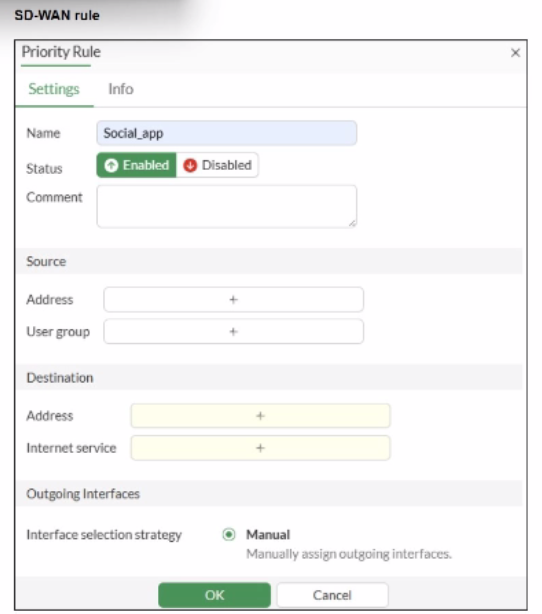
You configure SD-WAN on a standalone FortiGate device. You want to create an SD-WAN rule that steers traffic related to Facebook and LinkedIn through the less costly internet link. What must you do to set Facebook and LinkedIn applications as destinations from the GUI?
According to the SD-WAN 7.6 Core Administrator curriculum and the FortiOS 7.6 Administration Guide, setting common web-based services like Facebook and LinkedIn as destinations in an SD-WAN rule is primarily accomplished through the Internet Service Database (ISDB).
Internet Service vs. Application Control: In FortiOS, there is a distinction between Internet Services (which use a database of known IP addresses and ports to identify traffic at the first packet) and Applications (which require the IPS engine to inspect deeper into the packet flow to identify Layer 7 signatures).
SD-WAN Efficiency: Fortinet recommends using the Internet service field for services like Facebook and LinkedIn in SD-WAN rules because it allows the FortiGate to steer the traffic immediately upon the first packet. If the 'Application' signatures were used instead, the first session might be misrouted because the application is not identified until after the initial handshake.
GUI Configuration: As shown in the exhibit (image_b3a4c2.png), the 'Destination' section of an SD-WAN rule includes an Internet service field by default. To steer Facebook and LinkedIn traffic, the administrator simply clicks the '+' icon in that field and selects the entries for Facebook and LinkedIn from the database.
Feature Visibility (Alternative): While you can enable a specific 'Application' field in System > Feature Visibility (by enabling 'Application Detection Based SD-WAN'), this is typically used for less common applications that do not have dedicated ISDB entries. For the specific 'applications' mentioned (Facebook and LinkedIn), they are natively available in the Internet service field, making Option B the most direct and common implementation.
Why other options are incorrect:
Option A: Licensing for application signatures is part of the standard FortiGuard services and is not a prerequisite specific only to 'applications as destinations' in SD-WAN rules.
Option C: Standalone FortiGate devices fully support application-based and ISDB-based steering in SD-WAN rules.
Option D: While enabling feature visibility would add an additional field for L7 applications, it is not a 'must' for Facebook and LinkedIn, which are already accessible via the Internet Service field provided in the default GUI layout.
For a small site, an administrator plans to implement SD-WAN and ensure high network availability for business-critical applications while limiting the overall cost and the cost of pay-per-use backup connections.
Which action must the administrator take to accomplish this plan?
According to the SD-WAN 7.6 Core Administrator curriculum, to implement an SD-WAN solution that ensures high network availability for business-critical applications while managing costs, the administrator must configure at least two WAN links.
SD-WAN Fundamentals: SD-WAN operates by creating a virtual overlay across multiple physical or logical transport links (e.g., broadband, LTE, MPLS). Without at least two links, the SD-WAN engine has no alternative path to steer traffic toward if the primary link fails or degrades.
Cost Management: By using multiple links, administrators can implement the Lowest Cost (SLA) or Maximize Bandwidth strategies. This allows the site to use a low-cost broadband connection for primary traffic and only failover to a 'pay-per-use' backup (like LTE) when the primary link's quality falls below the defined SLA target.
High Availability (Link Level): While a 'High Availability (HA) cluster' (Option C) provides device redundancy (protecting against a hardware failure of the FortiGate itself), it does not address link redundancy or steering, which are the core functions of SD-WAN for application uptime.
Why other options are incorrect:
Option A: Using a mid-range device refers to hardware capacity but does not solve the requirement for link-level redundancy and cost-steering logic.
Option B: Dynamic routing (like BGP or OSPF) is often used with SD-WAN in large topologies, but for a small site, the primary mechanism for meeting availability and cost goals is the configuration of the SD-WAN member links and rules themselves.
Option C: HA clusters protect against hardware failure, but the question specifically asks about ensuring availability for applications while limiting backup link costs, which is a traffic-steering (SD-WAN) requirement rather than a hardware-redundancy requirement.
Refer to the exhibits.
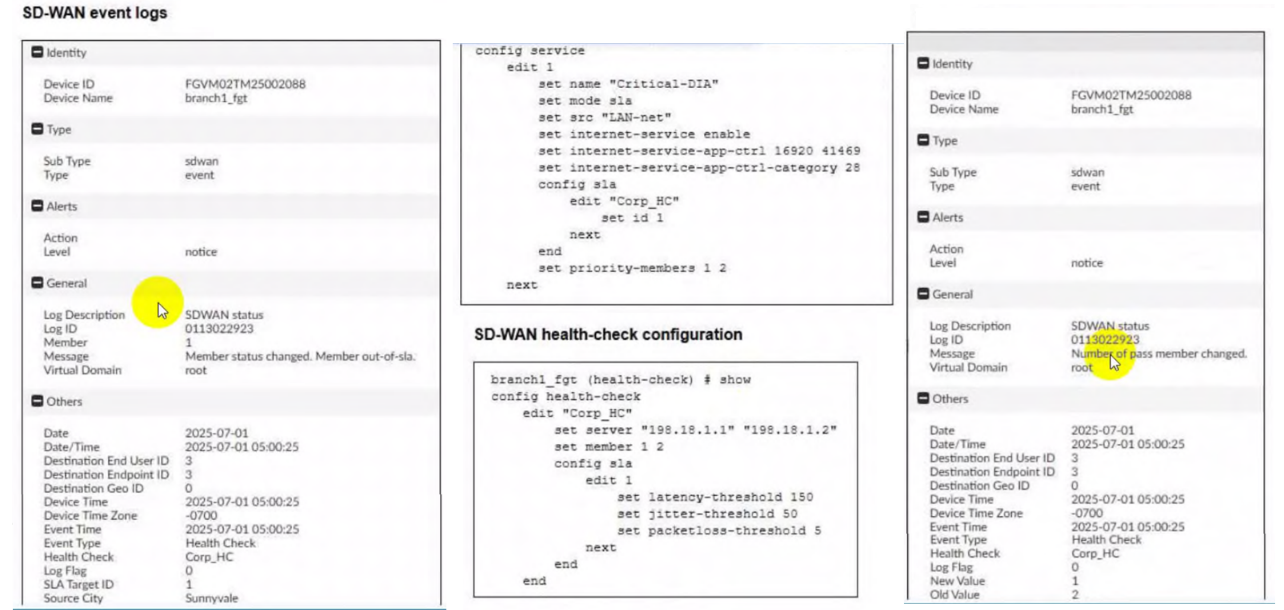
Two SD-WAN event logs, the member status, the SD-WAN rule configuration, and the health-check configuration for a FortiGate device are shown. Immediately after the log messages are displayed, how will the FortiGate steer the traffic based on the information shown in the exhibits? (Choose one answer)
According to the SD-WAN 7.6 Core Administrator curriculum and the provided exhibits, the traffic steering decision is determined by the interaction between the Lowest Cost (SLA) strategy and the link health status reported in the event logs.
Rule Strategy (Lowest Cost SLA): The SD-WAN rule configuration for ID 1 (named Critical-DIA) is set to mode sla. In this mode, the FortiGate will only steer traffic through member interfaces that satisfy the assigned Performance SLA targets.
Member Preference: The rule defines priority-members 1 2. This means that under normal conditions (where both links are healthy), Member 1 (port1) is the preferred interface because it is listed first.
Event Log Analysis:
The first log message explicitly states: 'Member status changed. Member out-of-sla.' for Member 1. This indicates that port1 has exceeded one of the thresholds (latency, jitter, or packet loss) defined in the Corp_HC health check.
The second log confirms: 'Number of pass member changed. New Value: 1, Old Value: 2'. This verifies that while there were previously two links passing the SLA, now only one link (Member 2/port2) remains in a passing state.
Steering Decision: Because the rule strategy is mode sla and the primary preferred member (port1) is now out-of-sla, the FortiGate immediately disqualifies Member 1 from the selection pool for this specific rule. It then moves to the next available member in the priority list that does satisfy the SLA, which is Member 2 (port2).
Why other options are incorrect:
Option A: FortiGate will not load balance or choose between both links because port1 is currently ineligible due to the SLA failure.
Option B: Steering to port1 would violate the 'Lowest Cost (SLA)' rule logic, as that link is no longer meeting the required health standards.
Option D: FortiGate does not 'skip' the rule unless no members meet the SLA and there is no fallback configured; in this scenario, port2 is still passing and available.
45 questions covering all exam domains, starting from $20
Exam domains verified against: Official Fortinet NSE5_SSE_AD-7.6 exam guide, last checked September 2026.
Implement a basic SD-WAN setup using FortiSASE. Configure SD-WAN members to define edge devices and zones to organize network segments. Configure performance service-level agreements to ensure traffic meets business requirements for latency, jitter, and bandwidth.
Configure SD-WAN rules to determine how traffic should be steered based on application, destination, and source criteria. Configure SD-WAN routing policies to define path selection and failover behavior across multiple WAN links.
Sample question from this domain above: Q1
Configure SASE administration settings such as organization details, cloud regions, and connector registration. Use available user onboarding methods including OIDC, SAML, and local authentication to enable endpoint access. Integrate FortiSASE with SD-WAN to converge network and security services.
Sample question from this domain above: Q2
Implement security profiles such as antivirus, web filtering, and application control to perform content inspection on managed traffic. Deploy compliance rules to managed endpoints to enforce data loss prevention and ensure adherence to organizational security policies.
Sample question from this domain above: Q4
Analyze SD-WAN logs to monitor rule and session behavior for performance troubleshooting. Identify potential security threats using FortiSASE logs and security event data. Analyze reports for user traffic patterns and security incidents to inform policy adjustments.
Common questions about the exam itself

