Key details for this exam, checked against the published exam outline
Each question shows the correct answer and an explanation of why it is right
Refer to the exhibit.
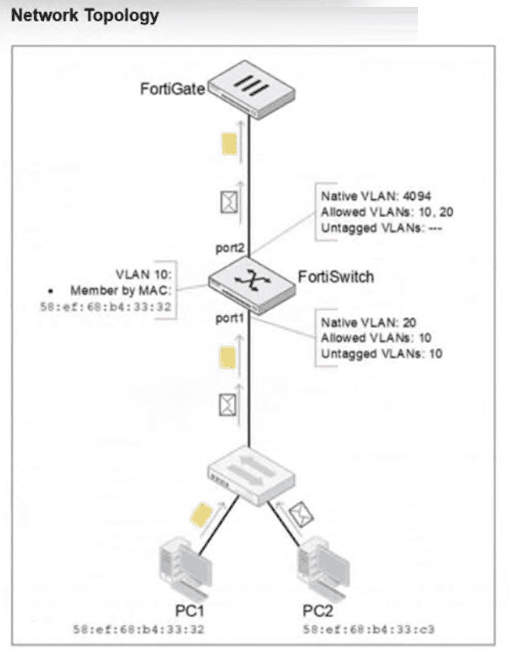
PC1 and PC2 are connected to port1 on FortiSwitch. Which VLAN tags will FortiSwitch apply when forwarding PC1 and PC2 traffic out of port2? (Choose one answer)
According to theFortiSwitchOS 7.6 Administration Guideand theFortiSwitch 7.6 Study Guide, the classification of untagged traffic entering a switch port is determined by the port's hierarchy of VLAN assignment rules.
For the traffic arriving atport1:
PC1 (MAC 58:ef:68:b4:33:32):The exhibit shows an explicitMAC-based VLAN assignmentrule for this specific MAC address, placing it intoVLAN 10. In FortiSwitchOS, dynamic assignments like MAC-based or protocol-based rules take precedence over the port's static native VLAN. Therefore, PC1's traffic is internally associated with VLAN 10.
PC2 (MAC 58:ef:68:b4:33:c3):There is no MAC-based rule for this device. As a result, the switch falls back to the default behavior and assigns the traffic to the port'sNative VLAN, which isVLAN 20.
For the traffic exiting port2:
The egress behavior depends on the VLAN tagging configuration of the outgoing interface. On port2, the Native VLAN is 4094, and VLANs 10 and 20 are listed as Allowed VLANs. According to Fortinet documentation, any traffic belonging to an allowed VLAN that does not match the native VLAN ID of the egress port must be sent as tagged 802.1Q frames. Since neither VLAN 10 nor VLAN 20 matches the native ID of 4094, the FortiSwitch will apply a VLAN 10 tag to PC1's traffic and a VLAN 20 tag to PC2's traffic as they are forwarded to the FortiGate.
Refer to the exhibit.
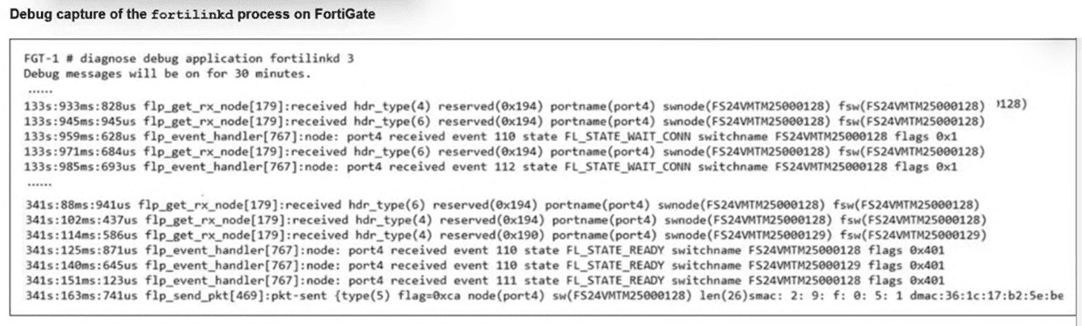
A periodic heartbeat message sent from a managed FortiSwitch and corresponding acknowledgments from FortiGate is shown. What does this behavior indicate? (Choose one answer)
According to theFortiOS 7.6 Study Guideand theFortiSwitch 7.6 FortiLink Guide, the health of the Control and Provisioning of Wireless Access Points (CAPWAP) based management tunnel between a FortiGate and a FortiSwitch is maintained through a continuous keepalive mechanism. The provided exhibit captures the fortilinkd process logs, which are essential for verifying the operational status of the FortiLink control plane.
The debug output reveals two critical indicators of a successful connection:
State Transitions:The lines at timestamp 341s show the managed switch (FS24VMTM25000128) has reached theFL_STATE_READYstate. This state indicates that the discovery, authorization, and configuration synchronization phases are complete, and the switch is now fully operational under the FortiGate's management.
Heartbeat Mechanism:The entry flp_send_pkt[469]:pkt-sent {type(5)} represents the transmission of aFortiLink heartbeat. TheseType 5 packetsare sent every few seconds to verify that the peer device is still reachable and responsive. In a healthy environment, the FortiGate sends these heartbeats, and the FortiSwitch responds (or vice versa depending on the specific sub-protocol phase), ensuring the management tunnel remains active.
The regular exchange of these messages as shown in the exhibit confirms that the FortiLink connection ishealthy and active. If the switch were unauthorized or stuck in a negotiation phase, the state would be shown as FL_STATE_WAIT_AUTH or FL_STATE_DISCOVERY, and the periodic type(5) heartbeats would either be absent or not acknowledged.
Exhibit.
You need to manage three FortiSwitch devices using a FortiGate device. Two of the FortiSwitch devices initiated a reboot after the authorization process. However, the FortiSwitch device with the configuration shown in the exhibit. did not reboot All three devices completed FortiLink manage-ment authorization successfully.
Why did the FortiSwitch device shown in the exhibit not reboot to complete the authorization pro-cess?
The management mode was set to use FortiLink mode.
Regarding the scenario where a FortiSwitch did not reboot after the authorization process while the other devices did, the most likely cause, given the configuration settings in the exhibit, is:
The management mode was set to use FortiLink mode (Option B): If the FortiSwitch was already configured to use FortiLink for its management mode, it may not require a reboot to complete the authorization process as its management interface settings are already aligned with FortiLink requirements. This is unlike switches that might be transitioning from a standalone or another management mode, which would typically require a reboot to apply new management settings fully.
FortiLink mode specifically tailors FortiSwitch to be managed via a FortiGate device, integrating its operation into the wider security fabric without needing a reboot if it is already set to this mode before authorization. This contrasts with other management modes where transitioning to FortiLink could necessitate a system restart to initialize the new configuration.
Which two statements about 802.1X authentication on FortiSwitch ports are true? (Choose two.)
All hosts behind an authenticated port are allowed access after a successful authentication (A): Once a device on a port successfully authenticates using 802.1X, all other devices connected behind that port also gain network access. This is typical in scenarios where a switch is behind an authenticated port and not each device individually authenticates.
All devices connecting to FortiSwitch must support 802.1X authentication (D): For a network secured with 802.1X, all devices attempting to connect through the FortiSwitch must support and participate in 802.1X authentication to gain access. This ensures that all devices on the network are authenticated before they are allowed to communicate on the network.
You are managing FortiSwitch ports from a FortiGate device with multiple VDOMs. Which two methods can you use to assign FortiSwitch ports to VDOMs? (Choose two answers)
According to theFortiOS 7.6 Administration Guideand theFortiSwitch 7.6 FortiLink Guide, managing FortiSwitch units in a multi-VDOM environment allows for granular control over physical switch resources. By default, when a FortiSwitch is discovered and authorized via FortiLink, its ports reside in the same VDOM as the FortiLink interface (typically the root or a dedicated management VDOM).
To allocate these ports to other VDOMs, administrators have two primary methods. The first method isdirect assignment(Option A). Using the FortiGate CLI or GUI, an administrator can export a specific physical port directly to a target VDOM. For example, the command set export-to <VDOM_name> under the config switch-controller managed-switch port settings physically isolates that port for use only by the specified VDOM. This is ideal for multi-tenant scenarios where a specific physical connection must be dedicated to a single business unit.
The second method involves using aVirtual Port Pool (VPP)(Option D). This method provides a layer of virtualization for switch ports. An administrator first creates a pool (VPP) in the management VDOM and assigns physical ports to it. Then, from the tenant VDOM, an administrator can 'request' a port from that specific pool. This allows for a more flexible 'shared' infrastructure where ports are not permanently tethered to a single VDOM until they are claimed from the pool. Both methods ensure that traffic remains logically and physically isolated between VDOMs, supporting the security requirements of complex enterprise deployments. Options B and C are incorrect as they relate to traffic routing and device identification rather than the foundational assignment of hardware ports to virtual domains.
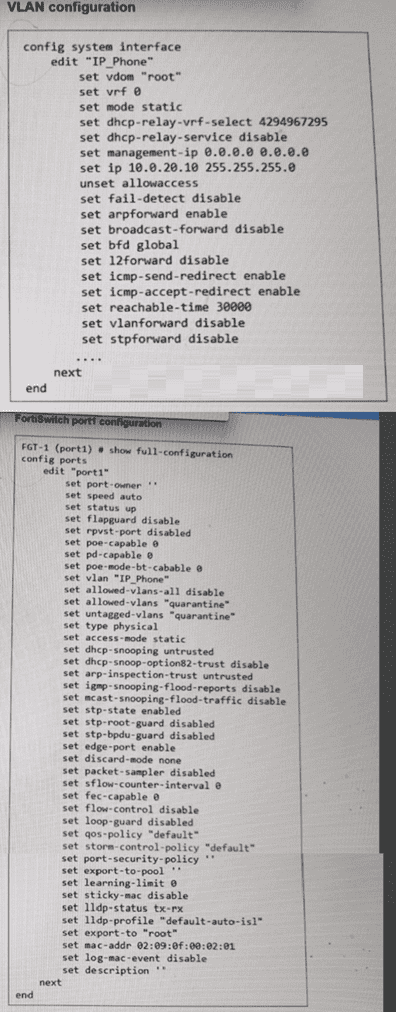
Exhibit.
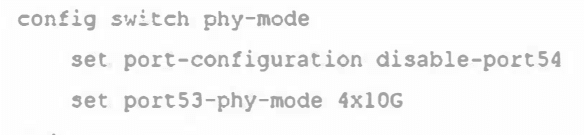
What conditions does a FortiSwitch need to have to successfully configure the options shown in the exhibit above? (Choose two.)
Regarding the configuration of a FortiSwitch to split a port into multiple smaller interfaces:
The CLI commands are enabling a split port into four 10Gbps interfaces (Option B): The command shown in the exhibit is typically used to configure a high-speed port (like a 40Gbps or 100Gbps interface) to be divided into smaller, independent 10Gbps interfaces. This feature allows more flexible use of the switch's physical resources.
The port full speed prior to the split was 100G SFP+ (Option C): Given the context of splitting the port into multiple 10Gbps interfaces, the original port configuration likely supported a high-speed transceiver such as 100G SFP+. This would make it technically feasible to divide the interface into multiple 10Gbps channels, enhancing connectivity options without requiring additional physical interfaces.
These configurations and capabilities are typical in modern network setups, especially in environments requiring high density and flexibility in connectivity, allowing network administrators to optimize physical infrastructure efficiently.
Refer to the exhibit.
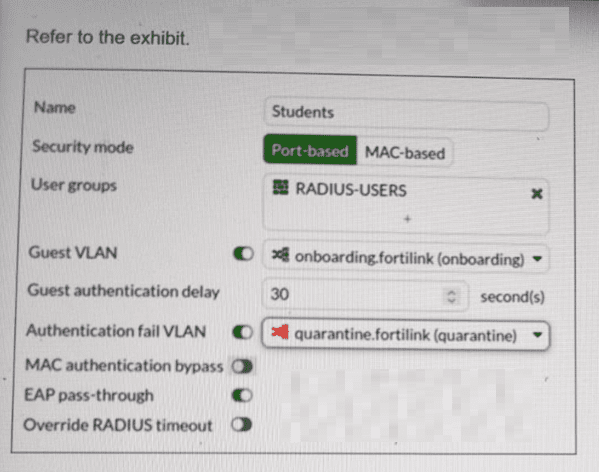
FortiSwitch 802.1X port security configuration is shown. A user connects their laptop to the port and attempts to authenticate using 802.1X, but enters the wrong credentials multiple times. What will the result to the device be? (Choose one answer)
According to theFortiSwitchOS 7.6 Administration Guideand theFortiSwitch 7.6 Study Guide, 802.1X port security allows administrators to define specific actions based on the outcome of an authentication attempt. The configuration exhibit shows a security policy named 'Students' with two specialized VLAN assignments enabled: aGuest VLANand anAuthentication fail VLAN.
In FortiSwitchOS 7.6, these two settings serve distinct purposes based on the client's behavior:
Guest VLAN (Option C):This is used when a connected device doesnothave an 802.1X supplicant (software) or does not respond to EAP (Extensible Authentication Protocol) requests within the specified 'Guest authentication delay'. In this scenario, the device is moved to the 'onboarding' VLAN to allow for basic network access or software downloads.
Authentication fail VLAN (Option A):This is triggered specifically when a devicedoesattempt to authenticate via 802.1X but the authentication server (RADIUS) returns anAccess-Rejectmessage, typically due toincorrect credentials.
As stated in the scenario, the userattemptsto authenticate but enters thewrong credentials. According to the policy shown in the exhibit, theAuthentication fail VLANis enabled and set to'quarantine.fortilink (quarantine)'. Therefore, the FortiSwitch will logically move the port's traffic into the quarantine VLAN, isolating the user from the production network due to the failed login attempt. Option B is incorrect as there is no 'shutdown' action configured, and Option D refers to a default state that is overridden by the explicit failure policy.
Exam domains verified against: Official Fortinet NSE5_FSW_AD-7.6 exam guide, last checked October 2026.
Configure VLANs, QoS and LLDP-MED on FortiSwitch. Understand stack deployment, switching and routing configuration, and STP to prevent network loops. Learn switch port types and available transceiver options.
Configure and provision FortiSwitch devices. Deploy supported topologies including multi-tenancy environments. Understand FortiLink integration and management best practices.
Apply port security options, filtering and antispoofing techniques. Configure ACLs, security profiles and VLAN security mechanisms to protect the switching infrastructure.
Use packet capturing and SPAN methods to monitor traffic. Troubleshoot FortiLink issues and use tools to view and extract network information from FortiSwitch devices.
Common questions about the exam itself

