At ValidExamDumps, we consistently monitor updates to the Fortinet NSE5_FSM-6.3 exam questions by Fortinet. Whenever our team identifies changes in the exam questions,exam objectives, exam focus areas or in exam requirements, We immediately update our exam questions for both PDF and online practice exams. This commitment ensures our customers always have access to the most current and accurate questions. By preparing with these actual questions, our customers can successfully pass the Fortinet NSE 5 - FortiSIEM 6.3 exam on their first attempt without needing additional materials or study guides.
Other certification materials providers often include outdated or removed questions by Fortinet in their Fortinet NSE5_FSM-6.3 exam. These outdated questions lead to customers failing their Fortinet NSE 5 - FortiSIEM 6.3 exam. In contrast, we ensure our questions bank includes only precise and up-to-date questions, guaranteeing their presence in your actual exam. Our main priority is your success in the Fortinet NSE5_FSM-6.3 exam, not profiting from selling obsolete exam questions in PDF or Online Practice Test.
What does the Frequency field determine on a rule?
Rule Evaluation in FortiSIEM: Rules in FortiSIEM are evaluated periodically to check if the defined conditions or subpatterns are met.
Frequency Field: The Frequency field in a rule determines the interval at which the rule's subpattern will be evaluated.
Evaluation Interval: This defines how often the system will check the incoming events against the rule's subpattern to determine if an incident should be triggered.
Impact on Performance: Setting an appropriate frequency is crucial to balance between timely detection of incidents and system performance.
Examples:
If the Frequency is set to 5 minutes, the rule will evaluate the subpattern every 5 minutes.
This means that every 5 minutes, the system will check if the conditions defined in the subpattern are met by the incoming events.
Reference: FortiSIEM 6.3 User Guide, Rules and Incidents section, which explains the Frequency field and how it impacts the evaluation of subpatterns in rules.
Refer to the exhibit.
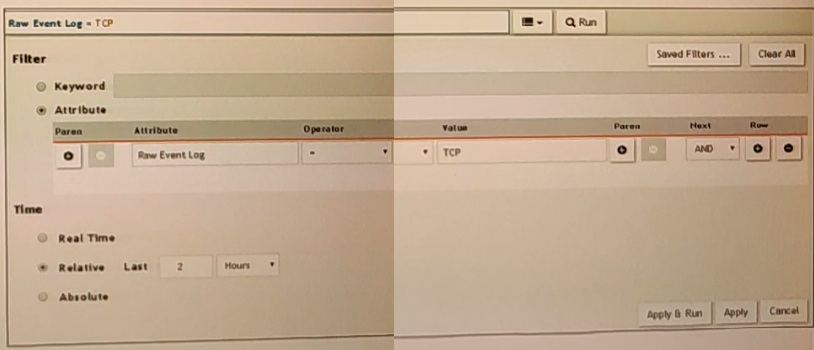
A FortiSIEM is continuously receiving syslog events from a FortiGate firewall The FortiSlfcM administrator is trying to search the raw event logs for the last two hours that contain the keyword tcp . However, the administrator is getting no results from the search.
Based on the selected filters shown in the exhibit, why are there no search results?
Case Sensitivity in Searches: In FortiSIEM, search queries, including those for raw event logs, are case sensitive. This means that keywords must be entered exactly as they appear in the logs.
Keyword Mismatch: The exhibit shows the keyword 'TCP' in the Value field. If the actual events use 'tcp' (lowercase), the search will return no results because of the case mismatch.
Correct Keyword: To match the keyword correctly, the administrator should enter 'tcp' in the Value field.
Reference: FortiSIEM 6.3 User Guide, Search and Filtering section, which discusses the importance of case sensitivity in search queries.
If an incident's status is Cleared, what does this mean?
Incident Status in FortiSIEM: The status of an incident indicates its current state and helps administrators track and manage incidents effectively.
Cleared Status: When an incident's status is 'Cleared,' it means that a specific condition set to clear the incident has been satisfied.
Clear Condition: This is typically a predefined condition that indicates the issue causing the incident has been resolved or no longer exists.
Automatic vs. Manual Clearance: While some incidents may be cleared automatically based on clear conditions, others might be manually cleared by an operator.
Reference: FortiSIEM 6.3 User Guide, Incident Management section, detailing the various incident statuses and the conditions that lead to an incident being marked as 'Cleared.'
Refer to the exhibit.
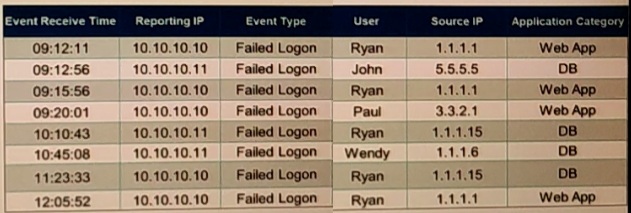
If events are grouped by Reporting IP, Event Type, and user attributes in FortiSIEM, how ,many results will be displayed?
Grouping Events: Grouping events by specific attributes allows for the aggregation of similar events.
Grouping Criteria: For this question, events are grouped by 'Reporting IP,' 'Event Type,' and 'User.'
Unique Combinations Analysis:
10.10.10.10, Failed Logon, Ryan, 1.1.1.1, Web App
10.10.10.11, Failed Logon, John, 5.5.5.5, DB
10.10.10.10, Failed Logon, Ryan, 1.1.1.1, Web App (duplicate, counted as one unique result)
10.10.10.10, Failed Logon, Paul, 3.3.2.1, Web App
10.10.10.11, Failed Logon, Ryan, 1.1.1.15, DB
10.10.10.11, Failed Logon, Wendy, 1.1.1.6, DB
10.10.10.10, Failed Logon, Ryan, 1.1.1.15, DB
Result Calculation: There are seven unique combinations based on the specified grouping attributes.
Reference: FortiSIEM 6.3 User Guide, Event Management and Reporting sections, explaining how events are grouped and reported based on selected attributes.
An administrator wants to search for events received from Linux and Windows agents.
Which attribute should the administrator use in search filters, to view events received from agents only.
Search Filters in FortiSIEM: When searching for specific events, administrators can use various attributes to filter the results.
Attribute for Agent Events: To view events received specifically from Linux and Windows agents, the attribute External Event Receive Agents should be used.
Function: This attribute filters events that are received from agents, distinguishing them from events received through other protocols or sources.
Search Efficiency: Using this attribute helps the administrator focus on events collected by FortiSIEM agents, making the search results more relevant and targeted.
Reference: FortiSIEM 6.3 User Guide, Event Search and Filters section, which describes the available attributes and their usage for filtering search results.

