At ValidExamDumps, we consistently monitor updates to the Fortinet NSE5_FNC_AD_7.6 exam questions by Fortinet. Whenever our team identifies changes in the exam questions, objectives, focus areas or requirements, We immediately update our exam questions for both PDF and online practice exams. This commitment ensures our customers always have access to the most current and accurate questions. By preparing with these up to date and 100% exam domain coverage questions, our customers can successfully pass the Fortinet NSE 5 - FortiNAC-F 7.6 Administrator exam on their first attempt without needing additional materials or study guides.
Other certification materials providers often include outdated or removed questions by Fortinet in their NSE5_FNC_AD_7.6 exam. These outdated questions lead to customers failing their Fortinet NSE 5 - FortiNAC-F 7.6 Administrator exam. In contrast, we ensure our questions bank includes only precise and up-to-date questions. Our main priority is your success in the Fortinet NSE5_FNC_AD_7.6 exam, not profiting from selling obsolete exam questions in PDF or Online Practice Test.
A healthcare organization is integrating FortiNAC-F with its existing MDM. Communication is failing between the systems.
What could be a probable cause?
The integration between FortiNAC-F and Mobile Device Management (MDM) platforms (such as Microsoft Intune, VMware Workspace ONE, or Jamf) is a critical component for providing visibility into mobile assets that do not connect directly to the managed infrastructure via standard wired or wireless protocols.
According to the FortiNAC-F MDM Integration Guide, the communication between the FortiNAC-F appliance and the MDM server is handled through REST API calls. FortiNAC-F acts as an API client, periodically polling the MDM server to retrieve device metadata, compliance status, and ownership information. If communication is failing, it is most likely because the API credentials (Client ID/Secret) are incorrect, the MDM's API endpoint is unreachable from the FortiNAC-F service port, or the SSL certificate presented by the MDM is not trusted by the FortiNAC-F root store.
While SSH (B) is used for switch CLI management and the Security Fabric (A) uses proprietary protocols for FortiGate synchronization, neither is the primary vehicle for MDM data exchange. SOAP API (D) is an older protocol that has been largely replaced by REST in modern FortiNAC integrations.
'FortiNAC integrates with MDM systems by utilizing REST API communication to query the MDM database for device information. To establish this link, administrators must configure the MDM Service Connector with the appropriate API URL and authentication credentials. If the 'Test Connection' fails, verify that the FortiNAC can reach the MDM provider via the REST API port (usually HTTPS 443).' --- FortiNAC-F Administration Guide: MDM Integration and Troubleshooting.
When FortiNAC-F is managing VPN clients connecting through FortiGate, why must the clients run a FortiNAC-F agent?
When FortiNAC-F manages VPN clients through a FortiGate, the agent plays a fundamental role in device identification that standard network protocols cannot provide on their own. In a standard VPN connection, the FortiGate establishes a Layer 3 tunnel and assigns a virtual IP address to the client. While the FortiGate sends a syslog message to FortiNAC-F containing the username and this assigned IP address, it typically does not provide the hardware (MAC) address of the remote endpoint's physical or virtual adapter.
FortiNAC-F relies on the MAC address as the primary unique identifier for all host records in its database. Without the MAC address, FortiNAC-F cannot correlate the incoming VPN session with an existing host record to apply specific policies or track the device's history. By running either a Persistent or Dissolvable Agent, the endpoint retrieves its own MAC address and communicates it directly to the FortiNAC-F service interface. This allows the 'IP to MAC' mapping to occur. Once FortiNAC-F has both the IP and the MAC, it can successfully identify the device, verify its status, and send the appropriate FSSO tags or group information back to the FortiGate to lift network restrictions.
Furthermore, while the agent can also perform compliance checks (Option D), the architectural requirement for the agent in a managed VPN environment is primarily driven by the need for session data correlation---specifically the collection of the IP and MAC address pairing.
'Session Data Components: * User ID (collected via RADIUS, syslog and API from the FortiGate). * Remote IP address for the remote user connection (collected via syslog and API from the FortiGate and from the FortiNAC agent). * Device IP and MAC address (collected via FortiNAC agent). ... The Agent is used to provide the MAC address of the connecting VPN user (IP to MAC).' --- FortiNAC-F FortiGate VPN Integration Guide: How it Works Section.
An organization wants to add a FortiNAC-F Manager to simplify their large FortiNAC-F deployment.
Which two policy types can be managed globally? (Choose two.)
The FortiNAC-F Manager is designed to centralize the management of multiple Control and Application (CA) appliances, ensuring consistent security posture across a distributed enterprise. To achieve this, the Manager allows administrators to define and distribute specific types of policies globally rather than configuring them on each individual CA.
According to the FortiNAC Manager Guide, the two primary policy types that are managed globally are:
Network Access Policies (D): These policies define the 'If-Then' logic for network entry. By managing these at the global level, an administrator can ensure that a 'Contractor' receives the same restricted access regardless of which branch office or campus they connect to.
Endpoint Compliance Policies (B): Global management of compliance policies---which consist of scans and configurations---allows for a unified security baseline. For example, a global policy can mandate that all Windows devices across the entire organization must have a specific antivirus version installed and active before gaining access to the production network.
While the Manager provides visibility into authentication events and can synchronize directory data, the specific Authentication (A) configurations (like local RADIUS secrets or specific LDAP server links) are often localized to the CA to account for site-specific infrastructure. Supplicant EasyConnect (C) is a feature set for onboarding, but the structural 'Global Policy' engine focuses primarily on the Access and Compliance frameworks.
'The FortiNAC Manager enables Global Policy Management, allowing for the creation and distribution of policies across all managed CA appliances. This includes Network Access Policies, which control VLAN and ACL assignment, and Endpoint Compliance Policies, which define the security requirements for hosts. Centralizing these policies ensures that security standards are enforced uniformly across the global network fabric.' --- FortiNAC Manager Administration Guide: Global Policy Management Overview.
An administrator wants to build a security rule that will quarantine contractors who attempt to access specific websites.
In addition to a user host profile, which Iwo components must the administrator configure to create the security rule? (Choose two.)
In FortiNAC-F, the Security Incidents engine is used to automate responses to security threats reported by external devices. When an administrator wants to enforce a policy, such as quarantining contractors who access restricted websites, they must create a Security Rule. A Security Rule acts as the 'if-then' logic that correlates incoming security data with the internal host database.
The documentation specifies that a Security Rule consists of three primary configurable components:
User/Host Profile: This identifies who or what the rule applies to (in this case, 'Contractors').
Trigger: This is the event that initiates the rule evaluation. In this scenario, the Trigger would be configured to match specific syslog messages or NetFlow data indicating access to prohibited websites. Triggers use filters to match vendor-specific data, such as a 'Web Filter' event from a FortiGate.
Action: This defines what happens when the Trigger and User/Host Profile are matched. For this scenario, the administrator would select a 'Quarantine' action, which instructs FortiNAC-F to move the endpoint to a restricted VLAN or apply a restrictive ACL.
While 'Methods' (A) relate to authentication and 'Security Strings' (E) are used for specific SNMP or CLI matching, they are not the structural components of a Security Rule in the Security Incidents menu.
'Security Rules are used to perform a specific action based on certain criteria... To configure a Security Rule, navigate to Logs > Security Incidents > Rules. Each rule requires a Trigger to define the event criteria, an Action to define the automated response (such as Quarantine), and a User/Host Profile to limit the rule to specific groups.' --- FortiNAC-F Administration Guide: Security Rules and Incident Management.
Refer to the exhibits.
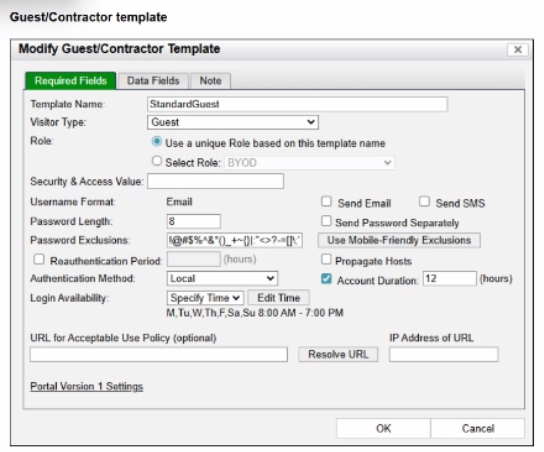
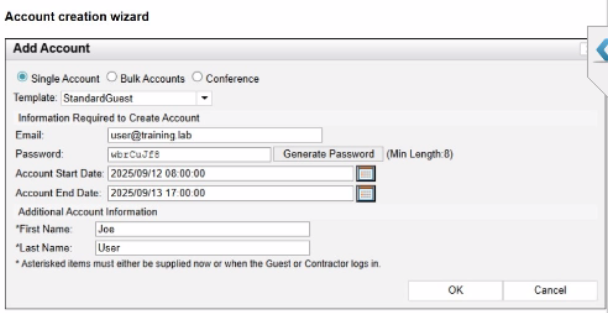
Based on the given configurations and settings, on which date and time would a guest account created at 8:00 AM on 2025/09/12 expire?
Questio ns no: 22
Verified Answe r: D
Comprehensive and Detailed 250 to 300 words each Explanation with Exact Matched Extract from FortiNAC-F Administrator library and documentation for current versions (including F 7.2, 7.4, and 7.6) documents:
In FortiNAC-F, the expiration of a guest or contractor account is determined by the configuration settings within the Account Creation Wizard and the associated Guest/Contractor Template. While a template can define a default 'Account Duration' (as seen in the 12-hour setting in the second exhibit), the Account Creation Wizard allows an administrator to manually specify or override the start and end parameters for a specific user session.
According to the FortiNAC-F Administration Guide regarding guest management, the Account End Date field in the creation wizard is the definitive timestamp for when the account object will be disabled or deleted from the system. In the provided exhibit (Account Creation Wizard), the administrator has explicitly set the Account Start Date to 2025/09/12 08:00:00 and the Account End Date to 2025/09/13 17:00:00.
Even though the template indicates an 'Account Duration' of 12 hours, this value typically serves as a pre-populated default. When a manual date and time are entered into the wizard, those specific values take precedence for that individual account. The account will remain active and valid until 5:00 PM (17:00:00) on the following day, 2025/09/13. It is also important to note the 'Login Availability' from the template (8:00 AM - 7:00 PM); while the account exists until the 13th at 17:00:00, the user would only be able to authenticate during the active hours defined by the login schedule on both days.
'When creating an account, the administrator can select a template to provide default settings. However, specific values such as the Account End Date can be modified within the Account Creation Wizard. The date and time specified in the 'Account End Date' field determines the absolute expiration of the account. Once this time is reached, the account is moved to an expired state and the user's network access is revoked.' --- FortiNAC-F Administration Guide: Guest and Contractor Account Management.

