Key details for this exam, checked against the published exam outline
Each question shows the correct answer and an explanation of why it is right
Which three statements explain a flow-based antivirus profile? (Choose three answers)
According to the FortiOS 7.6 Study Guide and Parallel Path Processing documentation, flow-based antivirus inspection is designed to provide security with minimal impact on performance.
First, a defining characteristic of modern flow-based AV (specifically in its 'hybrid' mode) is that FortiGate buffers the whole file but transmits to the client at the same time (Statement A). This behavior allows the client to start receiving data immediately to prevent session timeouts, while the FortiGate reassembles the file in memory to perform a signature check before the final packet is released.
Second, starting with recent FortiOS versions including 7.6, flow-based inspection uses a hybrid of the scanning modes (Statement B). Previously, flow mode offered 'Quick' or 'Full' scans; now, it combines these techniques to offer a balance between the speed of stream-based scanning and the thoroughness of archive inspection.
Third, the primary motivation for selecting this mode is that flow-based inspection optimizes performance compared to proxy-based inspection (Statement D). It processes traffic in a single pass using the IPS engine, avoiding the overhead associated with the WAD (proxy) process. Statement C is incorrect because if a virus is detected, the last packet is withheld and the connection is reset to prevent the file from being completed. Statement E is less accurate as the IPS engine loads the AV engine to perform the task rather than acting as a 'standalone' entity in the context of file scanning.
An administrator wants to form an HA cluster using the FGCP protocol. Which two requirements must the administrator ensure both members fulfill? (Choose two answers)
''To successfully form an HA cluster, you must ensure that the members have the same:
* Model: hardware model or VM model
* Firmware version
* Licensing: includes the FortiGuard license, virtual domain (VDOM) license, FortiClient license, and so on
* Hard drive configuration: the same number and size of drives and partitions
* Operating mode: the operating mode---NAT mode or transparent mode---of the management VDOM.''
''From a configuration and setup point of view, you must ensure that the HA settings on each member have the same group ID, group name, password, and heartbeat interface settings. Try to place all heartbeat interfaces in the same broadcast domain, or for two-member clusters, connect them directly.''
Technical Deep Dive:
The correct answers are A and D.
A is correct because FGCP cluster formation requires matching HA parameters, and group ID is explicitly one of them. If the group ID differs, the units will not consider each other part of the same cluster during HA discovery and election.
D is correct because FortiGate HA expects hardware parity in critical platform characteristics, including hard drive configuration. If disk layout differs, the members do not satisfy the HA formation prerequisites.
B is incorrect because the study guide does not require heartbeat interfaces to be in the same IP subnet. The requirement is that heartbeat links be in the same broadcast domain, or directly connected in a two-node design. In practice, heartbeat links are Layer 2 adjacency links; IP subnet matching is not the stated requirement.
C is incorrect because the guide does not say both units must start with the same number of configured VDOMs. What must match is the licensing level and the operating mode of the management VDOM. After cluster formation, the primary synchronizes its configuration to the secondary.
A practical verification set before forming FGCP HA is:
get system status
show system ha
diagnose sys ha status
Operationally, FGCP then uses the heartbeat links for member discovery, health monitoring, election, and config/session synchronization. On supported hardware, session forwarding and HA processing can still benefit from FortiGate's ASIC-assisted architecture, but HA state, config sync, and election logic remain control-plane functions handled by FortiOS.
A network administrator has enabled full SSL inspection and web filtering on FortiGate. When visiting any HTTPS websites, the browser reports certificate warning errors. When visiting HTTP websites, the browser does not report errors.
What is the reason for the certificate warning errors?
With full SSL inspection, FortiGate performs a man-in-the-middle process: it decrypts the HTTPS session, inspects it, then re-encrypts it. To do this, FortiGate presents a substitute certificate to the client, signed by the CA certificate configured in the SSL/SSH inspection profile (for example, Fortinet_CA_SSL or a custom enterprise CA).
Browsers will show certificate warning errors when the issuing CA is not trusted by the client device/browser trust store. This only happens for HTTPS because certificates are used in TLS; HTTP has no certificate exchange, so no warning appears.
Why the other options are incorrect:
A: Allowing invalid server certificates affects whether FortiGate blocks/permits connections to sites with bad certs; it does not fix the client warning about FortiGate's substituted cert.
B: Proxy vs flow inspection mode does not inherently cause certificate warnings; the warning is about trust of the signing CA.
D: Missing extensions is not the typical reason across ''any HTTPS website''; the standard reason is the client does not trust the FortiGate inspection CA
Which statement correctly describes NetAPI polling mode for the FSSO collector agent?
NetAPI: Polls temporary sessions created on the DC when a user logs on or logs off and calls the NetSessionEnum function on Windows. It's faster than the WinSec and WMI methods; however, it can miss some logon events if a DC is under heavy system load. This is because sessions can be quickly created and purged form RAM, before the agent has a chance to poll and notify FG.
Refer to the exhibits.
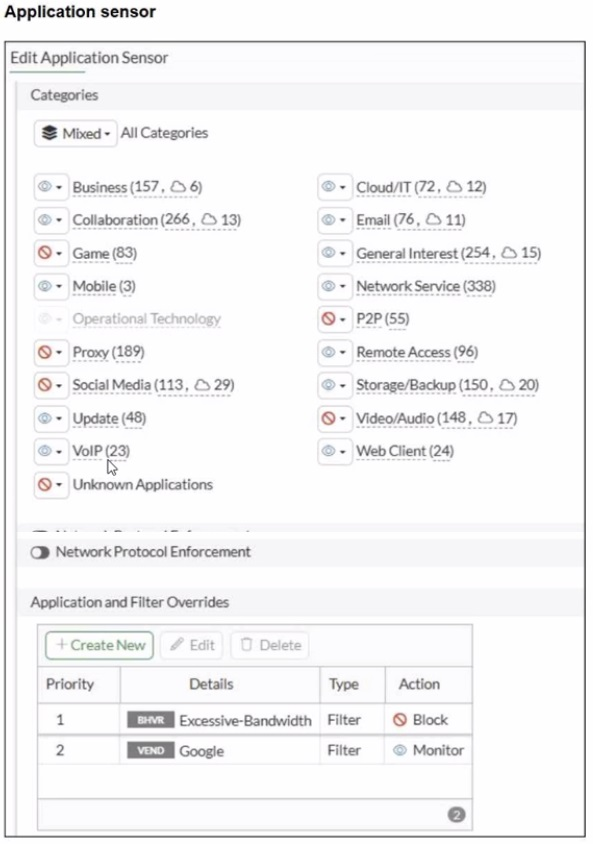
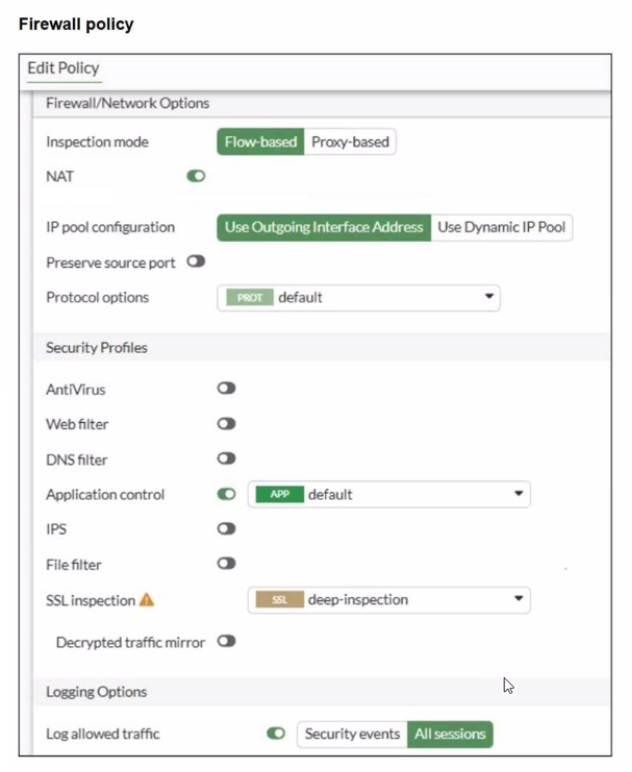
You have implemented the application sensor and the corresponding firewall policy as shown in the exhibits.
Which two factors can you observe from these configurations? (Choose two.)
From the exhibits:
The Application Control sensor has these key settings:
Application and Filter Overrides
Priority 1: Excessive-Bandwidth (Type: Filter) with Action Block
Priority 2: Google (Type: Filter) with Action Monitor
Category actions shown include Social Media set to Block (this category includes Facebook).
The firewall policy is using:
Flow-based inspection
Application control enabled (profile: default)
Deep inspection enabled (helps identify applications inside HTTPS)
Logging enabled
FortiOS applies Application Control as follows (top-down within the Application Control profile):
Overrides are evaluated by priority (highest priority first).
The first matching override determines the action (block/monitor/allow) for that traffic.
Category-based actions apply to applications that fall into those categories unless an override matches first.
Why A is correct
A . YouTube access is blocked based on Excessive-Bandwidth Application and Filter override settings.
The profile explicitly blocks the Excessive-Bandwidth behavior filter at the highest override priority.
When YouTube traffic is detected as matching the Excessive-Bandwidth behavior, FortiGate will apply the Block action due to the override.
Because this is a priority override, it is enforced before lower-priority entries.
Why B is correct
B . Facebook access is blocked based on the category filter settings.
The Application Sensor shows Social Media configured with a Block action.
Facebook is categorized under Social Media, so it will be blocked when matched by Application Control.
Why C is not correct
C . Facebook access is allowed but you cannot play Facebook videos...
Since the Social Media category is set to Block, Facebook would be blocked at the category level (not merely video playback).
Why D is not correct
D YouTube search is allowed based on the Google override...
The Google override action is Monitor, not Allow.
''Monitor'' logs/detects but does not override a block condition to ''allow'' traffic.
Also, YouTube traffic is not guaranteed to be treated as ''Google'' in a way that would permit it, and any matching block condition (such as Excessive-Bandwidth) would still take precedence.
FortiGate is operating in NAT mode and has two physical interfaces connected to the LAN and DMZ networks respectively. Which two statements about the requirements of connected physical interfaces on FortiGate are true? (Choose two.)
In FortiOS 7.6, when a FortiGate is operating in NAT mode, physical interfaces that participate in traffic forwarding (such as LAN and DMZ) must meet certain fundamental requirements.
Correct statements
D . Both interfaces must have IP addresses assigned.
Correct
In NAT mode, FortiGate operates as a Layer-3 device.
Every interface that forwards traffic must have an IP address.
Without an IP address:
The interface cannot participate in routing
Firewall policies cannot be applied correctly
This is a mandatory requirement.
C . Both interfaces must have directly connected routes on the routing table.
Correct
When an IP address is assigned to an interface, FortiGate automatically installs a connected route for that subnet in the routing table.
These connected routes are required so FortiGate:
Knows how to reach the locally attached networks
Can forward traffic between LAN and DMZ
While administrators do not manually create these routes, their presence is required for correct operation.
Why the other options are incorrect
A . Both interfaces must have DHCP enabled and roles assigned.
Incorrect
DHCP is optional; interfaces can use static IPs.
Interface roles (LAN, DMZ, WAN) are administrative/GUI aids, not functional requirements.
B . Both interfaces must have the interface role assigned.
Incorrect
Interface roles affect GUI grouping and some default behavior.
They are not required for NAT mode operation or traffic forwarding.
Exam domains verified against: Official Fortinet NSE4_FGT_AD-7.6 exam guide, last checked October 2026.
Perform initial FortiGate configuration including interfaces, static routes, and administrative access. Configure logging to diagnose deployment issues, resource constraints, and connectivity problems. Set up FGCP HA clusters for high availability and understand FortiGate CNF and VM deployment options in public cloud and FortiSASE administration.
Design and implement firewall policies that control traffic between network segments. Configure Source NAT and Destination NAT to manage address translation. Deploy firewall authentication methods including local user databases and FSSO for user access control and policy enforcement.
Sample question from this domain above: Q1
Implement encrypted traffic inspection using SSL certificates and identify inspection modes such as proxy-based and flow-based. Configure web filtering policies, application control rules to manage bandwidth and enforce acceptable use, antivirus scanning to detect malware, and IPS profiles to block network attacks.
Sample question from this domain above: Q5
Configure static routes to direct traffic to appropriate destinations and interfaces. Implement SD-WAN to load balance and failover across multiple WAN links, optimizing application performance and link utilization in multi-link environments.
Implement IPsec VPN tunnels in meshed and partially redundant topologies to secure traffic between FortiGate devices and remote sites. Configure encryption, authentication, and failover behaviour to maintain secure connectivity.
Common questions about the exam itself

