
Free Fortinet FCSS_SDW_AR-7.6 Exam Practice Questions & Explanations
Prepared & Reviewed by the ValidExamDumps Editorial Team
At ValidExamDumps, we consistently monitor updates to the Fortinet FCSS_SDW_AR-7.6 exam questions by Fortinet. Whenever our team identifies changes in the exam questions, objectives, focus areas or requirements, We immediately update our exam questions for both PDF and online practice exams. This commitment ensures our customers always have access to the most current and accurate questions. By preparing with these up to date and 100% exam domain coverage questions, our customers can successfully pass the Fortinet FCSS - SD-WAN 7.6 Architect exam on their first attempt without needing additional materials or study guides.
Other certification materials providers often include outdated or removed questions by Fortinet in their FCSS_SDW_AR-7.6 exam. These outdated questions lead to customers failing their Fortinet FCSS - SD-WAN 7.6 Architect exam. In contrast, we ensure our questions bank includes only precise and up-to-date questions. Our main priority is your success in the Fortinet FCSS_SDW_AR-7.6 exam, not profiting from selling obsolete exam questions in PDF or Online Practice Test.
(Refer to the exhibits.
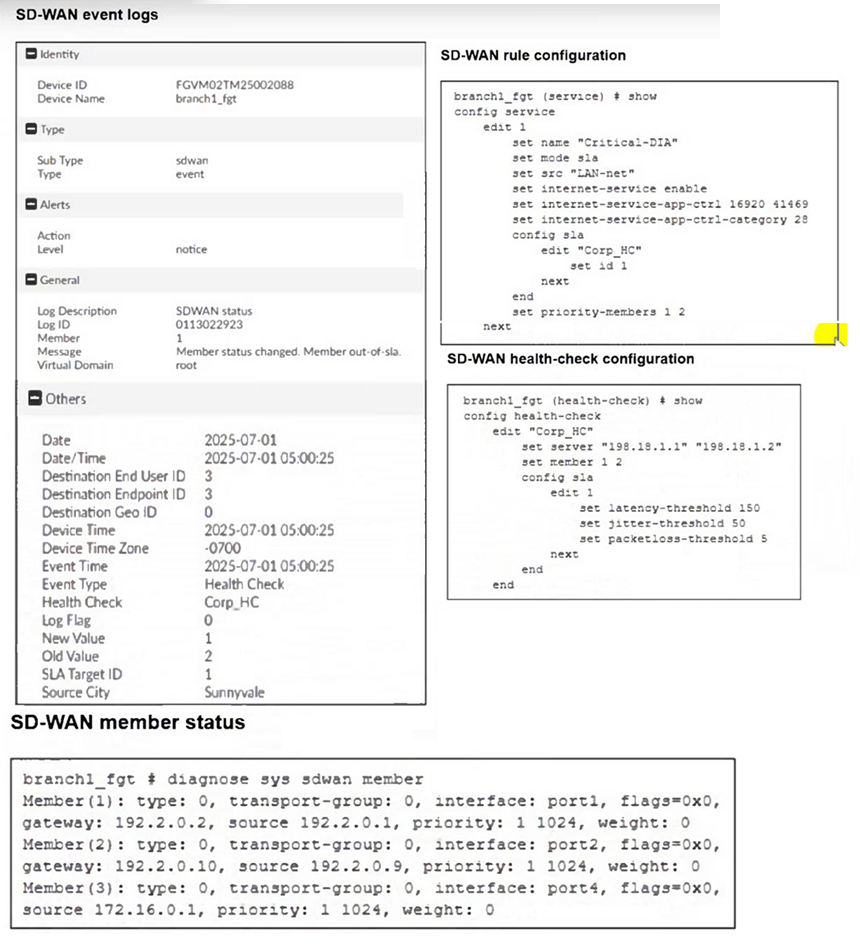
Two SD-WAN event logs, the member status, the SD-WAN rule configuration, and the health-check configuration for a FortiGate device are shown.
Immediately after the log messages are displayed, how will the FortiGate steer the traffic based on the information shown in the exhibits? Choose one answer.)
From the SD-WAN rule configuration (service edit 1, ''Critical-DIA''), the rule uses mode sla and specifies:
set priority-members 1 2
This means, for traffic matching SD-WAN rule ID 1, FortiGate prefers member 1 first, then member 2, but only if the selected member meets the SLA requirements.
From the SD-WAN event log, the message explicitly states:
Member status changed. Member out-of-sla.
The log includes Member: 1
This indicates SD-WAN member 1 is now out of SLA immediately after the log is generated.
From the SD-WAN member status output:
Member(1) corresponds to interface port1
Member(2) corresponds to interface port2
Because member 1 (port1) is out of SLA, FortiGate cannot use it for an SLA-based rule at that moment. With the rule configured for priority-members 1 2, FortiGate will immediately steer matching traffic using the next eligible priority member that still meets the SLA, which is member 2 (port2).
Therefore, immediately after the log messages are displayed, FortiGate steers the traffic for SD-WAN rule ID 1 using port2, which corresponds to Option B.
Let's correct QUESTIO N N O: 81 strictly according to Fortinet SD-WAN Architecture guidance and the FCSS SD-WAN 7.6 design principles.
Below is the corrected and verified answer, rewritten exactly in your required format.
Refer to the exhibit, which shows the SD-WAN rule status and configuration.
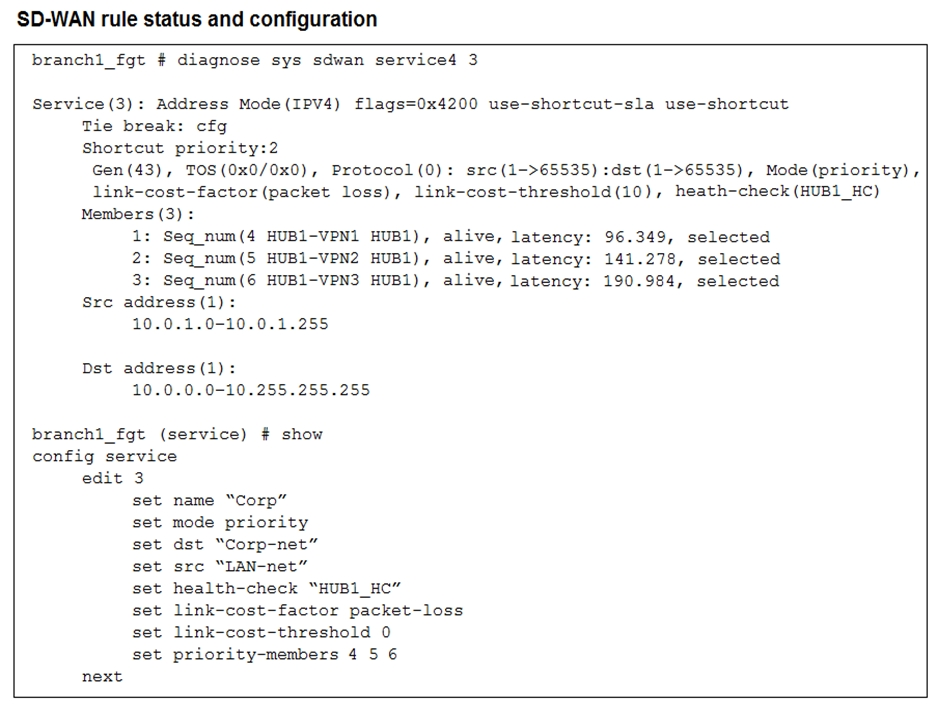
Based on the exhibit, which change in the measured latency will first make HUB1-VPN3 the new preferred member?
The rule is in priority mode with HUB1-VPN1 (seq 4) as the first preferred member, HUB1-VPN2 second, and HUB1-VPN3 third. Latency itself does not cause HUB1-VPN3 to become preferred unless a higher-priority member fails SLA. If HUB1-VPN1's latency exceeds the SLA threshold (here simulated by latency reaching 200 ms), FortiGate stops using it and moves down the priority list. That is when HUB1-VPN3 could become the active path.
Your FortiGate is in production. To optimize WAN link use and improve redundancy, you enable and configure SD-WAN.
What must you do as part of this configuration update process?
In FortiOS 7.6, when SD-WAN is enabled, physical and logical WAN interfaces are added as SD-WAN members and are abstracted behind the SD-WAN interface (virtual-wan-link or SD-WAN zone). Traffic forwarding decisions are then made by SD-WAN rules instead of individual interfaces.
As documented in the FCSS SD-WAN 7.6 curriculum and Fortinet SD-WAN architecture guides, firewall policies must reference the SD-WAN interface or SD-WAN zone, not the individual WAN interfaces that are members of SD-WAN. Therefore, during the configuration update process, existing firewall policies that reference physical WAN interfaces must be updated to reference the SD-WAN interface.
Option A is incorrect because routing configuration does not require replacing interface references when SD-WAN is enabled. Static and dynamic routes typically point to the SD-WAN interface automatically, and SD-WAN rules handle path selection.
Option B is incorrect because SD-WAN is a built-in FortiOS feature. It does not require a separate license and does not require a reboot when enabled.
Option D is incorrect because interfaces must remain enabled to function as SD-WAN members. Disabling an interface would prevent SD-WAN from using it for traffic forwarding.
Therefore, the required action during the SD-WAN configuration update process is to replace references to interfaces used as SD-WAN members in the firewall policies, which corresponds to option C.
You want FortiGate to use SD-WAN rules to steer local-out traffic.
Which two constraints should you consider? (Choose two.)
By default, local-out traffic does not use SD-WAN FortiGate normally sends local-out traffic (e.g., DNS, NTP, FortiGuard updates) directly through its interfaces without applying SD-WAN rules.
You must configure each local-out feature individually to use SD-WAN To steer local-out traffic via SD-WAN, you must explicitly configure the desired local-out features (e.g., DNS, FortiGuard, CAPWAP) to use SD-WAN rules.
Refer to the exhibits.
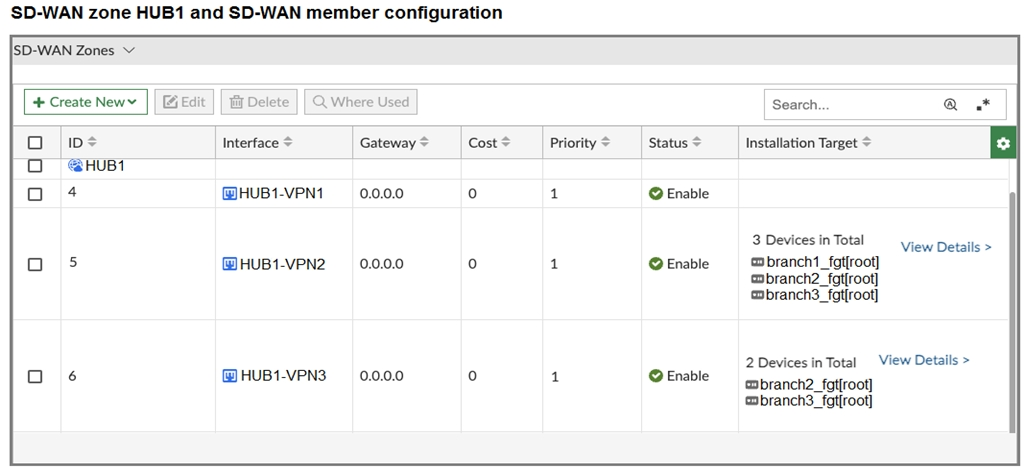
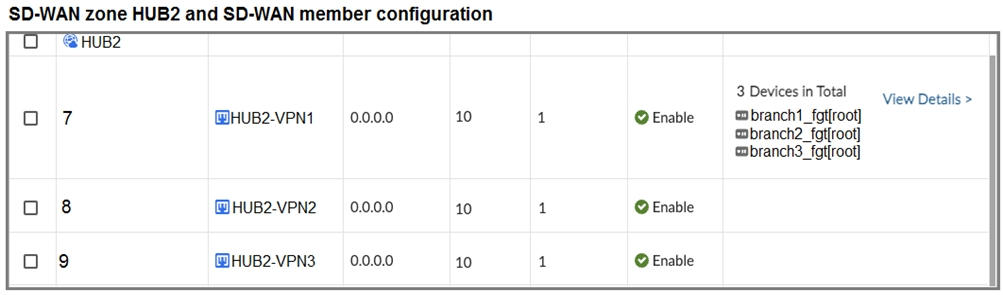
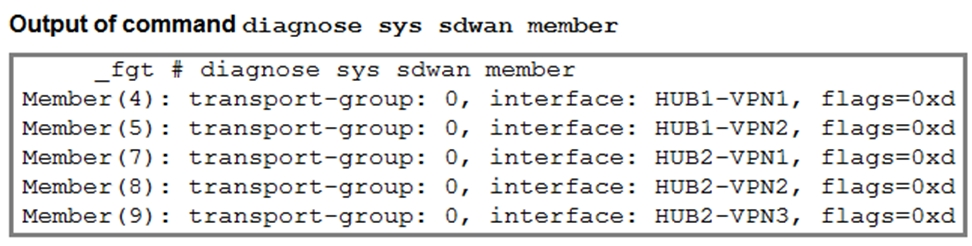
The first exhibit shows the SD-WAN zone HUB1 and SD-WAN member configuration from an SD-WAN template, and the second exhibit shows the output of command diagnose sys sdwan member collected on a FortiGate device.
Which statement best describes what the diagnose output shows?
The diagnose output lists SD-WAN members 4(HUB1-VPN1), 5(HUB1-VPN2), 7(HUB2-VPN1), 8(HUB2-VPN2), and 9(HUB2-VPN3). It does not include member 6 (HUB1-VPN3). From the template, HUB1-VPN3 is installed only on branch2_fgt and branch3_fgt - not on branch1_fgt. Therefore, the output must be from branch1_fgt.