At ValidExamDumps, we consistently monitor updates to the Fortinet FCSS_LED_AR-7.6 exam questions by Fortinet. Whenever our team identifies changes in the exam questions, objectives, focus areas or requirements, We immediately update our exam questions for both PDF and online practice exams. This commitment ensures our customers always have access to the most current and accurate questions. By preparing with these up to date and 100% exam domain coverage questions, our customers can successfully pass the Fortinet NSE 6 - LAN Edge 7.6 Architect exam on their first attempt without needing additional materials or study guides.
Other certification materials providers often include outdated or removed questions by Fortinet in their FCSS_LED_AR-7.6 exam. These outdated questions lead to customers failing their Fortinet NSE 6 - LAN Edge 7.6 Architect exam. In contrast, we ensure our questions bank includes only precise and up-to-date questions. Our main priority is your success in the Fortinet FCSS_LED_AR-7.6 exam, not profiting from selling obsolete exam questions in PDF or Online Practice Test.
Connectivity tests are being performed on a newly configured VLAN. The VLAN is configured on a FortiSwitch device that is managed by FortiGate. During testing, it is observed that devices
within the VLAN can successfully ping FortiGate. and FortiGate can also ping these devices.
Inter-VLAN communication is working as expected. However, devices within the same VLAN are unable to communicate with each other.
What could be causing this issue?
Observed behavior:
Devices in the VLANcan ping FortiGate gateway reachability OK.
FortiGatecan ping devicesin that VLAN return path OK.
Inter-VLAN routingworks FortiGate's L3 and policies are fine.
Devices in the same VLAN cannot ping each other problem is on theL2 switching plane, not L3.
On FortiSwitch (managed by FortiGate), there is a feature calledAccess VLAN(sometimes described in NAC/dynamic segmentation context):
WhenAccess VLANis enabled on a VLAN, the switchdoes not perform normal L2 forwardingbetween hosts in that VLAN.
Instead, all traffic from endpoints in that VLAN isforced upstream to FortiGate, as if every frame were destined for the gateway.
This is used for designs where you wantall intra-VLAN traffic inspected by the firewall, implementing micro-segmentation.
Resulting behavior:
Host FortiGate: works (frames are forwarded to FortiGate).
FortiGate Host: works (routed back).
Host A Host B (same VLAN):
Frame from A goes to FortiGate.
FortiGate seessource and destination in same subnet; depending on policy, it may drop or not have a policy allowing that traffic.
Even if allowed, certain designs still break pure L2 expectations.
In the exam scenario, the key point is:
IfAccess VLAN is enabled,local L2 communication within that VLAN is disabled, so hosts in the same VLAN cannot communicate directly.
That perfectly explains:
Same VLAN hosts can't ping each other
But they can both reach FortiGate and beyond
Why the other options are less likely / incorrect
B . FortiSwitch MAC address table is missing entries
If MAC table were empty/bad,nothingin that VLAN would work properly, including pinging FortiGate.
C . FortiGate ARP table is missing entries
Then FortiGate couldn't ping the devices either; but it can.
D . Native VLAN misconfigured on ports
That would affect connectivity to FortiGate too, not only host-to-host.
Refer to the exhibits.
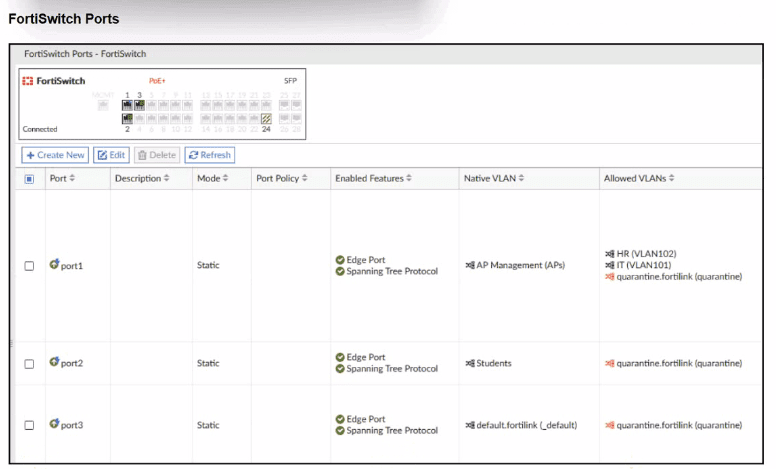
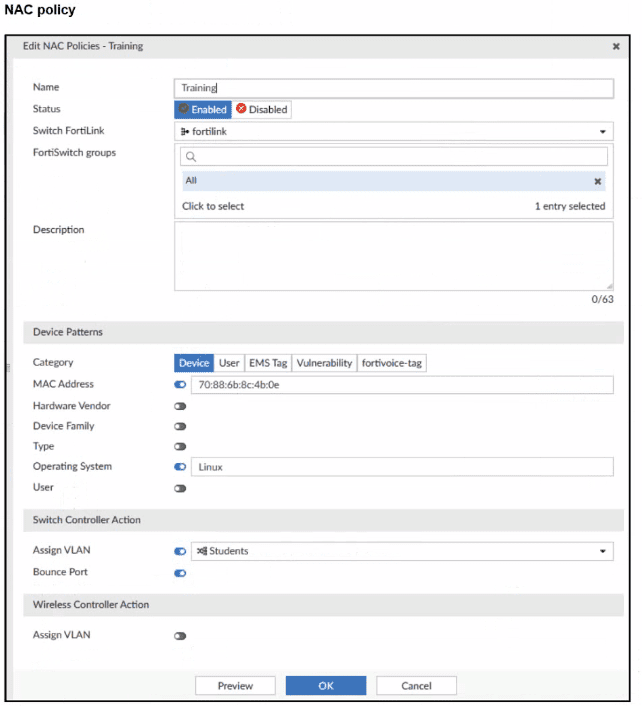
A NAC policy has been configured to apply traffic that flows through FortiSwitch port 2. Traffic that meets the NAC policy criteria will be assigned to the Students VLAN. However, the NAC policy does not seem to be taking effect.
Which configuration is missing?
From the exhibits:
FortiSwitch Ports viewshows:
port2
Mode: Static
Native VLAN: Students
Allowed VLANs: quarantine.fortilink (quarantine)
NAC policy ''Training'':
Switch FortiLink: fortilink
Category:Device
Matching criteria:
MAC Address: 70:88:6b:8c:4b:0e (enabled)
Operating System:Linux(enabled)
Switch Controller Action:
Assign VLAN = Students
Bounce Port = enabled
Design intent:
Device with that MAC + OS Linux, when plugged intoport2, should be dynamically moved to VLANStudentsby the NAC policy.
Why it doesn't work now
On FortiLink NAC,dynamic NAC decisions only apply on ports whose ''Access Mode'' is set to NAC:
NAC mode = FortiGate controls theonboarding VLAN, evaluates NAC policies, and then dynamically reassigns the switch port VLAN (access, quarantine, etc.).
Static mode(what we see on port2) means the port just uses its configurednative/allowed VLANs, andno NAC classificationhappens.
Right now:
port2 is astatic access portwith Native VLAN = Students.
The NAC policy exists, butFortiSwitch is not in NAC enforcement mode on that port, so the policy is never evaluated for traffic on port2.
Therefore, themissing configurationis:
Setport2toNAC mode(sometimes called ''Access mode: NAC'' or ''NAC LAN edge port'').
Once port2 is changed to NAC mode:
Device initially lands in the onboarding/quarantine VLAN.
FortiGate collects device info (MAC, OS, etc.).
NAC policy ''Training'' matches MAC + Linux.
Switch controller actionAssign VLAN = Studentsis applied.
Port is bounced (if configured), bringing the device back up in VLAN Students.
Why the other options are wrong
B . MAC or OS misconfigured
Possible in general, but the question asks forwhich configuration is missing, and the exhibits clearly focus on port mode. Also, even with wrong MAC/OS, the port would still be in NAC mode; here NAC isn't even active.
C . Port Policy mode
Port policy (edge/trunk) is separate from NAC; NAC requires the specificNAC access mode.
D . Students VLAN should be Allowed VLANs instead of Native VLAN
For an access port, having Students as thenative VLANis correct. NAC policy's Assign VLAN will set that as access VLAN; no need to make it an allowed trunk VLAN.
Refer to the exhibits.
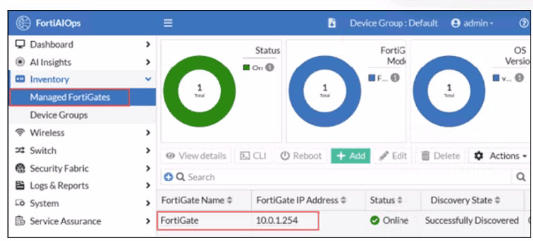
FortiGate has been added to FortiAIOps for management.
Which step must be performed on FortiAIOps to add a FortiSwitch device connected to the recently added FortiGate?
In a LAN Edge deployment:
FortiSwitch is managedthrough FortiGate via FortiLink.
FortiAIOps integrates withFortiGateas the single managed device; from there it gains visibility intoall Fabric and LAN-edge devices(FortiSwitch, FortiAP) that are registered to that FortiGate.
Once the FortiGate is successfully added to FortiAIOps (as shown in the exhibit, statusOnline / Successfully Discovered), all FortiSwitches managed by that FortiGate are:
Discovered automatically through the FortiGate--FortiAIOps connection
Shown under the appropriate inventory / switch views withno separate onboarding stepfor each switch.
This is why no extra IP, serial number, or credential entry is required for FortiSwitch.
So:
AandBsuggest manual per-switch onboarding, which is not how FortiAIOps works with LAN Edge.
Dsimilarly assumes direct FortiSwitch management, but FortiAIOps talks toFortiGate, not the switch.
Therefore the correct behavior is that theFortiSwitch is added automatically (C)once its managing FortiGate is connected to FortiAIOps.
You are configuring FortiAuthenticator to integrate with FSSO for user identification. To enable FortiAuthenticator to extract user information from syslog messages and inject it into FSSO, you have configured syslog matching rules.
What is the role of syslog matching rules in the process of injecting user information into FSSO?
When FortiAuthenticator is used as anFSSO agentbased onsyslog, it must:
Parse incoming syslog messagesfrom devices (firewalls, WLAN controllers, VPN concentrators, etc.).
Extract identity fieldssuch as:
Username
IP address
Login/logout event indicators
Syslogmatching ruleson FortiAuthenticator define:
Which syslog messages are relevant (by facility, message pattern, or regex).
How to capture specific fields (username, IP, group, event type).
FortiAuthenticator then uses this parsed data toinject logon sessions into FSSO, so FortiGate can apply identity-based policies.
Thus, the role of syslog matching rules is exactly as described inC.
A: Group mapping is handled separately via directory groups / FSSO config, not directly by matching rules.
B: Enforcement of authentication policies is done on FortiGate, not directly by the matching rules.
D: While irrelevant logs can be ignored via rules, the primary purpose isparsing and extraction, not generic filtering.
A FortiSwitch is not appearing in the FortiGate management interface after being connected via FortiLink. What could be a first troubleshooting step?
In FortiLink topologies, a managed FortiSwitch normally gets itsmanagement IP automaticallyfrom theDHCP server on the FortiLink interface. If the switch does not receive an IP:
It cannot form the FortiLink CAPWAP/DTLS control channel.
Therefore it doesnot appearunderWiFi & Switch Controller > FortiSwitch.
FortiOS documentation states that FortiLink uses abuilt-in DHCP serveron the FortiLink interface for onboarding switches.
So thefirst troubleshooting stepis to confirm:
The FortiLink DHCP server is enabled.
Leases are being handed out to the FortiSwitch MAC.
Other options:
A: Security policies do not affect the L2 FortiLink control channel.
B: Static IP may be used but is not the normal first step.
D: Internet access is not required for FortiGate to see the switch.

