At ValidExamDumps, we consistently monitor updates to the Fortinet FCP_ZCS_AD-7.4 exam questions by Fortinet. Whenever our team identifies changes in the exam questions, objectives, focus areas or requirements, We immediately update our exam questions for both PDF and online practice exams. This commitment ensures our customers always have access to the most current and accurate questions. By preparing with these up to date and 100% exam domain coverage questions, our customers can successfully pass the Fortinet FCP - Azure Cloud Security 7.4 Administrator exam on their first attempt without needing additional materials or study guides.
Other certification materials providers often include outdated or removed questions by Fortinet in their FCP_ZCS_AD-7.4 exam. These outdated questions lead to customers failing their Fortinet FCP - Azure Cloud Security 7.4 Administrator exam. In contrast, we ensure our questions bank includes only precise and up-to-date questions. Our main priority is your success in the Fortinet FCP_ZCS_AD-7.4 exam, not profiting from selling obsolete exam questions in PDF or Online Practice Test.
A Linux server was deployed in a protected subnet with a dynamic IP address. A FortiGate VM in the internal subnet provides traffic filtering to it. and you must implement a firewall policy using the IP address of the Linux server.
Which feature could help integrate FortiGate using Linux server tags?
The Software-defined network (SDN) connector allows FortiGate to dynamically pull metadata such as tags, IP addresses, and resource groups from Azure resources. This enables automatic policy updates based on dynamic IP changes, such as those of a Linux server in a protected subnet.
What is a key distinction between Azure Firewall and FortiGate VM in terms of their primary functions?
Azure Firewall is a cloud-native, fully managed network security service designed to control and log network traffic using Azure policies. In contrast, the FortiGate VM is a network virtual appliance (NVA) that delivers comprehensive security features, including firewalling, IPS, antivirus, VPN, and application control, suitable for both on-premises and cloud deployments.
Which statement about deploying VMs in a gateway subnet is true?
Azure does not allow the deployment of virtual machines (VMs) in a gateway subnet. The gateway subnet is specifically reserved for Azure VPN Gateway or ExpressRoute Gateway instances, and deploying other resources in it can cause gateway deployment or operation failures.
Refer to the exhibits.
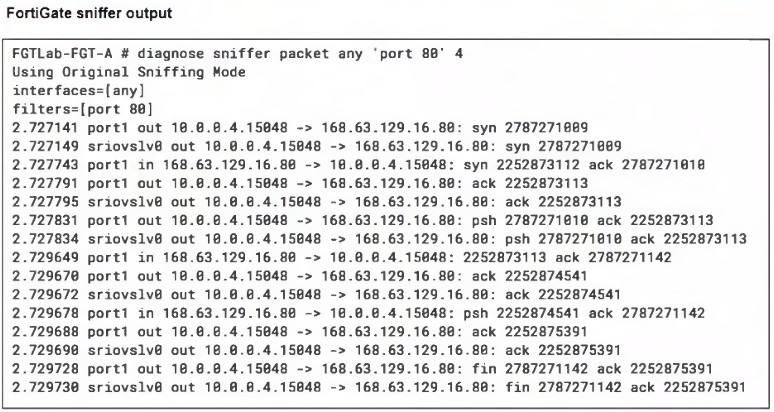
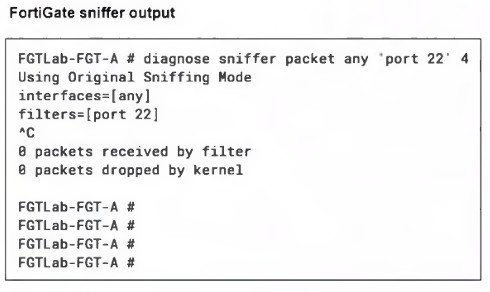
A high availability (HA) active-active FortiGate with Elastic Load Balancing (ELB) and Internal Load Balancing (ILB) was deployed with a default setup to filter traffic to a Linux server running Apache server.
Ports 80 and 22 are open on the Linux server, and on FortiGate a VIP and firewall policy are configured to allow traffic through ports 80 and 22. Traffic on port 80 is successful, but traffic on port 22 is not detected by FortiGate.
What configuration changes could you perform to allow SSH traffic?
Since port 80 traffic is reaching the FortiGate (as shown in the sniffer output) but port 22 traffic is not, the issue lies before the FortiGate, at the Azure Load Balancer level. Azure Load Balancers require an Inbound NAT rule to forward specific ports (like SSH on port 22) to a specific backend VM. Creating a new Inbound NAT rule for port 22 will allow SSH traffic to be properly routed to the FortiGate VM.
What characterizes the branch-to-branch topology in an Azure virtual WAN?
The branch-to-branch topology in Azure Virtual WAN is characterized by direct connectivity between branches through the Virtual WAN backbone, which reduces dependency on centralized hubs. This results in a simplified network architecture, lowering latency and optimizing routing between branch locations.

