Free Fortinet FCP_FSA_AD-5.0 Exam Actual Questions & Explanations

Last updated on: Jul 7, 2026
Author: Anthony Ross (Fortinet Security Certification Specialist)

The FCP_FSA_AD-5.0 exam validates your ability to deploy, configure, and manage Fortinet NSE 5 - FortiSandbox 5.0 in production environments. This certification is part of the Fortinet Certified Professional, FCP Fortinet Certified Professional Security Operations credential path, designed for security operations professionals who work with Fortinet's advanced threat detection and analysis solutions. This page provides a clear roadmap of exam topics, question formats, and practical preparation strategies to help you study efficiently and build confidence before test day. Whether you are new to FortiSandbox or expanding your Fortinet expertise, understanding the exam structure and core competencies is the first step toward success.

FCP_FSA_AD-5.0 Exam Syllabus & Core Topics

Use this topic map to guide your study for Fortinet FCP_FSA_AD-5.0 (Fortinet NSE 5 - FortiSandbox 5.0 Administrator) within the Fortinet Certified Professional, FCP Fortinet Certified Professional Security Operations path.

  • Deployment and System Settings: Configure FortiSandbox appliances in your network, set up system parameters, manage licenses, and establish initial security policies. You must understand hardware requirements, network interfaces, and how to integrate FortiSandbox into existing Fortinet infrastructure.
  • Scanning and Rating Components: Operate the file submission and analysis workflows, interpret threat ratings and verdicts, and manage scanning queues. Candidates should be able to troubleshoot scanning failures, adjust detection sensitivity, and review detailed analysis reports for submitted samples.
  • Integration: Connect FortiSandbox with FortiGate, FortiMail, and other Fortinet products to enable automated threat response. You must configure integration settings, manage API connections, and ensure proper data flow between systems for coordinated security operations.
  • Results Analysis: Interpret sandbox analysis outcomes, understand behavioral indicators, and make informed decisions based on threat intelligence. Candidates should analyze execution flows, identify malicious behaviors, and use findings to refine security policies and containment strategies.

Question Formats & What They Test

The FCP_FSA_AD-5.0 exam uses a mix of question types to assess both foundational knowledge and practical decision-making skills in real-world FortiSandbox scenarios.

  • Multiple Choice: Test core definitions, feature behavior, system capabilities, and key terminology related to sandbox analysis, threat ratings, and integration protocols.
  • Scenario-Based Items: Present realistic situations such as configuring a new sandbox deployment, responding to suspicious file submissions, or troubleshooting integration issues. You select the best approach based on security requirements and operational constraints.
  • Configuration Reasoning: Require you to identify correct settings for specific use cases, such as adjusting scanning parameters, enabling threat feeds, or establishing failover procedures.

Questions progress in difficulty and emphasize practical application, meaning you must not only know features but also understand when and how to use them in a security operations center.

Preparation Guidance

Effective preparation for FCP_FSA_AD-5.0 combines structured topic review with hands-on practice and timed assessments. Organize your study plan around the four core domains, allocate study time based on your comfort level, and regularly test your understanding to identify gaps before exam day.

  • Map Deployment and System Settings, Scanning and Rating Components, Integration, and Results Analysis to weekly study goals and track your progress with a checklist.
  • Work through practice question sets; review explanations for both correct and incorrect answers to understand the reasoning behind each choice.
  • Connect features and concepts across all four domains by studying how deployment decisions affect scanning operations, how integration enables automated responses, and how analysis findings drive policy refinement.
  • Complete a timed mini mock exam under realistic conditions to build pacing confidence, identify time management weak spots, and reduce test anxiety.
  • In the final week, focus on areas where you scored lowest and review key terminology, configuration steps, and decision frameworks.

Explore other Fortinet certifications: view all Fortinet exams.

Get the PDF & Practice Test

Strengthen your preparation with up-to-date resources from validexamdumps.com. These materials align to FCP_FSA_AD-5.0 and cover practical scenarios with clear explanations.

  • Q&A PDF with Explanations: Topic-mapped questions that clarify why correct options are right and others aren't, helping you build conceptual understanding.
  • Practice Test: Realistic items, timed and untimed modes, progress tracking, and detailed review feedback to pinpoint improvement areas.
  • Focused Coverage: Aligned to Deployment and System Settings, Scanning and Rating Components, Integration, and Results Analysis so you study what matters most.
  • Regular Updates: Content refreshes that reflect syllabus changes and product updates to FortiSandbox.

Visit the exam page to download the PDF, Online Practice Test, or get a Bundle Discount offer for both formats: Fortinet NSE 5 - FortiSandbox 5.0 Administrator.

Frequently Asked Questions

What topics carry the most weight on the FCP_FSA_AD-5.0 exam?

Integration and Results Analysis typically account for a larger portion of the exam because they directly impact security operations and threat response decisions. However, all four domains are essential; weakness in any area can lower your score. Prioritize hands-on practice with real sandbox scenarios to build confidence across all topics.

How do Deployment and System Settings connect to Scanning and Rating Components in real workflows?

Deployment decisions such as network placement, resource allocation, and threat feed configuration directly affect how quickly and accurately FortiSandbox can scan and rate files. For example, insufficient memory or disabled threat feeds will degrade analysis quality. Understanding this relationship helps you design robust sandbox environments that support reliable threat detection.

How much hands-on FortiSandbox experience do I need before taking the exam?

Direct experience with FortiSandbox administration is highly beneficial but not strictly required if you have strong foundational knowledge of malware analysis and Fortinet products. Prioritize lab work on deployment, file submission workflows, and integration setup. Even virtual lab practice or sandbox walkthroughs significantly improve your ability to answer scenario-based questions correctly.

What are common mistakes candidates make on this exam?

Many candidates confuse FortiSandbox verdict categories or misunderstand how integration settings affect threat response timing. Others underestimate the importance of system resource planning and fail to recognize when analysis results indicate false positives. Careful review of threat rating definitions and integration troubleshooting scenarios during study helps you avoid these pitfalls.

How should I pace my study in the final week before the exam?

Shift from learning new topics to reinforcing weak areas and building speed. Take one full-length practice test under timed conditions, review all incorrect answers, and drill terminology and configuration steps. Avoid cramming new material; instead, focus on confidence building and ensuring you can quickly recognize key concepts and decision points during the actual exam.

Question No. 1

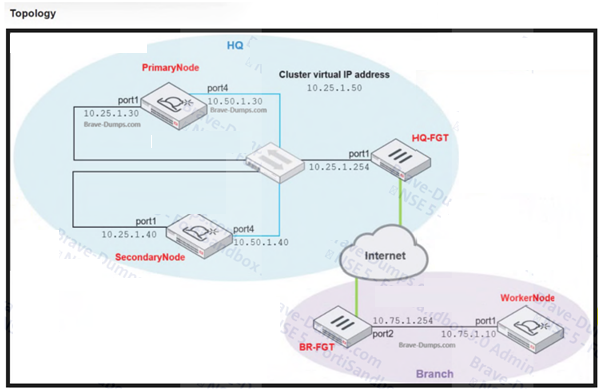
Refer to the exhibit.

Which command must you use to configure the FortiSandbox device as the primary node? (Choose one answer)

Show Answer Hide Answer
Correct Answer: D

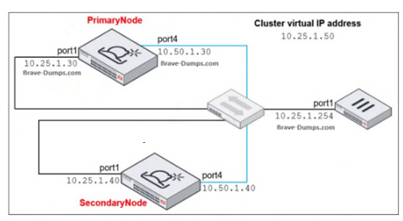
The exhibit labels 10.25.1.50 as the cluster virtual IP address. The Study Guide explains that in HA configuration, ''You must configure the HA group name, password, and the virtual IP only on the primary node.'' It also says: ''You must also configure an external interface for external communication and an IP address that will be used as a virtual IP for the whole cluster. Devices will interact with the cluster using this virtual IP.''

That is why the command for the primary node must point to the cluster virtual IP, not to the individual port1 addresses of the primary, secondary, or upstream firewall. In the exhibit, 10.25.1.30 is the primary node's own port1 IP, 10.25.1.40 is the secondary node's port1 IP, and 10.25.1.254 is the network device. The only address that matches the required cluster virtual IP is 10.25.1.50, so the correct command is hc-settings -si iport1 -a10.25.1.50.


Question No. 2

Refer to the exhibits.

A FortiClient EMS server is integrated with a FortiSandbox device. You are asked to find ways to expedite all scan jobs that require dynamic scanning so end users do not have to wait too long for a rating on suspicious attachments and URLs. Which configuration change will maintain a high security level but expedite all dynamic scan job requests? (Choose one answer)

Show Answer Hide Answer
Correct Answer: B

The best answer is B. enable Pipeline Mode. The FortiSandbox 5.0 Administrator Study Guide states: ''The Pipeline Mode feature improves performance by allowing to scan multiple files, one at a time, without shutting down the VM instance after scanning each file.'' It further explains that ''FortiSandbox will continue scanning files without shutting down the VM instance, as long as the VM status hasn't changed.'' This directly improves the throughput of dynamic VM-based scanning, which is exactly what the question asks for.

The other options do not fit as well. Option A would reduce waiting time for users, but it lowers security because files could be accessed before a sandbox verdict is returned; the EMS lab profile intentionally enables ''Wait for FortiSandbox Results before Allowing File Access'' with a Low detection level to maintain strong protection. Option C also weakens security by making remediation apply only when the verdict ''equals or exceeds the selected FortiSandbox Detection Verdict Level,'' so raising it to Medium would ignore Low-risk detections. Option D enables prefiltering logic, which can reduce submissions, but it does not directly accelerate jobs that already require dynamic scanning. Therefore, Pipeline Mode is the only choice that both preserves a high security level and speeds dynamic scan processing.


Question No. 3

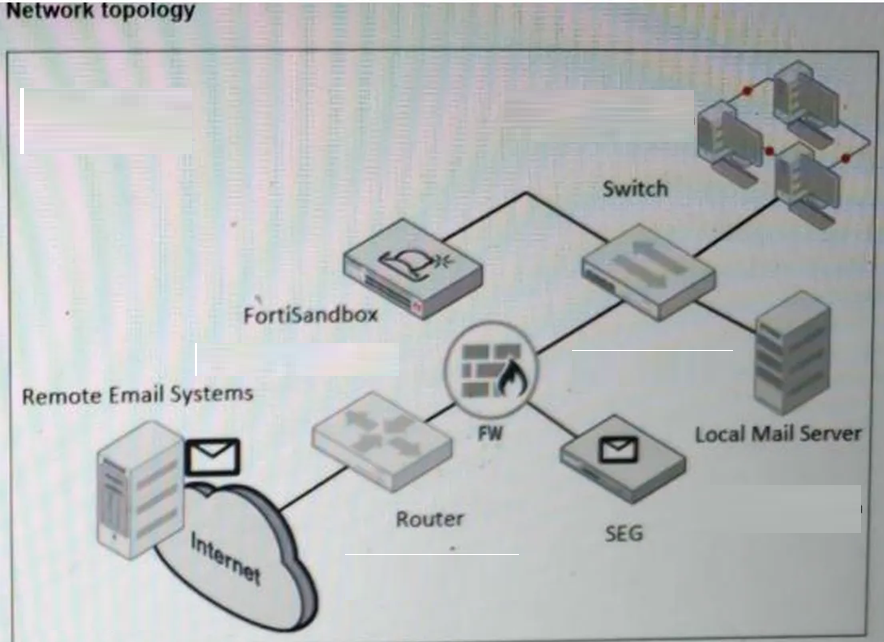
You are troubleshooting long delays between FortiMail file submissions to FortiSandbox and verdicts being returned form FortiSandbox. Which FortiMail debug tool must you use to troubleshoot this issue further? (Choose one answer)

Show Answer Hide Answer
Correct Answer: B

The FortiSandbox 5.0 Administrator Lab Guide shows that, when diagnosing FortiMail submission issues, the required FortiMail debugs are sandboxclid and deferd. It explicitly instructs: ''Enter the following commands to enable both deferd and sandboxclid debugging'' and then shows that the deferd daemon spools the email and later releases the email from the queue folder after FortiSandbox processing.

Because sandboxclid is not one of the answer choices, the best answer among the listed FortiMail debug tools is deferd. It is the FortiMail daemon directly shown in the official lab workflow for troubleshooting submission-and-verdict handling. The other options in the answer list are not the ones the lab uses for FortiMail-to-FortiSandbox submission troubleshooting. So, based on the uploaded guide, diagnose debug application deferd is the correct choice.


Question No. 4

What is the default timeout value on FortiGate for inline scanning mode? (Choose one answer)

Show Answer Hide Answer
Correct Answer: B

The correct answer is B. 50 seconds. The Study Guide explicitly states: ''FortiGate holds the file while waiting for a verdict from FortiSandbox... The default file inspection timeout, and maximum, is 50 seconds.'' This is the clearest direct statement for the default timeout used with inline scanning mode on FortiGate.

The Lab Guide confirms the same design limit from the operational side. During the inline scanning exercise, it notes: ''Because of the inline scanning time-out limit (maximum of 50 seconds), it's not recommended to submit files for VM inspection.'' That reinforces that inline scanning is designed for quick decision phases such as active content, community cloud, antivirus, and static analysis, not long VM dynamic analysis jobs. Therefore, options A, C, and D are incorrect because they are far above the documented inline inspection limit. The default FortiGate inline scanning timeout is 50 seconds.


Question No. 5

To allow access to the FortiSandbox GUI the administrator must configure an IP address and a default gateway. Which two commands must the administrator use to accomplish this task? (Choose two answers)

Show Answer Hide Answer
Correct Answer: A, D

From the Deployment and System Settings lesson, the Study Guide explicitly states:

'Initial port1 IP configuration must be performed from the console, using the commands shown on this slide. If your management computer is on a separate subnet from FortiSandbox, you must specify a gateway address using the commands shown on this slide.'

The two required commands are:

set port1-ip <IP address> --- to assign the IP address to port1 for GUI access

set default-gw <IP Address> --- to configure the default gateway so the management computer can reach FortiSandbox from a different subnet

Option B (set api-port port1) is for API access configuration, and Option C (set admin-port port1) is not a valid FortiSandbox CLI command for this purpose.