Key details for this exam, checked against the published exam outline
Each question shows the correct answer and an explanation of why it is right
Refer to the exhibit.
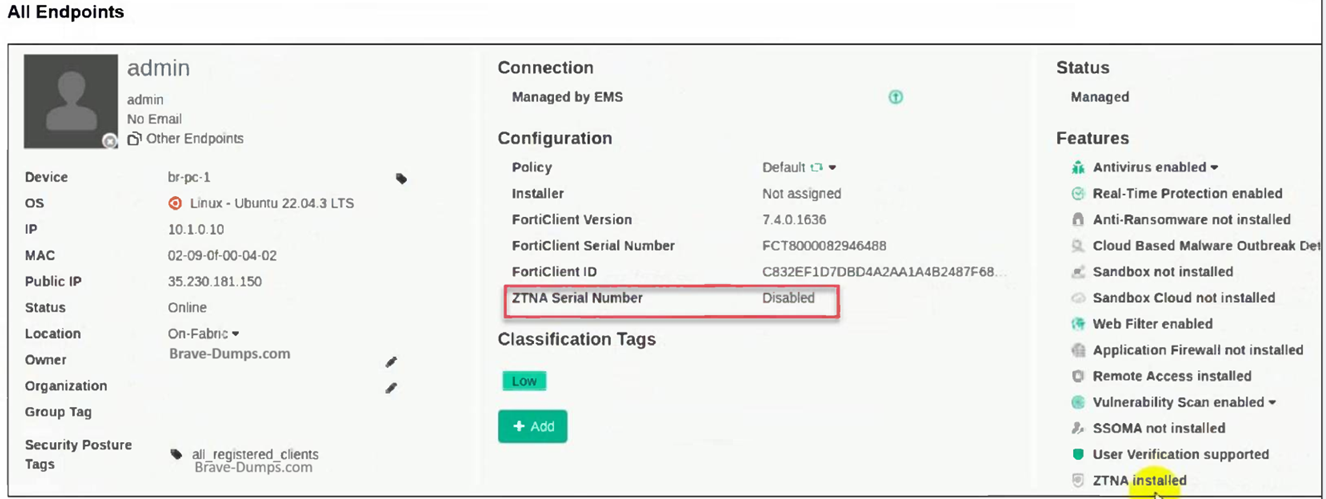
The zero trust network access (ZTNA) serial number on endpoint br-pc-1 is in a disabled state.
What is causing the problem? (Choose one answer)
Based on the FortiClient EMS 7.2/7.4 Study Guides and the visual evidence provided in the exhibit, here is the verified breakdown of why the ZTNA Serial Number is showing as Disabled:
1. Analysis of the Exhibit
Operating System: The endpoint is running Linux (Ubuntu 22.04.3 LTS).
Connection Status: The endpoint status is Online and Managed by EMS. This immediately eliminates Option C, as the device is actively communicating with the EMS server.
Features List: At the bottom right of the 'Features' column, it explicitly states 'ZTNA installed'. This eliminates Option A, confirming the software component is present on the endpoint.
ZTNA Serial Number Field: The field is highlighted in red and shows 'Disabled'.
2. Identifying the Root Cause (Option B)
In the FortiClient EMS curriculum regarding ZTNA (Zero Trust Network Access), the ZTNA Serial Number (also known as the ZTNA Tagging or Client Certificate UID) is generated and activated based on the assigned Endpoint Profile.
Profile Dependency: For FortiClient to generate a ZTNA serial number/certificate and participate in ZTNA, the administrator must enable and configure the ZTNA Destinations (or ZTNA Connection) profile within the EMS.
Disabled State: If the ZTNA Destinations feature is disabled in the profile assigned to that specific endpoint (or if the endpoint is assigned the 'Default' profile where ZTNA is not configured), the 'ZTNA Serial Number' status on the EMS dashboard will reflect as Disabled.
Linux Specifics: In FortiClient for Linux, ZTNA support is available but requires the profile to be explicitly pushed and active. If the profile is toggled off in the EMS GUI under Endpoint Profiles > ZTNA Destinations, the serial number functionality is suspended.
3. Why Other Options are Incorrect
A . The ZTNA feature is not installed: The exhibit clearly shows 'ZTNA installed' under the Features list.
C . FortiClient disconnected from EMS: The exhibit shows the status as 'Online' and 'Managed by EMS' with a green checkmark.
D . The ZTNA certificate has been revoked: If a certificate is revoked, the status typically shows as 'Revoked' or 'Expired,' or the serial number would still be present but marked as untrusted. A 'Disabled' state indicates the feature itself is turned off at the policy/profile level.
Refer to the exhibit, which shows the Zero Trust Tagging Rule Set configuration.
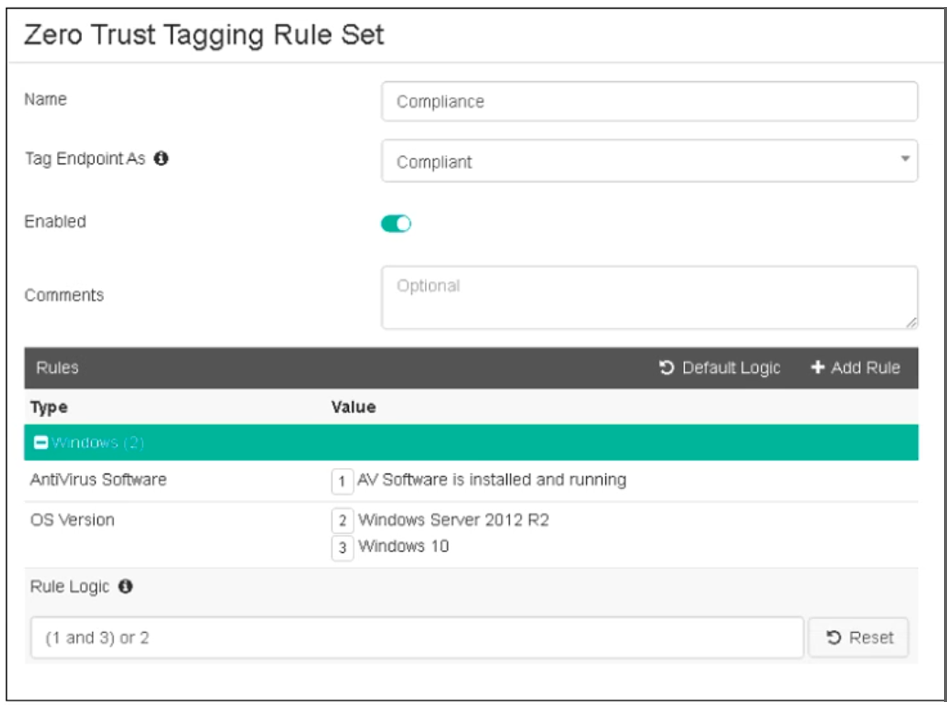
Which two statements about the rule set are true? (Choose two.)
Based on the Zero Trust Tagging Rule Set configuration shown in the exhibit:
The rule set includes two conditions:
AV Software is installed and running
OS Version is Windows Server 2012 R2 or Windows 10
The Rule Logic is specified as '(1 and 3) or 2,' meaning:
The endpoint must have antivirus software installed and running and must be running Windows 10.
Alternatively, the endpoint must be running Windows Server 2012 R2.
Therefore, the endpoint must satisfy either:
Antivirus is installed and running and Windows 10 is running.
Windows Server 2012 R2 is running.
Reference
FortiClient EMS 7.2 Study Guide, Zero Trust Tagging Rule Set Configuration Section
Fortinet Documentation on Configuring Zero Trust Tagging Rules and Logic
Which two statements are true about the ZTNA rule? (Choose two.)
Understanding ZTNA Rule Configuration:
The ZTNA rule configuration shown in the exhibit defines how traffic is managed and controlled based on specific tags and conditions.
Evaluating Rule Components:
The rule includes security profiles to protect traffic by applying various security checks (A).
The rule also enforces access control by determining which endpoints can access the specified resources based on the ZTNA tag (D).
Eliminating Incorrect Options:
SNAT (Source Network Address Translation) is not mentioned as part of this ZTNA rule.
The rule does not define the access proxy but uses it to enforce access control.
Conclusion:
The correct statements about the ZTNA rule are that it applies security profiles to protect traffic (A) and enforces access control (D).
ZTNA rule configuration documentation from the study guides.
Refer to the exhibit.
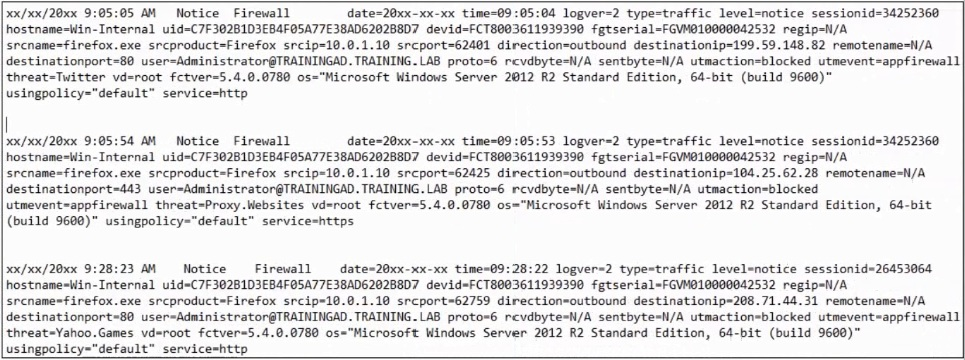
Based on the FortiClient logs shown in the exhibit which application is blocked by the application firewall?
Based on the FortiClient logs shown in the exhibit:
The first log entry shows the application 'firefox.exe' trying to access a destination IP, with the threat identified as 'Twitter.'
The action taken by the application firewall is 'blocked' with the event type 'appfirewall.'
This indicates that the application firewall has blocked access to Twitter.
Reference
FortiClient EMS 7.2 Study Guide, Application Firewall Logs Section
Fortinet Documentation on Interpreting FortiClient Logs
Refer to the exhibits.
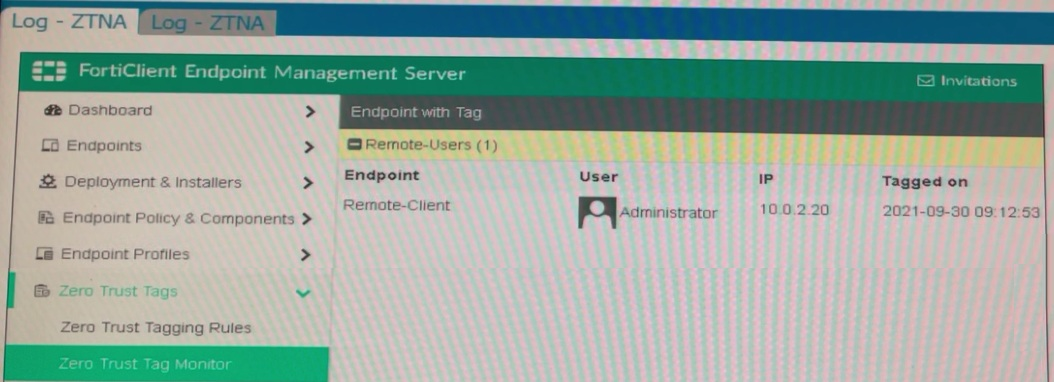
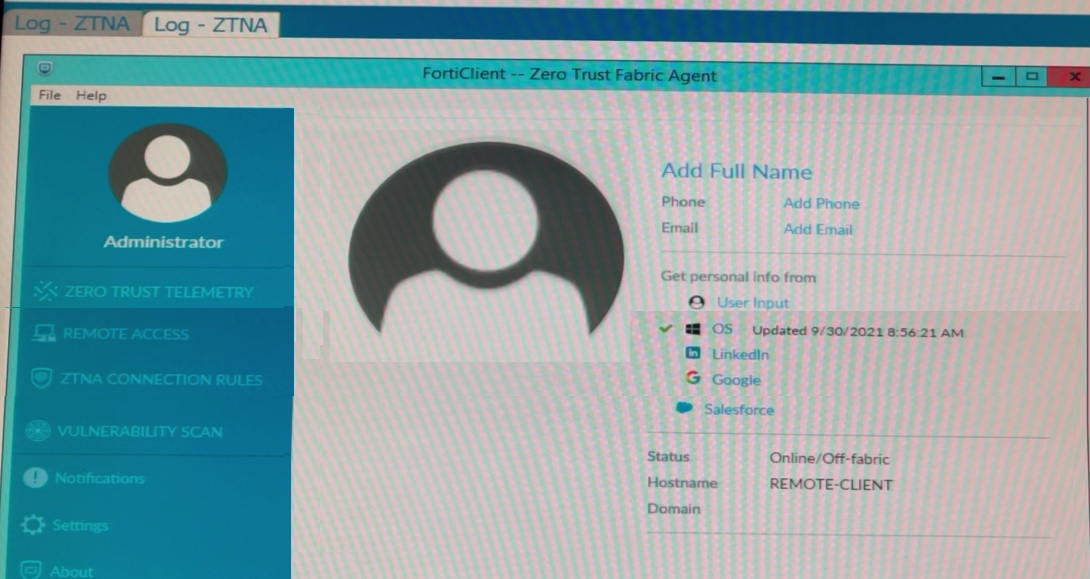
Which show the Zero Trust Tag Monitor and the FortiClient GUI status.
Remote-Client is tagged as Remote-Users on the FortiClient EMS Zero Trust Tag Monitor.
What must an administrator do to show the tag on the FortiClient GUI?
Based on the exhibits provided:
The 'Remote-Client' is tagged as 'Remote-Users' in the FortiClient EMS Zero Trust Tag Monitor.
To ensure that the tag 'Remote-Users' is visible in the FortiClient GUI, the system settings within FortiClient need to be updated to enable tag visibility.
The tag visibility feature is controlled by FortiClient system settings which manage how tags are displayed in the GUI.
Therefore, the administrator needs to change the FortiClient system settings to enable tag visibility.
Reference
FortiClient EMS 7.2 Study Guide, Zero Trust Tagging Section
FortiClient Documentation on Tag Management and Visibility Settings
In a ForliSandbox integration, what does the remediation option do?
Understanding FortiSandbox Integration:
In a FortiSandbox integration, various remediation options are available for handling suspicious files.
Evaluating Remediation Options:
The remediation option for alerting and notifying without blocking access or waiting for results is essential to understand.
Conclusion:
The correct action for the remediation option in this context is to alert and notify only.
FortiSandbox integration documentation from the study guides.
Which three features does FortiClient endpoint security include? (Choose three.)
Understanding FortiClient Features:
FortiClient endpoint security includes several features aimed at protecting and managing endpoints.
Evaluating Feature Set:
Vulnerability management is a key feature of FortiClient, helping to identify and address vulnerabilities (B).
IPsec is supported for secure VPN connections (D).
Real-time protection is crucial for detecting and preventing threats in real-time (E).
Eliminating Incorrect Options:
Data Loss Prevention (DLP) (A) is typically managed by FortiGate or FortiMail.
L2TP (C) is a protocol used for VPNs but is not specifically a feature of FortiClient endpoint security.
FortiClient endpoint security features documentation from the study guides.
Exam domains verified against: Official Fortinet FCP_FCT_AD-7.4 exam guide, last checked October 2026.
Describe FortiClient EMS architecture, components, and deployment modes. Perform installation and configuration of FortiClient EMS.
Sample question from this domain above: Q6
Deploy FortiClient on endpoint devices. Configure endpoint profiles to provision endpoint devices. Implement endpoint security.
Sample question from this domain above: Q7
Configure Security Fabric integration. Set up quarantine for compromised endpoints. Implement zero trust network access for endpoints.
Analyze diagnostic information to troubleshoot EMS and endpoint issues. Resolve common deployment and configuration issues.
Sample question from this domain above: Q4
Common questions about the exam itself

