Key details for this exam, checked against the published exam outline
Each question shows the correct answer and an explanation of why it is right
A BIG-IP Administrator needs to verify the state of equipment in the data center.
A BIG-IP appliance has a solid yellow indicator on the status LED.
How should the administrator interpret this LED indicator?
BIG-IP hardware platforms use chassis LEDs to indicate system health states.
A solid yellow status LED typically indicates a warning condition, such as:
A non-critical hardware alert
A temperature threshold nearing limit
A minor fan or sensor irregularity
Other non-fatal environmental or system conditions
This state reflects a warning-level alarm, meaning the unit is operational but requires investigation.
Why the other options are incorrect
A . Halted or EUD mode
This is associated with different LED patterns (usually flashing conditions or specific color codes), not a solid yellow status LED.
B . Standby in device group
HA state is not indicated by the chassis status LED.
Standby status is a logical device state, not a hardware LED state.
D . Power supply failure
Power supply indicators use separate LEDs located on each power module (usually flashing amber/red), not the system status LED.
Thus, a solid yellow status indicator signifies a warning-level alarm.
Refer to the exhibit.
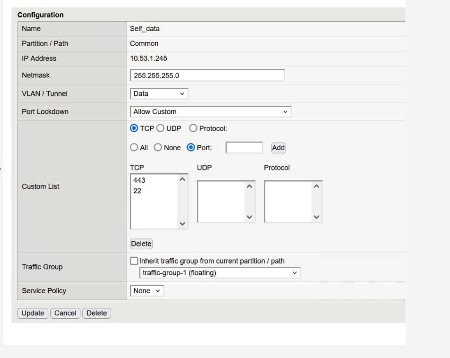
What traffic will be permitted to reach the BIG-IP?
The exhibit shows the configuration of a Self IP with:
Port Lockdown: Allow Custom
A Custom List that includes the following TCP ports:
443
22
Meaning of these ports:
TCP 443 HTTPS (TMUI --- web-based management)
TCP 22 SSH (command-line remote access)
No other TCP, UDP, or protocol entries are listed; therefore, only these two services are allowed to reach the BIG-IP via this Self IP.
Evaluating the answer choices:
Option Service Port Allowed?
FTP TCP 21 Not listed Not allowed
SSH TCP 22 Listed Allowed
Telnet TCP 23 Not listed Not allowed
Thus, SSH is the only traffic permitted through this Self IP configuration.
The BIG-IP Administrator uses Secure Copy Protocol (SCP) to upload a TMOS image to the /shared/images/ directory in preparation for an upgrade.
After the upload is complete, what will the system do before the image appears in the GUI under:
System Software Management Image List?
When a TMOS ISO file is transferred to /shared/images/, the BIG-IP automatically performs a validation step:
Checksum Verification
Before the image becomes visible in the GUI, the system verifies the internal checksum embedded inside the ISO.
This ensures:
The file was fully transferred
The image is not corrupted
It matches the official F5 release signature
Only after passing this verification does the GUI display the ISO under ''Available Images.''
Why the other options are incorrect:
A . Reboot into a new partition
No reboot occurs simply from uploading an image.
C . Copying into /var/local/images/
This directory is not used for ISO storage.
All valid images remain in /shared/images/.
Thus, the correct system action is checksum verification.
Which configuration file can a BIG-IP administrator use to verify the provisioned modules?
Provisioning settings define which modules are enabled and how system resources are allocated to them.
These provisioning declarations are stored in:
/config/bigip.conf
This file contains:
Full module provisioning statements
TMSH-equivalent provisioning configurations such as:
sys provision ltm { level nominal }
sys provision asm { level nominal }
It is the primary system configuration file that stores all active provisioning details.
Why the other answers are incorrect
A . /config/bigip.license
Shows licensed modules, not provisioned modules.
B . /config/bigip_base.conf
Stores base networking (VLANs, Self-IPs, routes), not provisioning.
D . config.ucs
A backup archive, not a live configuration file.
Thus, the correct file to review active module provisioning is /config/bigip.conf.
The BIG-IP Administrator wants to manage the newly built F5 system through an in-band Self-IP.
The administrator has configured a VLAN and Self-IP and can ping the IP from their workstation, but cannot access the system via SSH or HTTPS.
What port lockdown settings should the BIG-IP Administrator use to allow management access on the Self-IP?
(Choose two.)
Self-IPs include a security feature called Port Lockdown, which restricts which services respond on that Self-IP.
By default, Self-IPs block management access (SSH and HTTPS/TMUI), meaning an administrator cannot manage the device through in-band Self-IPs unless explicitly allowed.
Allow Mgmt / Allow Management
These settings enable only the management services required for administrative access, specifically:
SSH (22)
HTTPS/TMUI (443)
These options allow secure administration without opening unnecessary ports.
Why these are correct:
They provide only the essential access for management.
They follow F5 security best practices when using in-band admin access.
They do not expose all services, reducing the attack surface.
Why the other options are incorrect:
A . Allow Default
This allows only a minimal set of system-required ports (e.g., failover, config sync), not SSH or HTTPS.
Administrator access would still fail.
B . Allow All
Opens all ports on the Self-IP, which is not secure.
Exposes services that should remain restricted.
Therefore, Allow Mgmt / Allow Management are the correct choices.
A BIG-IP Administrator is using Secure Copy Protocol (SCP) to transfer a TMOS image to the BIG-IP system in preparation for an upgrade.
To what directory should the file be transferred?
BIG-IP systems require all ISO images (base TMOS images and HotFix images) to be stored in a specific directory used for software installation:
/shared/images/
This directory:
Is the only supported location from which the BIG-IP software installation system validates and installs ISO files
Is accessible by both the GUI and TMSH installers
Has adequate storage space allocated specifically for images
Is part of the shared partition that persists across reboots
When transferring images via SCP, the administrator must copy them directly into /shared/images/ so that:
The GUI (System Software Management Available Images) can detect the image
TMSH install software image commands can reference it
Other directories such as /local/images/ or /var/images/ are not valid storage paths for software images.
For security reasons, a BIG-IP Administrator needs to specify allowable IP ranges for access to the Configuration Utility (WebUI). The exhibit shows the User Administration section of the Configuration Utility.
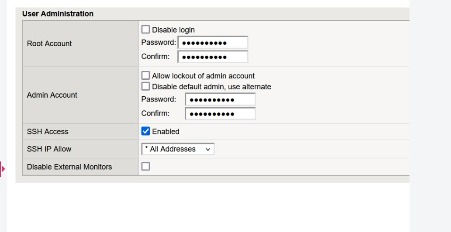
The administrator could not find any setting that explicitly restricts access to the Configuration Utility.
Which one of the following is a reason for that?
The screenshot shown is from the User Administration section of the BIG-IP GUI.
This section controls:
Root and Admin passwords
SSH Access
SSH IP Allow settings
However, it does not contain any controls for restricting access to the WebUI (TMUI).
BIG-IP does not provide TMUI access restrictions from this part of the GUI.
Access to the web-based Configuration Utility is controlled by the httpd allow list, configured through TMSH:
tmsh modify /sys httpd allow { <IP/subnet> }
This setting is not displayed in the User Administration panel, and in many BIG-IP versions, the httpd allow list is only configurable from the CLI, not the GUI.
Therefore, the administrator cannot find the setting in the screen shown because:
TMUI access restriction is not located in this GUI section
It must be configured using tmsh under /sys httpd allow
This is why Option A is correct.
Exam domains verified against: Official F5 Networks F5CAB1 exam guide, last checked October 2026.
This section evaluates how BIG-IP processes application traffic on the data plane, covering traffic flow, main data path elements, basic load balancing ideas, and how security and performance settings influence user traffic. Understanding these concepts forms the foundation for configuring and managing data plane behavior.
This section evaluates skills in setting up BIG IP components that define data plane behavior, including virtual servers, pools, nodes, monitors, and profiles. Proper configuration ensures that applications run stably and efficiently in line with design goals.
This section covers running the control plane where BIG IP is set up and managed, including handling user accounts, roles, device options, and configuration handling. It addresses using both the graphical interface and command line for everyday administration tasks.
This section evaluates finding and fixing frequent issues that impact BIG IP functionality, involving work with logs, statistics, diagnostic utilities, and troubleshooting practices. The goal is to restore healthy traffic flow and dependable application delivery.
This section covers the full lifecycle of putting a BIG IP system into service and keeping it current, including installation, initial configuration, licensing, basic networking setup, and planning and performing software updates and hotfixes.
Common questions about the exam itself

