Key details for this exam, checked against the published exam outline
Each question shows the correct answer and an explanation of why it is right
Refer to the exhibit.
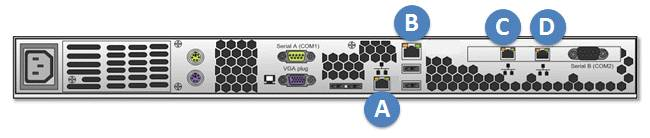
A storage administrator is experiencing an unplanned site outage. After recovery of the network, they are still unable to access the management server.
Which port on the back of the management server can the administrator connect to with a hardcoded IP address to access the VPLEX cluster and troubleshoot the issue?
In the event of an unplanned site outage and subsequent recovery, if a storage administrator is unable to access the management server, they can connect to a specific port on the back of the management server with a hardcoded IP address to regain access to the VPLEX cluster and begin troubleshooting.
Identify the Management Port: The management server typically has a dedicated port that can be used for direct access in case of network issues. This port is designed to accept a hardcoded IP address for such scenarios1.
Connect to the Management Port: The administrator should use an Ethernet cable to connect a laptop or a computer directly to the management port, which is usually labeled and can be identified based on the server's hardware manual or documentation1.
Configure the Hardcoded IP Address: On the connected device, the administrator needs to configure a static IP address that is in the same subnet as the management server's default IP range1.
Access the VPLEX CLI: Once the connection is established, the administrator can use SSH or a similar protocol to access the VPLEX Command Line Interface (CLI) through the hardcoded IP address1.
Troubleshoot the Issue: With access to the VPLEX CLI, the administrator can now run diagnostic commands, check the system status, and troubleshoot the connectivity issue1.
In this scenario, the correct port to connect to is labeled 'A' on the back of the management server. This port is reserved for such direct access and allows the administrator to bypass the network to troubleshoot and resolve the issue.
Once installed, how does VPLEX Cluster Witness communicate with each cluster to provide the health check heartbeats required for monitoring?
The VPLEX Cluster Witness communicates with each cluster using a VPN Tunnel over IP to the management servers. This method is used to provide the health check heartbeats required for monitoring the status of the clusters.
VPN Tunnel Creation: Initially, a VPN tunnel is established between the VPLEX Cluster Witness and each VPLEX cluster's management server. This secure tunnel ensures that the communication for health checks is protected1.
Health Check Heartbeats: Through the VPN tunnel, the VPLEX Cluster Witness sends periodic health check heartbeats to each management server. These heartbeats are used to monitor the operational status of the clusters1.
Monitoring Cluster Health: The health check heartbeats are essential for the VPLEX Cluster Witness to determine the health of each cluster. If a heartbeat is missed, it may indicate a potential issue with the cluster1.
Failover Decisions: Based on the health check heartbeats, the VPLEX Cluster Witness can make informed decisions about failover actions if one of the clusters becomes unresponsive or encounters a failure1.
Configuration and Management: The configuration and management of the VPN tunnels and the health check mechanism are typically done through the VPLEX management console or CLI, following the best practices outlined in the Dell VPLEX Deploy Achievement documents1.
In summary, the VPLEX Cluster Witness uses a VPN Tunnel over IP to communicate with each cluster's management server, providing the necessary health check heartbeats for continuous monitoring and ensuring high availability of the VPLEX system.
What is an EMC best practice for connecting VPLEX to back-end arrays?
EMC recommends specific best practices for connecting VPLEX to back-end storage arrays to ensure high availability and optimal performance. One of these best practices is that each VPLEX director should have four active paths to every back-end array storage volume.
Multiple Paths: Having multiple active paths from each VPLEX director to the storage volumes ensures that there is no single point of failure. If one path fails, the other paths can continue to provide connectivity1.
Load Balancing: Multiple paths also allow for load balancing of I/O operations across the different paths, which can improve performance and reduce the risk of bottlenecks1.
Path Redundancy: Path redundancy is crucial for maintaining continuous availability, especially in environments where the VPLEX is used for mission-critical applications1.
Configuration: The configuration of the paths should be done in accordance with EMC's best practices, which include proper zoning and masking in the SAN environment1.
Documentation: Detailed guidelines and best practices for VPLEX SAN connectivity, including back-end array connections, are available in EMC's documentation, which provides comprehensive instructions for setting up and managing these connections1.
In summary, EMC's best practice for connecting VPLEX to back-end arrays is to ensure that each VPLEX director has four active paths to every back-end array storage volume. This setup provides the necessary redundancy and performance for a robust and reliable storage environment.
Which command is used to display available statistics for monitoring VPLEX?
The command used to display available statistics for monitoring VPLEX is monitor stat-list. This command provides a list of all the statistics that can be monitored on the VPLEX system.
Command Usage: The monitor stat-list command is executed in the VPLEX CLI (Command Line Interface). When run, it will display a list of all the statistics that are available for monitoring1.
Monitoring Statistics: The statistics available for monitoring can include various performance metrics such as IOPS (Input/Output Operations Per Second), throughput, and latency. These metrics are crucial for assessing the health and performance of the VPLEX system1.
Custom Monitors: In addition to the default system monitors, custom monitors can be created to track specific data. The monitor stat-list command helps in identifying which statistics can be included in these custom monitors1.
Performance Analysis: By using the monitor stat-list command, administrators can determine which statistics are relevant for their performance analysis and can then create monitors to track those specific metrics1.
Documentation Reference: For more information on the usage of the monitor stat-list command and other monitoring commands, administrators should refer to the VPLEX CLI and Administration Guides for the code level the VPLEX is running1.
In summary, the monitor stat-list command is used to display the available statistics for monitoring VPLEX, providing administrators with the information needed to set up and manage performance monitoring on the system.
How many copies can RecoverPoint maintain in a MetroPoint topology?
"The MetroPoint topology can maintain up to five copies of data, including one remote copy and one local copy at each VPLEX site. It provides protection for each of the VPLEX Metro sites with continuous local replication via RecoverPoint"..
You are troubleshooting performance issues on a Microsoft SQL Server application hosted on a VPLEX virtual volume. You discover the volume is involved in a data mobility job
with a transfer rate of 32 MB. It has been recommended to change this setting.
Which transfer rate will help improve the performance of the Microsoft SQL Server application?
When troubleshooting performance issues on a Microsoft SQL Server application hosted on a VPLEX virtual volume, adjusting the data mobility job transfer rate can have a significant impact on the application's performance. A higher transfer rate can help improve performance by allowing data to be moved more quickly, reducing the impact on the application's I/O operations.
Assessing Current Performance: The current transfer rate of 32 MB may be insufficient for the workload of the SQL Server application, leading to performance issues1.
Recommended Transfer Rate: Increasing the transfer rate to 120 MB can help alleviate these performance issues by accelerating the data mobility process, thus minimizing the time during which the SQL Server application's performance is impacted1.
Implementing the Change: To change the transfer rate, the administrator would use the VPLEX CLI to adjust the settings for the data mobility jB. This involves modifying the transfer rate parameter to the new value of 120 MB1.
Monitoring the Impact: After making the change, it's important to monitor the SQL Server application's performance to ensure that the new transfer rate is having the desired effect and not causing any additional issues1.
Best Practices: It is recommended to follow best practices for data mobility and performance tuning as outlined in the Dell VPLEX documentation, which includes considering the impact of data mobility jobs on application performance1.
In summary, changing the data mobility job transfer rate to 120 MB is recommended to help improve the performance of the Microsoft SQL Server application hosted on a VPLEX virtual volume.
How does VS6 improve internal cluster I/O over VS2?
The VPLEX VS6 improves internal cluster I/O over the VS2 by utilizing 40 Gbps InfiniBand Local COM connections. This enhancement significantly increases the internal bandwidth available for communication between directors within a VPLEX cluster.
InfiniBand Technology: InfiniBand is a high-speed networking technology that provides substantial bandwidth and low latency. By using 40 Gbps InfiniBand connections, the VS6 directors can communicate more data at faster rates compared to the older VS2 hardware1.
Increased I/O Performance: The increased bandwidth from the 40 Gbps InfiniBand connections allows for higher I/O performance, which is particularly beneficial for workloads that require fast data transfer rates and low response times1.
Scalability: The VS6's improved internal cluster I/O capabilities also contribute to its scalability, supporting larger configurations and more volumes, which is essential for growing enterprise environments1.
Optimized for All-Flash Storage: The VS6 is optimized for all-flash storage, providing 2X IOPS at one-third the latency compared to the VS2, which is a direct result of the improved internal cluster I/O capabilities1.
Future-Ready Infrastructure: The adoption of 40 Gbps InfiniBand Local COM connections positions the VS6 as a future-ready infrastructure that can handle the increasing demands of modern data centers1.
In summary, the VPLEX VS6's use of 40 Gbps InfiniBand Local COM connections is a key factor in its improved internal cluster I/O performance over the VS2, offering higher bandwidth and lower latency for demanding enterprise applications.
Exam domains verified against: Official Dell D-VPX-DY-A-24 exam guide, last checked October 2026.
You learn VPLEX terminology and configurations along with the product hardware and software architecture. The exam covers VS2 and VS6 technology, how to upgrade from VS2 to VS6, and VPLEX I/O Operations.
Sample question from this domain above: Q7
You need to prepare the site and identify the ports needed for installation. Use EMC procedures and utilities to install VPLEX and provision storage to its back-end ports. You also install the VPLEX Witness component as part of the setup process.
Virtual Volume Provisioning is a key skill. You study how to integrate VPLEX into an existing environment and encapsulate storage. Creating VPLEX Distributed Devices and managing devices and extents on VPLEX devices are also included.
Sample question from this domain above: Q3
Expanding VPLEX devices is covered alongside performing data migration using VPLEX. You also learn how to protect VPLEX with RecoverPoint.
Monitoring VPLEX means understanding events and system reports sent to an ESRS Gateway. You work with SNMP data collection, set up performance monitors in VPLEX, and analyze the monitoring data you collect.
Sample question from this domain above: Q4
Learn how to collect data from VPLEX systems for analysis and support. Troubleshoot common issues on various VPLEX elements and perform basic maintenance tasks. You will also work with expanding a VPLEX topology to grow the environment.
Common questions about the exam itself

