Key details for this exam, checked against the published exam outline
Each question shows the correct answer and an explanation of why it is right
Which two elements are configured when RoCE is enabled?
When RDMA over Converged Ethernet (RoCE) is enabled, Enhanced Transmission Selection (ETS) and Priority Flow Control (PFC) are two key elements that need to be configured. ETS allows for bandwidth allocation among different traffic classes, and PFC provides lossless Ethernet operation for specific traffic classes to support low-latency, high-performance network communication.
Dell Technologies SONiC documentation
RDMA over Converged Ethernet Configuration Guide
SIMULATION
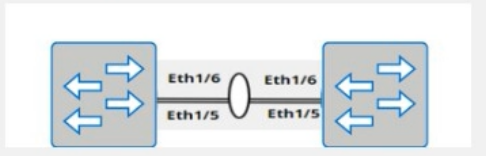
A customer must configure a peer link between two switches in the L2 MC-LAG scenario.
SwitchB has already been configured. Configure the peer link on SwitchA.
Use the following configuration information:
MC-LAG domain 1
VLAN 101
Peer link Port-Channel 100
SwitchA IP: 192.168.1.1/24
SwitchB IP: 192.168.1.2/24
MC-LAG system MAC: 00:00:00:11:11:11
The physical ports to connect the peer switch are Eth 1/5 and Eth 1/6 for each switch.
Here are the steps to configure the peer link on SwitchA:
Enter Configuration Mode:
SwitchA# configure terminal
Create VLAN 101:
SwitchA(config)# vlan 101
Create Port-Channel 100:
SwitchA(config)# interface port-channel 100
SwitchA(config-if-po100)# switchport mode trunk
SwitchA(config-if-po100)# switchport trunk allowed vlan 101
SwitchA(config-if-po100)# exit
Assign Physical Interfaces to Port-Channel 100:
SwitchA(config)# interface ethernet 1/5
SwitchA(config-if-eth1/5)# channel-group 100 mode active
SwitchA(config-if-eth1/5)# exit
SwitchA(config)# interface ethernet 1/6
SwitchA(config-if-eth1/6)# channel-group 100 mode active
SwitchA(config-if-eth1/6)# exit
Configure MC-LAG Domain 1:
SwitchA(config)# mclag domain 1
SwitchA(config-mclag-domain)# peer-link port-channel 100
SwitchA(config-mclag-domain)# local-ip 192.168.1.1
SwitchA(config-mclag-domain)# peer-ip 192.168.1.2
SwitchA(config-mclag-domain)# system-mac 00:00:00:11:11:11
SwitchA(config-mclag-domain)# exit
Save Configuration:
SwitchA# write memory
Comprehensive Detailed Step by Step Explanation with Reference:
Enter Configuration Mode:
Begin by entering the global configuration mode to make changes to the switch configuration.
Create VLAN 101:
Create VLAN 101 to be used for the MC-LAG peer link communication.
Create Port-Channel 100:
Enter the port channel interface configuration mode using interface port-channel 100.
Set the port channel to trunk mode with switchport mode trunk.
Allow VLAN 101 on the trunk with switchport trunk allowed vlan 101.
Exit the port channel interface configuration mode.
Assign Physical Interfaces to Port-Channel 100:
Enter interface configuration mode for ethernet 1/5 and assign it to port channel 100 using the channel-group 100 mode active command.
Exit the interface configuration mode.
Repeat the same steps for ethernet 1/6.
Configure MC-LAG Domain 1:
Enter the MC-LAG domain configuration mode using mclag domain 1.
Specify the peer link port channel with peer-link port-channel 100.
Configure the local IP address as 192.168.1.1 using local-ip 192.168.1.1.
Configure the peer IP address as 192.168.1.2 using peer-ip 192.168.1.2.
Set the MC-LAG system MAC address using system-mac 00:00:00:11:11:11.
Exit the MC-LAG domain configuration mode.
Save Configuration:
Save the configuration to ensure the changes persist after a reboot using the write memory command.
Dell Technologies Networking - SONiC
Dell Enterprise SONiC Deployment Guide
These steps provide a comprehensive guide to configure the peer link for an MC-LAG scenario on SwitchA, ensuring the specific requirements for IP addressing, VLAN configuration, and port channel setup are met.
What is the impact of entering the qos-mode uniform command on a VTEP interface?
Entering the qos-mode uniform command on a VTEP interface ensures that the DSCP (Differentiated Services Code Point) value of the payload is copied to the outer header DSCP value. This maintains the Quality of Service (QoS) markings across the VXLAN tunnel, allowing consistent traffic prioritization.
Dell Technologies SONiC documentation
VXLAN and QoS Configuration Guide
An administrator issues The ztp enable and show ztp status commands. What two objectives are they trying to accomplish?
The ztp enable command is used to administratively enable the Zero Touch Provisioning (ZTP) process on the switch. This process allows the switch to automatically download and apply configuration files upon boot-up without manual intervention. The show ztp status command is used to check on the progress and status of the ZTP process, providing information about whether the process is active, completed, or encountered any issues.
Dell Technologies SONiC documentation
Dell Networking Configuration Guide
Which two elements must be included in the show mclag interface x x command?
The show mclag interface command provides information about the multi-chassis link aggregation (MC-LAG) configuration. Essential elements that must be included are the peer-link port channel number and the MC-LAG port channel number. These parameters are critical for identifying the interface and its associated link aggregation settings.
Dell SONiC Command Reference Guide
Dell Technologies InfoHub
An administrator is installing Enterprise SONIC in ONIE from an HTTP server.
On which interface should the administrator configure the IP?
When installing Enterprise SONIC from an HTTP server using the Open Network Install Environment (ONIE), the management interface typically used for network installations is eth0. This is the default interface ONIE uses for network connectivity to retrieve installation images and other configuration files.
Dell Technologies SONiC documentation
ONIE User Guide
SIMULATION
Use the simulator to perform the following configuration task.
1. Map a single-tagged CVLAN 100 to SVLAN 200 translation on PE
switch interface Eth1/1.
2. Map a double-tagged VLAN packet with an outer CVLAN 100 and an
inner dot1q 200 to SVLAN 300 translation on PE switch interface
Eth1/2.
The necessary VLANs and VLAN stacking have already been configured.

Here are the steps to configure the required VLAN translations on a Dell SONiC switch:
Map a Single-Tagged CVLAN 100 to SVLAN 200 on Interface Eth1/1:
sonic# configure terminal
sonic(config)# interface Ethernet1/1
sonic(config-if-Ethernet1/1)# switchport mode trunk
sonic(config-if-Ethernet1/1)# switchport vlan mapping 100 200
sonic(config-if-Ethernet1/1)# end
sonic# write memory
Map a Double-Tagged VLAN Packet with Outer CVLAN 100 and Inner dot1q 200 to SVLAN 300 on Interface Eth1/2:
sonic# configure terminal
sonic(config)# interface Ethernet1/2
sonic(config-if-Ethernet1/2)# switchport mode trunk
sonic(config-if-Ethernet1/2)# switchport vlan mapping 100 200 300
sonic(config-if-Ethernet1/2)# end
sonic# write memory
Comprehensive Detailed Step by Step Explanation with Reference:
Enter Configuration Mode:
Access the global configuration mode using the configure terminal command.
Configure Interface Eth1/1:
Enter interface configuration mode for Ethernet1/1 using the command interface Ethernet1/1.
Set the switchport mode to trunk with the command switchport mode trunk.
Configure the VLAN translation using the switchport vlan mapping 100 200 command, which maps CVLAN 100 to SVLAN 200.
Exit the interface configuration mode by typing end.
Save the configuration with write memory.
Configure Interface Eth1/2:
Enter interface configuration mode for Ethernet1/2 using the command interface Ethernet1/2.
Set the switchport mode to trunk with the command switchport mode trunk.
Configure the double-tagged VLAN translation using the switchport vlan mapping 100 200 300 command, which maps packets with outer CVLAN 100 and inner dot1q 200 to SVLAN 300.
Exit the interface configuration mode by typing end.
Save the configuration with write memory.
Dell Technologies Networking - SONiC
Dell Enterprise SONiC Deployment Guide
These steps provide a comprehensive guide to configure VLAN translations on a Dell SONiC switch, ensuring that the specific requirements for single-tagged and double-tagged VLAN mappings are met.
Exam domains verified against: Official Dell D-SNC-DY-00 exam guide, last checked October 2026.
Compare Enterprise SONiC bundles and understand their differences and networking applications. Evaluate which bundle variant fits different deployment scenarios and network topology requirements.
Install, upgrade, and downgrade SONiC using both ONIE manual and automatic methods. Apply different installation approaches based on deployment requirements and operational constraints.
Administer port groups, port profiles, and management access. Configure and verify port breakout, VLAN trunks, access ports, Link Aggregation Groups, VRRP, MC-LAG, Q-in-Q tunnels, and VLAN translation in production environments.
Configure L3 IP addressing, static routing, and single area OSPF topologies. Describe BGP operations, implement Equal Cost Multi-Pathing, configure BGP, and manage route redistribution across network domains.
Describe VXLAN and Asymmetric IRB operation, then configure and verify BGP EVPN with Asymmetric IRB. Implement Symmetric IRB and configure and verify BGP EVPN with Symmetric IRB for data center overlays.
Describe QoS operations and configure QoS features to manage network traffic efficiently. Apply QoS policies and verify their effectiveness in controlling bandwidth allocation and traffic prioritization.
Common questions about the exam itself

