Key details for this exam, checked against the published exam outline
Each question shows the correct answer and an explanation of why it is right
A platform engineer is creating a Dell PowerScale cluster that must meet SEC 17a-4f rules. Node 1 is powered on and cabled.
What action must be taken to meet the requirement?
To meet SEC 17a-4(f) regulations, the platform engineer must reboot the node into SmartLock Compliance mode before creating the cluster.
Understanding SEC 17a-4(f) Requirements:
SEC 17a-4(f):
A regulation that requires electronic records to be stored in a non-rewriteable, non-erasable format (WORM - Write Once Read Many).
Compliance Necessity:
Financial institutions must comply to ensure data integrity and regulatory adherence.
Dell PowerScale SmartLock Compliance Mode:
SmartLock Compliance Mode:
Provides WORM storage capabilities that meet SEC 17a-4(f) requirements.
Once enabled, it cannot be disabled, ensuring data remains immutable.
Activation Process:
Nodes must be booted into Compliance mode before cluster creation.
Requires selecting the Compliance mode boot option during node initialization.
Required Action:
Reboot into SmartLock Compliance Mode:
Power on Node 1 and access the boot menu.
Select the option to boot into SmartLock Compliance mode.
Proceed with cluster creation in this mode.
Why Other Options Are Less Suitable:
Option A (Create a cluster):
Creating the cluster without first booting into Compliance mode would not meet SEC 17a-4(f) requirements.
Option C (Activate the Enterprise Security mode license):
Enterprise Security mode enhances security features but does not specifically enable WORM storage.
Option D (Call Dell Tech Support to configure the cluster manually):
While Dell Support can assist, the engineer must still reboot into Compliance mode as per procedure.
Important Considerations:
Irreversible Setting:
Once in Compliance mode, the cluster cannot revert to a standard mode.
Data Handling:
All data stored will be subject to WORM policies.
Planning:
Ensure that Compliance mode is necessary before proceeding, as it affects the entire cluster.
Dell PowerScale Reference:
Dell EMC PowerScale OneFS SmartLock Administration Guide:
Provides detailed instructions on enabling Compliance mode.
Dell EMC PowerScale OneFS SmartLock Guide
Dell EMC PowerScale OneFS Security Configuration Guide:
Discusses regulatory compliance features.
Dell EMC PowerScale OneFS Security Guide
Knowledge Base Articles:
Article ID 000123008: 'Configuring SmartLock Compliance Mode for SEC 17a-4(f) Compliance'
Article ID 000123009: 'Steps to Enable Compliance Mode on PowerScale Clusters'
Dell EMC Technical Support has requested a part to be sent directly back to Dell Logistics to be studied. Which process or document needs to be completed prior to sending the part back?
When Dell EMC Technical Support requests that a part be sent back directly to Dell Logistics for further analysis, a specific process must be followed to ensure proper handling and documentation.
Required Process:
Complete the WWFA (Worldwide Field Analysis) Form:
The WWFA is a document that needs to be filled out before returning parts that require detailed analysis.
It provides information about the failure, circumstances, and any relevant data that can assist in the investigation.
Why Option D is Correct:
WWFA (Worldwide Field Analysis):
The correct form required in this scenario.
Ensures that the returned part is properly tracked and analyzed by Dell EMC.
Why Other Options Are Incorrect:
Option A (WWF):
Likely a typographical error or incorrect abbreviation.
Option B (CDMR):
Refers to a Customer Declared Material Return, not applicable here.
Option C (DMR):
Stands for Defective Material Return, a general process but may not include the necessary details for analysis.
Dell PowerScale Reference:
Dell EMC Support Policies:
Return Material Authorization (RMA) Procedures:
Outline the process for returning parts.
Specify when a WWFA is required.
Communication with Support:
Support Request:
Dell EMC Technical Support will inform you if a WWFA is needed.
They will provide instructions on how to complete and submit the form.
Documentation:
The WWFA form typically includes:
Part number and serial number.
Description of the issue.
Environmental conditions.
Any troubleshooting steps taken.
Best Practices:
Accurate Information:
Provide detailed and accurate information to aid in the analysis.
Timely Submission:
Complete the WWFA promptly to avoid delays.
Packaging and Shipping:
Follow any packaging instructions to prevent further damage.
Use the shipping labels provided by Dell EMC if applicable.
Benefits of Completing the WWFA:
Improved Support:
Helps Dell EMC identify root causes and prevent future issues.
Warranty Compliance:
Ensures that the return is processed under the terms of the warranty or support agreement.
Feedback Loop:
Provides valuable feedback to Dell EMC for product improvements.
Which two rack solutions can support H500. H5600 and H700 models?
The two rack solutions that can support Dell PowerScale models H500, H5600, and H700 are:
B . Titan D
C . Titan HD
Dell EMC Titan Racks Overview:
Titan D (Depth):
Designed for standard-depth nodes like the H500 and H700.
Accommodates nodes with typical depth requirements.
Provides necessary power and cooling for these models.
Titan HD (High Density):
Built for high-density storage solutions.
Suitable for nodes like the H5600, which have larger physical dimensions due to increased storage capacity.
Supports the weight and size of high-capacity nodes.
Compatibility with H-Series Models:
H500 and H700:
Fit within standard rack dimensions.
Require racks that can handle their power and cooling needs.
Supported by Titan D and Titan HD.
H5600:
Larger and heavier due to high-density storage drives.
Requires racks designed to support increased depth and weight.
Supported by Titan HD.
Conclusion:
Both Titan D and Titan HD racks are capable of housing these models, making them the correct choices.
Why Other Options Are Less Suitable:
A . Titan A:
There is no commonly known 'Titan A' rack in Dell's PowerScale solutions.
May refer to an outdated or incorrect rack designation.
D . Third-Party Racks:
While third-party racks might physically support the nodes, Dell recommends using their certified racks to ensure proper fit, cooling, and power distribution.
Using uncertified racks could lead to warranty issues or inadequate environmental support.
Benefits of Using Titan D and Titan HD Racks:
Optimized Cooling:
Designed to provide adequate airflow for Dell PowerScale nodes.
Power Distribution:
Equipped with PDUs (Power Distribution Units) suitable for the power requirements of the nodes.
Structural Support:
Built to handle the weight and dimensions of the nodes safely.
Dell PowerScale Reference:
Dell EMC PowerScale Site Preparation and Planning Guide:
Details on rack requirements, specifications, and supported models.
Dell EMC PowerScale Site Preparation Guide
Dell EMC PowerScale Hardware Specifications:
Provides physical dimensions and weight of the H500, H5600, and H700 nodes.
Dell EMC PowerScale Hardware Specs
Knowledge Base Articles:
Article ID 000345678: 'Recommended Racks for PowerScale H-Series Nodes'
Article ID 000345679: 'Titan D and Titan HD Rack Compatibility with PowerScale Models'
Refer to the exhibit.
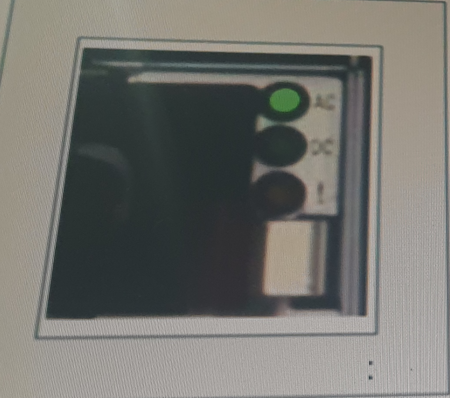
In the exhibit, the status indicators show:
AC (Alternating Current): A green light indicating the PowerScale system is receiving power from the AC input, which means it is powered on.
DC (Direct Current): The absence of a lit DC indicator means that the system is not currently converting AC power to DC power, but this does not indicate an issue with functionality based on this view.
Given that the AC light is green, the system is powered and functioning as expected. Therefore, the system is 'On and healthy' based on the AC input, making B. On and healthy the correct answer.
A company must ensure their PowerScale cluster can handle many active client connections. What must they do when designing their system?
To ensure a Dell PowerScale cluster can handle many active client connections, the company should include a Leaf-Spine backend network in their system design.
Understanding Network Topologies:
Leaf-Spine Architecture:
A high-performance network topology designed to handle large amounts of east-west (node-to-node) traffic.
Consists of two network layers: leaf switches (access layer) and spine switches (aggregation layer).
Every leaf switch connects to every spine switch, providing multiple pathways and reducing bottlenecks.
Benefits for PowerScale Clusters:
Scalability:
Supports a large number of nodes and client connections without significant degradation in performance.
Low Latency:
Reduces hop count between any two endpoints, minimizing latency.
High Throughput:
Provides increased bandwidth to accommodate many active connections.
Redundancy:
Multiple pathways between nodes enhance fault tolerance.
Handling Many Active Client Connections:
Network Bandwidth:
A Leaf-Spine network ensures sufficient bandwidth is available for client connections and data movement.
Load Balancing:
Distributes client connections evenly across the network to prevent overloading any single path.
Reduced Contention:
Minimizes network congestion, leading to improved client experience.
Why Other Options Are Less Suitable:
Option B (Use the P100 node):
P100 nodes are accelerator nodes that enhance performance but do not specifically address handling many client connections.
Option C (Add maximum RAM in each node):
While increasing RAM can improve performance, it does not directly impact the cluster's ability to handle numerous client connections.
Option D (Add L3 cache to the nodes):
Adding L3 cache improves data retrieval speeds but does not significantly affect network capacity for client connections.
Dell PowerScale Reference:
Dell EMC PowerScale Network Design Considerations:
Discusses network topologies and their impact on cluster performance.
Dell EMC PowerScale Network Design Considerations
Dell EMC PowerScale Best Practices Guide:
Recommends network architectures for optimal performance.
Dell EMC PowerScale Best Practices
Knowledge Base Articles:
Article ID 000123002: 'Implementing Leaf-Spine Architecture for PowerScale Clusters'
Article ID 000123003: 'Scaling Client Connections in Dell PowerScale Environments'
A customer is planning to expand a Dell PowerScale Gen5 cluster with H500 nodes What is a consideration?
When expanding a Dell PowerScale Gen5 cluster with H500 nodes (which are Gen6 nodes), a key consideration is that a minimum of one H500 chassis is needed, which contains four H500 nodes.
Understanding Dell PowerScale Node Generations:
Gen5 Cluster:
Existing cluster with Gen5 nodes.
H500 Nodes:
Part of the Gen6 family, which introduces a new hardware architecture and chassis design.
Gen6 Chassis and Node Configuration:
Chassis Design:
Gen6 nodes like the H500 are installed in a chassis that holds four nodes.
The chassis is the physical enclosure that houses and powers the nodes.
Minimum Node Addition:
You cannot add individual Gen6 nodes to a cluster; you must add at least one full chassis.
Therefore, the minimum number of H500 nodes you can add is four, as part of a single chassis.
Considerations When Expanding with H500 Nodes:
Compatibility:
OneFS allows mixing Gen5 and Gen6 nodes in the same cluster, but certain considerations apply.
Network Connectivity:
New nodes must be properly connected to the cluster's internal network.
Chassis Requirements:
A minimum of one H500 chassis (containing four nodes) is required for expansion.
Why Option D is Correct:
Option D:
'A minimum of one H500 chassis is needed.'
This accurately reflects the requirement to add at least one chassis (four nodes) when expanding the cluster.
Why Other Options Are Less Suitable:
Option A:
'A minimum of three H500 chassis are needed.'
This would require adding 12 nodes, which is not the minimum requirement.
Option B:
'All new nodes must be on the network.'
While it's true that nodes must be networked, this is a standard practice and not a specific consideration in this context.
Option C:
'A minimum of four H500 nodes are needed.'
While technically correct in terms of node count, the key consideration is the chassis requirement, making Option D more precise.
Dell PowerScale Reference:
Dell EMC PowerScale OneFS Node and Chassis Overview:
Describes the architecture of Gen6 nodes and chassis requirements.
Dell EMC PowerScale OneFS Administration Guide:
Provides guidelines on expanding clusters and adding new nodes.
Knowledge Base Articles:
Article ID 000114567: 'Expanding Gen5 Clusters with Gen6 Nodes'
Article ID 000114568: 'Understanding Gen6 Chassis and Node Requirements'
An engineer replaced a failed node in a PowerScale H500 due to hardware issues. They must verity that the replacement node is functioning correctly.
What is a crucial step when replacing the failed node in the cluster?
After replacing a failed node in a PowerScale H500 cluster, it is crucial to run a diagnostic test on the replacement node to ensure it is functioning correctly and can integrate seamlessly into the cluster.
Importance of Diagnostics:
Verify Hardware Functionality:
Ensures all components of the replacement node are working properly.
Identify Potential Issues:
Detects any hardware faults or configuration problems before the node joins the cluster.
Diagnostic Procedures:
Boot Diagnostics:
During startup, the node performs POST (Power-On Self-Test).
OneFS Healthcheck:
Use the isi diagnostics commands to run health checks on the node.
Cluster Integration Tests:
Verify network connectivity, storage availability, and cluster communication.
Steps to Run Diagnostics:
Physical Inspection:
Ensure all cables and components are properly connected.
Power On the Node:
Observe for any error lights or beep codes.
Execute Diagnostic Commands:
Run isi_hw_status to check hardware status.
Use isi_diag tools for comprehensive testing.
Review Logs:
Check system logs for any error messages.
Why Other Options Are Less Crucial:
B . Confirm that the replacement node inherits the old serial number from the cluster:
Serial numbers are hardware-specific and cannot be inherited.
Nodes have unique serial numbers; cluster identity is managed logically.
C . Verify the size of the storage capacity of the replacement node:
While important, it's generally assumed that the replacement node matches the failed node's specifications.
Not as crucial as ensuring the node functions correctly.
D . Power on the replacement node and ensure it connects to the network without any problems:
Necessary, but this is part of the diagnostic process.
Running diagnostics encompasses powering on and verifying network connectivity.
Dell PowerScale Reference:
Dell EMC PowerScale OneFS Administration Guide:
Provides information on monitoring and diagnostics commands.
Node Replacement Procedures in SolVe Online:
Outline the steps for replacing nodes and the importance of running diagnostics.
Best Practices for Cluster Maintenance:
Emphasize verifying node health before adding it to the cluster.
Exam domains verified against: Official Dell D-PSC-MN-01 exam guide, last checked October 2026.
Distinguish the architectural components of PowerScale platforms and identify specific use cases. Understand PowerScale networking configurations and use software management tools to optimize hardware performance.
Perform preliminary maintenance activities and prepare nodes for operation. Handle Field Replaceable Unit (FRU) and Customer Replaceable Unit (CRU) requests to keep hardware functional and minimize downtime.
Plan and execute PowerScale hardware installation following best practices for racks, nodes and subcomponents. Apply node cabling best practices to ensure effective hardware performance during setup.
Create new clusters and add nodes to existing clusters for practical system implementation. Differentiate between various upgrade activities and implement alternative accessories or configurations for enhanced performance.
Common questions about the exam itself

