Key details for this exam, checked against the published exam outline
Each question shows the correct answer and an explanation of why it is right
Refer to the exhibit.
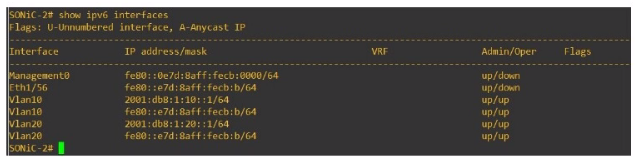
Eth 1/1 of SONiC-1 and Eth1/56 of SONiC-2 should be a routed link connecting the two Enterprise SONiC switches. No traffic is passing between them.
What is the cause of the failure?
From the exhibit, it is evident that Eth1/56 on SONiC-2 is assigned a link-local IPv6 address (fe80::e7d:8aff:fecb
/64). Link-local addresses are not routable beyond the local network segment, which means they cannot be used to route traffic between SONiC-1 and SONiC-2. For routed links, global unicast addresses must be used.
Dell Technologies SONiC documentation
IPv6 Addressing Guide
An administrator is installing Enterprise SONIC in ONIE from an HTTP server.
On which interface should the administrator configure the IP?
When installing Enterprise SONIC from an HTTP server using the Open Network Install Environment (ONIE), the management interface typically used for network installations is eth0. This is the default interface ONIE uses for network connectivity to retrieve installation images and other configuration files.
Dell Technologies SONiC documentation
ONIE User Guide
What is ECMP?
ECMP (Equal-Cost Multi-Path) is a Layer 3 routing feature that allows traffic to be forwarded using multiple available paths of equal cost. This improves bandwidth utilization and provides redundancy. ECMP is commonly used in modern networks to optimize the flow of traffic and increase the resiliency of network connections.
Dell Technologies SONiC documentation
ECMP Configuration Guide
An administrator obtains the following CLI output:
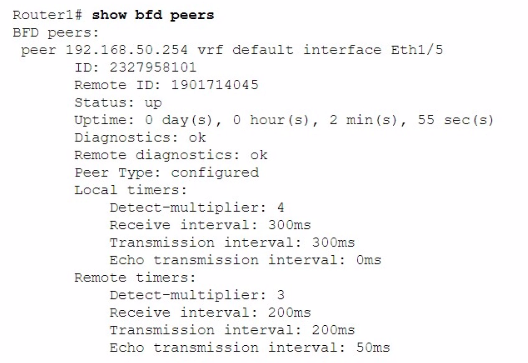
How much time does the local system take to detect remote failures without receiving packets?
The local timers in the BFD (Bidirectional Forwarding Detection) configuration show a detect multiplier of 4 and a receive interval of 300ms. The time taken to detect remote failures is calculated as detect multiplier receive interval = 4 300ms = 1200ms.
Dell Technologies SONiC documentation
BFD Configuration Guide
SIMULATION
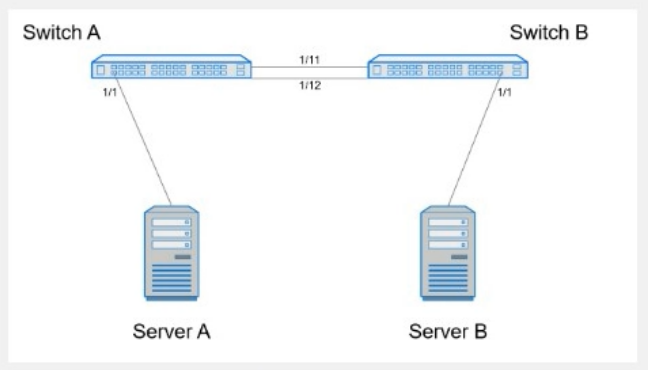
Create port channel 10 on interfaces Eth 1/11 and 1/12, so that it connects to an already configured switch. A server will be connected on Eth 1/1. Both the server and port channel need VLAN 1 untagged and only VLAN 10 tagged.
Complete the configuration on Switch A.
Here are the steps to configure the required port channel and VLAN settings on Switch A:
Enter Configuration Mode:
SwitchA# configure terminal
Create Port Channel 10:
SwitchA(config)# interface port-channel 10
SwitchA(config-if-po10)# switchport mode trunk
SwitchA(config-if-po10)# switchport trunk native vlan 1
SwitchA(config-if-po10)# switchport trunk allowed vlan 1,10
Assign Interfaces Eth 1/11 and Eth 1/12 to Port Channel 10:
SwitchA(config)# interface ethernet 1/11
SwitchA(config-if-eth1/11)# channel-group 10 mode active
SwitchA(config-if-eth1/11)# exit
SwitchA(config)# interface ethernet 1/12
SwitchA(config-if-eth1/12)# channel-group 10 mode active
SwitchA(config-if-eth1/12)# exit
Configure Interface Eth 1/1 for Server Connection:
SwitchA(config)# interface ethernet 1/1
SwitchA(config-if-eth1/1)# switchport mode trunk
SwitchA(config-if-eth1/1)# switchport trunk native vlan 1
SwitchA(config-if-eth1/1)# switchport trunk allowed vlan 1,10
SwitchA(config-if-eth1/1)# end
Save Configuration:
SwitchA# write memory
Comprehensive Detailed Step by Step Explanation with Reference:
Enter Configuration Mode:
Start by entering the global configuration mode to make changes to the switch configuration.
Create Port Channel 10:
Enter the port channel interface configuration mode using interface port-channel 10.
Set the port channel to trunk mode with switchport mode trunk.
Specify VLAN 1 as the native VLAN (untagged) using switchport trunk native vlan 1.
Allow VLANs 1 and 10 on the trunk with switchport trunk allowed vlan 1,10.
Assign Interfaces Eth 1/11 and Eth 1/12 to Port Channel 10:
Enter interface configuration mode for ethernet 1/11 and ethernet 1/12.
Assign each interface to port channel 10 using the channel-group 10 mode active command.
Exit the interface configuration mode.
Configure Interface Eth 1/1 for Server Connection:
Enter interface configuration mode for ethernet 1/1.
Set the interface to trunk mode with switchport mode trunk.
Specify VLAN 1 as the native VLAN using switchport trunk native vlan 1.
Allow VLANs 1 and 10 on the trunk with switchport trunk allowed vlan 1,10.
Exit the configuration mode.
Save Configuration:
Ensure the configuration is saved so it persists after a reboot using the write memory command.
Dell Technologies Networking - SONiC
Dell Enterprise SONiC Deployment Guide
These steps provide a comprehensive guide to configure a port channel and VLAN settings on Switch A to meet the specified requirements for server and trunk connections.
45 questions covering all exam domains, starting from $20
Exam domains verified against: Official Dell EMC D-SNC-DY-00 exam guide, last checked September 2026.
Compare Enterprise SONiC bundles and understand their differences and networking applications. Evaluate which bundle variant fits different deployment scenarios and network topology requirements.
Install, upgrade, and downgrade SONiC using both ONIE manual and automatic methods. Apply different installation approaches based on deployment requirements and operational constraints.
Administer port groups, port profiles, and management access. Configure and verify port breakout, VLAN trunks, access ports, Link Aggregation Groups, VRRP, MC-LAG, Q-in-Q tunnels, and VLAN translation in production environments.
Sample question from this domain above: Q4
Configure L3 IP addressing, static routing, and single area OSPF topologies. Describe BGP operations, implement Equal Cost Multi-Pathing, configure BGP, and manage route redistribution across network domains.
Sample question from this domain above: Q5
Describe VXLAN and Asymmetric IRB operation, then configure and verify BGP EVPN with Asymmetric IRB. Implement Symmetric IRB and configure and verify BGP EVPN with Symmetric IRB for data center overlays.
Sample question from this domain above: Q3
Describe QoS operations and configure QoS features to manage network traffic efficiently. Apply QoS policies and verify their effectiveness in controlling bandwidth allocation and traffic prioritization.
Common questions about the exam itself

