Key details for this exam, checked against the published exam outline
Each question shows the correct answer and an explanation of why it is right
33 of 55. The data engineering team created a pipeline that extracts data from a transaction system. The transaction system stores timestamps in UTC, and the data engineers must now transform the transaction_datetime field to the ''America/New_York'' timezone for reporting.
Which code should be used to convert the timestamp to the target timezone?
A.
raw.withColumn("transaction_datetime", from_utc_timestamp(col("transaction_datetime"), "America/New_York"))
B.
raw.withColumn("transaction_datetime", to_utc_timestamp(col("transaction_datetime"), "America/New_York"))
C.
raw.withColumn("transaction_datetime", date_format(col("transaction_datetime"), "America/New_York"))
D.
raw.withColumn("transaction_datetime", convert_timezone(col("transaction_datetime"), "America/New_York"))
In Spark SQL, to convert a UTC timestamp to another timezone, you use the function from_utc_timestamp().
Correct syntax:
from pyspark.sql.functions import from_utc_timestamp, col
df_converted = raw.withColumn(
'transaction_datetime',
from_utc_timestamp(col('transaction_datetime'), 'America/New_York')
)
This adjusts the UTC time into the specified timezone using Spark's timezone database.
Why the other options are incorrect:
B: to_utc_timestamp() converts local time to UTC, not the other way around.
C: date_format() formats timestamps as strings but doesn't adjust timezones.
D: convert_timezone() is not a valid Spark SQL function.
Spark SQL Functions --- from_utc_timestamp() and to_utc_timestamp().
Databricks Exam Guide (June 2025): Section ''Using Spark SQL'' --- working with timestamps and timezone conversions.
46 of 55.
A data engineer is implementing a streaming pipeline with watermarking to handle late-arriving records.
The engineer has written the following code:
inputStream \
.withWatermark("event_time", "10 minutes") \
.groupBy(window("event_time", "15 minutes"))
What happens to data that arrives after the watermark threshold?
Watermarking in Structured Streaming defines how late a record can arrive based on event time before Spark discards it.
Behavior:
.withWatermark('event_time', '10 minutes')
This means Spark will keep state for 10 minutes beyond the maximum event time seen so far.
Any data arriving later than 10 minutes after the current watermark is ignored --- it will not be included in the aggregation or output.
Why the other options are incorrect:
B: Late data beyond the watermark threshold is not included.
C: Late data is not moved to a new window; it's simply dropped.
D: True for late data within the watermark threshold, not after it.
Spark Structured Streaming Guide --- withWatermark() behavior and late data handling.
Databricks Exam Guide (June 2025): Section ''Structured Streaming'' --- watermarking and state cleanup behavior.
44 of 55. A data engineer is working on a real-time analytics pipeline using Spark Structured Streaming. They want the system to process incoming data in micro-batches at a fixed interval of 5 seconds.
Which code snippet fulfills this requirement?
A.
query = df.writeStream \
.outputMode("append") \
.trigger(processingTime="5 seconds") \
.start()
B.
query = df.writeStream \
.outputMode("append") \
.trigger(continuous="5 seconds") \
.start()
C.
query = df.writeStream \
.outputMode("append") \
.trigger(once=True) \
.start()
D.
query = df.writeStream \
.outputMode("append") \
.start()
To process data in fixed micro-batch intervals, use the .trigger(processingTime='interval') option in Structured Streaming.
Correct usage:
query = df.writeStream \
.outputMode('append') \
.trigger(processingTime='5 seconds') \
.start()
This instructs Spark to process available data every 5 seconds.
Why the other options are incorrect:
B: continuous triggers are for continuous processing mode (different execution model).
C: once=True runs the stream a single time (batch mode).
D: Default trigger runs as fast as possible, not fixed intervals.
PySpark Structured Streaming Guide --- Trigger types: processingTime, once, continuous.
Databricks Exam Guide (June 2025): Section ''Structured Streaming'' --- controlling streaming triggers and batch intervals.
Given the code:
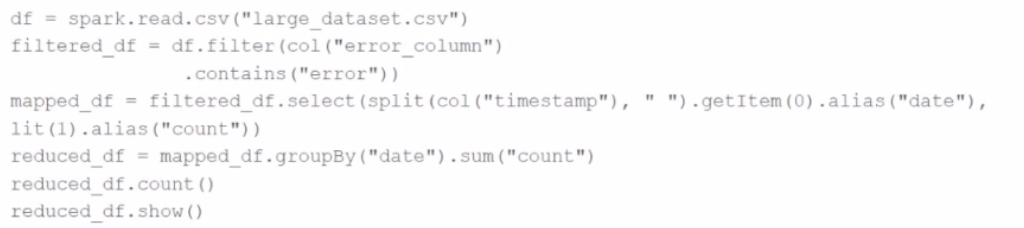
df = spark.read.csv("large_dataset.csv")
filtered_df = df.filter(col("error_column").contains("error"))
mapped_df = filtered_df.select(split(col("timestamp"), " ").getItem(0).alias("date"), lit(1).alias("count"))
reduced_df = mapped_df.groupBy("date").sum("count")
reduced_df.count()
reduced_df.show()
At which point will Spark actually begin processing the data?
Spark uses lazy evaluation. Transformations like filter, select, and groupBy only define the DAG (Directed Acyclic Graph). No execution occurs until an action is triggered.
The first action in the code is:reduced_df.count()
So Spark starts processing data at this line.
A Data Analyst is working on the DataFrame sensor_df, which contains two columns:
Which code fragment returns a DataFrame that splits the record column into separate columns and has one array item per row?
A)

B)

C)

D)

A.
exploded_df = sensor_df.withColumn("record_exploded", explode("record"))
exploded_df = exploded_df.select("record_datetime", "sensor_id", "status", "health")
B.
exploded_df = exploded_df.select(
"record_datetime",
"record_exploded.sensor_id",
"record_exploded.status",
"record_exploded.health"
)
exploded_df = sensor_df.withColumn("record_exploded", explode("record"))
C.
exploded_df = exploded_df.select(
"record_datetime",
"record_exploded.sensor_id",
"record_exploded.status",
"record_exploded.health"
)
exploded_df = sensor_df.withColumn("record_exploded", explode("record"))
D.
exploded_df = exploded_df.select("record_datetime", "record_exploded")
To flatten an array of structs into individual rows and access fields within each struct, you must:
Use explode() to expand the array so each struct becomes its own row.
Access the struct fields via dot notation (e.g., record_exploded.sensor_id).
Option C does exactly that:
First, explode the record array column into a new column record_exploded.
Then, access fields of the struct using the dot syntax in select.
This is standard practice in PySpark for nested data transformation.
Final Answer: C
27 of 55. A data engineer needs to add all the rows from one table to all the rows from another, but not all the columns in the first table exist in the second table. The error message is:
AnalysisException: UNION can only be performed on tables with the same number of columns.
The existing code is:
au_df.union(nz_df)
The DataFrame au_df has one extra column that does not exist in the DataFrame nz_df, but otherwise both DataFrames have the same column names and data types.
What should the data engineer fix in the code to ensure the combined DataFrame can be produced as expected?
A.
df = au_df.unionByName(nz_df, allowMissingColumns=True)
B.
df = au_df.unionAll(nz_df)
C.
df = au_df.unionByName(nz_df, allowMissingColumns=False)
D.
df = au_df.union(nz_df, allowMissingColumns=True)
When two DataFrames have different column sets, the normal union() or unionAll() functions fail unless both have exactly the same columns in the same order.
Solution: Use unionByName() with allowMissingColumns=True. This aligns columns by name and automatically adds missing columns with null values.
Correct syntax:
combined_df = au_df.unionByName(nz_df, allowMissingColumns=True)
This ensures the union works even if one DataFrame has extra or missing columns.
Why the other options are incorrect:
B: unionAll() is deprecated; also requires identical schemas.
C: With allowMissingColumns=False, Spark still throws a mismatch error.
D: union() doesn't accept the allowMissingColumns argument.
PySpark API --- DataFrame.unionByName() with allowMissingColumns option.
Databricks Exam Guide (June 2025): Section ''Developing Apache Spark DataFrame/DataSet API Applications'' --- combining DataFrames and schema alignment.
A data engineer wants to create a Streaming DataFrame that reads from a Kafka topic called feed.
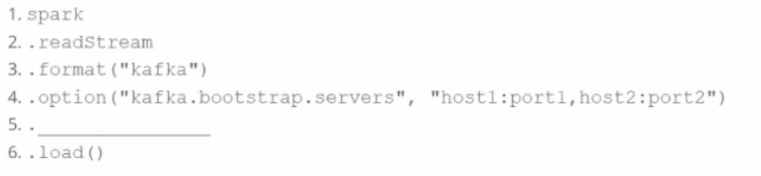
Which code fragment should be inserted in line 5 to meet the requirement?
Code context:
spark \
.readStream \
.format("kafka") \
.option("kafka.bootstrap.servers", "host1:port1,host2:port2") \
.[LINE 5] \
.load()
Options:
To read from a specific Kafka topic using Structured Streaming, the correct syntax is:
python
CopyEdit
.option('subscribe', 'feed')
This is explicitly defined in the Spark documentation:
'subscribe -- The Kafka topic to subscribe to. Only one topic can be specified for this option.' (Source: Apache Spark Structured Streaming + Kafka Integration Guide)
'subscribe -- The Kafka topic to subscribe to. Only one topic can be specified for this option.' (Source: Apache Spark Structured Streaming + Kafka Integration Guide)
B . 'subscribe.topic' is invalid.
C . 'kafka.topic' is not a recognized option.
D . 'topic' is not valid for Kafka source in Spark.
Exam domains verified against: Official Databricks Databricks-Certified-Associate-Developer-for-Apache-Spark-3.5 exam guide, last checked October 2026.
Learn how Spark driver, executors, cluster manager, and SparkContext work together to distribute work across a cluster. Study execution modes, the execution hierarchy, fault tolerance, and lazy evaluation in real Spark applications.
Work with structured data through DataFrames and Spark SQL syntax. Practice aggregations, joins, transformations, and understand how the Catalyst optimizer executes your queries.
Sample question from this domain above: Q7
Build ETL workflows using the DataFrame and Dataset APIs to handle structured and semi-structured data. Apply column operations, row filtering, aggregations, and schema manipulation in real data pipelines.
Set up continuous data ingestion with Spark Structured Streaming. Master stateful and stateless operations, watermarking, output modes, checkpointing, and fault tolerance in streaming pipelines.
Understand how Spark Connect enables remote communication and execution of Spark applications. Learn deployment patterns that enhance performance and scalability in distributed systems.
Use the Pandas API on Apache Spark to run familiar Pandas operations at scale. Execute large-scale data analytics by combining Python simplicity with Spark's distributed computing.
Diagnose and debug Spark applications by inspecting execution plans and logs. Tune memory, parallelism, and configuration parameters to resolve performance bottlenecks.
Common questions about the exam itself

