Key details for this exam, checked against the published exam outline
Each question shows the correct answer and an explanation of why it is right
A Linux administrator receives reports that an application hosted in a system is not completing tasks in the allocated time. The administrator connects to the system and obtains the following details:
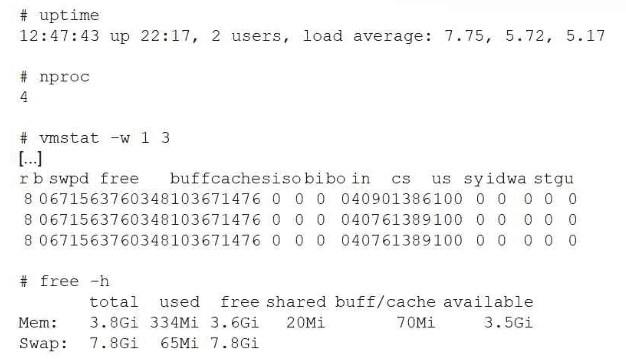
Which of the following actions can the administrator take to help speed up the jobs?
This scenario represents a classic CPU-bound performance issue, which is covered under the Troubleshooting domain of CompTIA Linux+ V8. The most important indicator is the load average compared to the number of available CPU cores.
The system has 4 CPU cores, as shown by nproc, but the load averages are consistently above 5, with a peak of 7.75. Load average reflects the number of processes either actively running on the CPU or waiting for CPU time. When the load average exceeds the number of CPU cores for extended periods, it indicates CPU contention. Processes must wait longer to be scheduled, resulting in delayed task completion.
The memory statistics confirm that memory is not the bottleneck. free -h shows over 3.5 GiB of available memory, and swap usage is minimal. Additionally, vmstat shows no significant swap-in or swap-out activity and low I/O wait, ruling out memory pressure and disk bottlenecks.
Increasing swap space would not help because the system is not memory constrained. Adding more disks would not address CPU scheduling delays. Increasing free memory is unnecessary because sufficient memory is already available.
Linux+ V8 documentation emphasizes correlating load average with CPU core count to diagnose CPU saturation. The most effective way to speed up job execution in this case is to increase CPU resources, such as adding more vCPUs, moving the workload to a more powerful system, or distributing the workload across multiple systems.
Therefore, the correct answer is B. Increase the amount of CPU resources available to the system.
A Linux server is experiencing slowness. A systems administrator obtains the following output:
top - load average: 2.43, 1.80, 2.32
Tasks: ... 154 zombie
%Cpu(s): 6.2 us, 5.1 sy, 0.0 ni, 79.2 id, 9.1 wa, ...
$ iostat -m 2
%user %nice %system %iowait %steal %idle
4.30 2.02 0.29 70.38 4.00 19.01
Which of the following explains the issue?
Performance troubleshooting in CompTIA Linux+ V8 requires the ability to correlate metrics from tools like top, vmstat, and iostat. In this case, the iostat output provides the most critical data point: %iowait is at 70.38%.
The %iowait metric (also shown as wa in top) represents the percentage of time that the CPU was idle while there were outstanding disk I/O requests. Essentially, the CPU is waiting for the storage subsystem (hard drives or SSDs) to complete read or write operations. A value as high as 70% indicates a severe bottleneck in the storage layer. This 'I/O wait' causes the system to feel sluggish or unresponsive because processes are stuck in an uninterruptible sleep state while waiting for data from the disk.
The top output also shows that the overall CPU is 79.2% idle, which confirms that the problem is NOT a lack of computational power (overutilization), making Option B incorrect. The system has 154 zombie processes, which might indicate poorly written software, but zombies themselves do not consume resources or cause slowness. There is no evidence of swap exhaustion (Option A) or a need for patching (Option D) provided in the statistics.
According to Linux+ V8 best practices, when high I/O wait is detected, administrators should investigate disk health, controller performance, or application-level disk usage (e.g., a database performing heavy indexing).
Therefore, high storage I/O latency is the verified explanation for the server slowness.
A Linux administrator attempts to log in to a server over SSH as root and receives the following error message: Permission denied, please try again. The administrator is able to log in to the console of the server directly with root and confirms the password is correct. The administrator reviews the configuration of the SSH service and gets the following output:
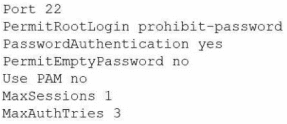
Based on the above output, which of the following will most likely allow the administrator to log in over SSH to the server?
The SSH configuration option PermitRootLogin prohibit-password prevents the root user from logging in with password authentication. This setting means root cannot use a password to log in via SSH; only key-based authentication is permitted for root. The administrator can still log in as root locally, which is not affected by this SSH configuration. To allow SSH access as root, the administrator must use an SSH key instead of a password.
Other options:
A . MaxSessions controls the number of simultaneous SSH sessions but is not causing the login denial here.
B . PAM (Pluggable Authentication Modules) is disabled, but enabling it is not required for basic SSH authentication.
C . Changing the SSH port is unrelated to the authentication method issue.
CompTIA Linux+ Study Guide: Exam XK0-006, Sybex, Chapter 11: 'Securing Linux', Section: 'Securing SSH Access'
CompTIA Linux+ XK0-006 Objectives, Domain 3.0: Security
Which of the following filesystems contains non-persistent or volatile data?
Understanding Linux filesystems and their purposes is a fundamental system management skill outlined in the Linux+ V8 objectives. Among the listed options, /proc is the filesystem that contains non-persistent, volatile data.
The /proc filesystem is a virtual filesystem that exists entirely in memory and is dynamically generated by the Linux kernel. It does not store data on disk and does not persist across system reboots. Instead, /proc provides real-time information about running processes, kernel parameters, system memory, CPU statistics, and hardware state. Files within /proc represent kernel data structures and change constantly as the system operates.
The other filesystems contain persistent data stored on disk. /boot stores bootloader files and kernel images, which are critical for system startup. /usr contains user applications, libraries, and documentation, all of which are persistent. /var holds variable data such as logs, spool files, and caches, which may change frequently but are still stored persistently on disk.
Linux+ V8 documentation emphasizes that /proc is used primarily for system monitoring and tuning. Administrators often interact with /proc to inspect process details or modify kernel parameters using tools like sysctl. Because its contents are generated at runtime and cleared on reboot, /proc is classified as non-persistent or volatile.
Therefore, the correct answer is C. /proc.
Users report that a Linux system is unresponsive and simple commands take too long to complete. The Linux administrator logs in to the system and sees the following: Output 1:
10:06:29 up 235 day, 19:23, 2 users, load average: 8.71, 8.24, 7.71

Which of the following is the system experiencing?
This scenario is a classic performance troubleshooting case covered under the Troubleshooting domain of the CompTIA Linux+ V8 objectives. The key indicators to analyze are the load average values and the CPU utilization statistics.
The uptime command shows load averages of 8.71, 8.24, and 7.71 over the 1-, 5-, and 15-minute intervals. Load average represents the average number of processes that are either running on the CPU or waiting to run. On a system with 4 CPU cores, a healthy load average would typically be close to or below 4. Load averages consistently near or above 8 indicate that there are significantly more runnable processes than available CPU resources, causing processes to wait and resulting in poor system responsiveness.
The CPU output further confirms this condition. The %idle value is 0, meaning the CPU has no idle time available. The majority of CPU time is spent in user space (65.88%) and system/kernel space (20.54%), indicating heavy computational and kernel activity. While %iowait is present at 5.65%, it is not high enough to suggest that disk I/O is the primary bottleneck.
Option C, high CPU load, best explains the symptoms. High CPU load causes commands to execute slowly because processes are competing for limited CPU time. This directly matches the observed behavior of the system being unresponsive.
The other options are incorrect. High uptime simply indicates how long the system has been running and does not cause performance issues by itself. High latency is a general term and not a specific diagnosis shown by the metrics provided. High I/O wait times would require a significantly higher %iowait value.
According to Linux+ V8 documentation, correlating load averages with CPU core count and utilization is essential for accurate performance diagnosis. Therefore, the correct answer is C. High CPU load.
A Linux administrator is testing a web application on a laboratory service and needs to temporarily allow DNS and HTTP/HTTPS traffic from the internal network. Which of the following commands will accomplish this task?
Comprehensive and Detailed Explanation From Exact Extract:
The correct way to temporarily allow specific services in a particular zone with firewalld is to use firewall-cmd --add-service=service --zone=zone. Multiple services can be specified in curly braces and separated by commas. The correct syntax is:
bash
CopyEdit
firewall-cmd --add-service={dns,http,https} --zone=internal
This command will allow DNS (port 53), HTTP (port 80), and HTTPS (port 443) through the firewall for the 'internal' zone temporarily (for the current runtime session).
Other options:
A . The command syntax is incorrect; firewalld is a service, not a command-line tool.
B . iptables does not use the --enable-service flag, nor does it have zones in this way.
D . systemctl mask disables services, and the rest of the command is invalid.
CompTIA Linux+ Study Guide: Exam XK0-006, Sybex, Chapter 9: 'Networking', Section: 'Managing Firewalls with firewalld'
CompTIA Linux+ XK0-006 Objectives, Domain 2.0: Networking
Which of the following commands would a Linux administrator use to determine the temperature of a motherboard?
The correct answer is D. lm_sensors because it is the standard Linux utility used to monitor hardware sensor data, including motherboard temperature, CPU temperature, fan speeds, and voltage levels. The lm_sensors package provides tools such as the sensors command, which reads data from hardware monitoring chips embedded on the motherboard and displays real-time environmental and thermal information.
In Linux system management, monitoring hardware health is critical for maintaining system stability and preventing overheating issues. After installing and configuring lm_sensors (typically using the sensors-detect command), administrators can run sensors to view temperature readings for various components, including the motherboard chipset.
Option A (ipmitool) is partially related but incorrect in this context. While ipmitool can retrieve hardware monitoring data (including temperature) via IPMI interfaces, it requires compatible server hardware with IPMI support. It is not universally applicable across all Linux systems and is more specialized for enterprise server environments.
Option B (dmidecode) is incorrect because it retrieves hardware information from the system BIOS/firmware, such as manufacturer details, serial numbers, and hardware specifications. It does not provide real-time sensor data like temperature readings.
Option C (lspci) is also incorrect because it lists PCI devices and provides information about connected hardware components, but it does not include environmental or thermal data.
From a Linux+ perspective, lm_sensors is the most appropriate and commonly used tool for monitoring system temperatures and other hardware metrics, making it essential for proactive system management and troubleshooting.
Exam domains verified against: Official CompTIA XK0-006 exam guide, last checked October 2026.
Learn to identify the Linux boot process, kernel architecture, and filesystems. Manage kernel modules and hardware devices through device utilities.
Control file permissions and create symbolic and hard links. Add, remove, and modify user and group accounts using standard Linux tools.
Sample question from this domain above: Q2
Configure PAM, LDAP, and Kerberos for authentication. Set firewall rules using iptables, nftables, and UFW.
Sample question from this domain above: Q1
Automate tasks with Ansible and Puppet or CI/CD tools. Write shell scripts and Python scripts for system administration tasks.
Monitor system health using logs and event alerts. Diagnose and repair boot, mount, networking, and performance issues.
Common questions about the exam itself

