Key details for this exam, checked against the published exam outline
Each question shows the correct answer and an explanation of why it is right
A penetration tester gained a foothold within a network. The penetration tester needs to enumerate all users within the domain. Which of the following is the best way to accomplish this task?
Comprehensive and Detailed Explanation From Exact Extract:
net.exe is the classic Windows networking utility that includes commands for enumerating domain resources and accounts from a compromised host where the tester has any authenticated domain context. Typical commands used by penetration testers to enumerate domain users with net.exe include:
net user /domain --- lists domain user accounts (name and some properties).
net group 'Domain Users' /domain --- lists members of the Domain Users group.
net view /domain --- lists computers in the domain (useful to find targets for further enumeration).
Why net.exe is the best option here:
It is installed by default on Windows systems and works with the current authenticated domain credentials (common after gaining a foothold).
It provides a quick, low-noise way to enumerate user accounts and groups without requiring additional tooling or elevated privileges beyond an authenticated domain user.
Results can be scripted and parsed for further enumeration and pivoting.
Why the other options are not appropriate:
A . pwd.exe --- Not a standard Windows tool for domain enumeration (and not present by default).
C . sc.exe --- Service Controller tool for managing services; not used to enumerate domain users.
D . msconfig.exe --- System configuration GUI utility for startup/services; not for domain account enumeration.
Related alternatives (contextual, commonly used in pentests):
dsquery user -limit 0 (on systems with RSAT/AD tools) to query AD directly.
Get-ADUser -Filter * (PowerShell, requires the ActiveDirectory module and appropriate rights).
Tools like PowerView (PowerShell) or BloodHound (collection phase) can provide richer AD enumeration, but net.exe is the simplest built-in option to enumerate domain users from an authenticated foothold.
CompTIA PT0-003 Objective Mapping (summary):
Domain 2.0 Information Gathering and Vulnerability Scanning --- enumerate network and Active Directory objects using native tools and scripts (e.g., net.exe for domain user enumeration).
openssl passwd password
$1$OjxLvZ85$Fdr51vn/Z4zXWsQR/Xrj.
The tester then adds the following line to the world-writable script:
echo 'root2:$1$0jxLvZ85$Fdr51vn/Z4zXWsQR/Xrj .: 1001:1001:,,,:/root:/bin/bash">> /etc/passwd
Which of the following should the penetration tester do to enable this exploit to work correctly?
The attacker's goal is to create an account entry in /etc/passwd that grants root privileges. In Unix/Linux, the UID and GID determine privileges; UID 0 is the root account. The line the tester appended sets UID/GID to 1001:1001, which does not grant root privileges. Changing those numeric fields to 0:0 (UID 0, GID 0) will cause the new account to be treated as root when the entry is parsed by the system, enabling a root-level login with the supplied hash.
Additional correctness notes (non-exploitating guidance):
The appended line must match the exact /etc/passwd format (no stray spaces or malformed punctuation).
The password hash must match the system's expected scheme; openssl passwd produced an MD5-style hash ($1$...) --- ensure the hash is correctly copied (case/character fidelity matters).
Modifying /etc/passwd in this way is destructive and illegal without explicit authorization; in an authorized testing engagement, these details are taught to illustrate how misconfigurations lead to privilege escalation.
Why other choices are incorrect:
A: The redirect >> /etc/passwd (append) is appropriate for adding a line; switching to a single redirect is not the central issue.
B: md5sum would produce a raw MD5 digest, not the salted hash format expected by /etc/shadow//etc/passwd entries.
C: Logging in via SSH does not enable the exploit; creating the user with UID 0 is the required change.
CompTIA PT0-003 Mapping:
Domain 3.0 Attacks and Exploits --- local privilege escalation techniques and understanding of OS account mechanics.
A penetration tester achieves shell access. The tester tries to use the following command, but it fails:
netsh advfirewall set domainprofile state off
Which of the following should the tester do to help correct this issue?
The correct answer is B. Perform privilege escalation.
The command:
netsh advfirewall set domainprofile state off
attempts to disable the Windows Firewall for the domain profile. Changing firewall settings requires administrative privileges. If the tester has shell access but the command fails, the most likely reason is that the current shell does not have sufficient privileges.
The tester should attempt privilege escalation to gain the required administrative or SYSTEM-level permissions before modifying firewall settings.
A is incorrect because finding other attack paths may be useful later, but the immediate issue is insufficient privilege.
C is incorrect because validating the target system's fingerprint does not resolve a permissions failure when running a privileged Windows command.
D is incorrect because gathering more network data does not correct the inability to modify local firewall configuration.
In PenTest+ terms, this falls under Attacks and Exploits, specifically post-exploitation actions, privilege escalation, and executing commands that require elevated permissions on a compromised host.
A penetration tester is evaluating a company's cybersecurity preparedness. The tester wants to acquire valid credentials using a social engineering campaign. Which of the following tools and techniques are most applicable in this scenario? Select two.
Gophish and Evilginx are the most applicable choices because the scenario specifically describes acquiring valid credentials through a social engineering campaign. Gophish is a phishing framework used to create campaigns, send phishing emails, manage landing pages, track user interaction, and measure susceptibility to credential-harvesting simulations. Evilginx is a reverse-proxy phishing framework that can relay legitimate authentication flows through an attacker-controlled proxy during an authorized assessment, allowing the tester to evaluate exposure to credential theft and session-token capture techniques, including attacks against some multi-factor authentication workflows. TruffleHog is primarily used to find secrets in repositories or file systems, not to run a social engineering campaign. Shodan identifies Internet-exposed systems but does not perform credential acquisition through phishing. Maltego and theHarvester are useful for OSINT, target mapping, and discovering emails or relationships, but they are preparatory reconnaissance tools rather than primary credential-acquisition mechanisms. Because the question asks for tools and techniques most applicable to obtaining valid credentials through social engineering, Gophish and Evilginx directly satisfy the objective. This maps to study-guide topics covering social engineering, phishing campaigns, credential attacks, adversary emulation, and authorized exploitation workflows.
During a vulnerability assessment, a penetration tester finds the following information:
KRBTGT account with more than 1250 days without password change.
Which of the following tools could an attacker use to exploit this vulnerability?
The correct answer is A. Mimikatz
The KRBTGT account is a special Active Directory account used by the Key Distribution Center to encrypt and sign Kerberos tickets. If the KRBTGT account password has not been changed for a long time, and an attacker obtains the account hash, the attacker can use it to forge Kerberos Ticket Granting Tickets. This is known as a Golden Ticket attack.
Mimikatz is the tool commonly used to extract credentials, obtain Kerberos-related secrets, and create forged Kerberos tickets such as Golden Tickets. With a valid forged ticket, an attacker may maintain long-term domain persistence and impersonate privileged users.
B is incorrect because John the Ripper is primarily used for offline password cracking. It does not create or inject Kerberos Golden Tickets.
C is incorrect because Hashcat is also used for password/hash cracking. It may help crack hashes, but it is not the primary tool used to exploit a stale KRBTGT password through Golden Ticket creation.
D is incorrect because Hydra is an online password brute-force tool. It is not used for Kerberos ticket forgery.
In PenTest+ terms, this falls under Attacks and Exploits, specifically Active Directory attacks, Kerberos abuse, credential attacks, and Golden Ticket persistence.
A penetration tester creates the following Python script that can be used to enumerate information about email accounts on a target mail server:
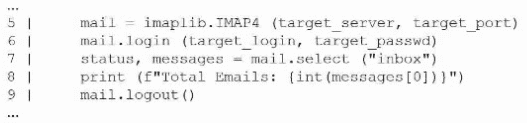
Which of the following logic constructs would permit the script to continue despite failure?
The correct construct for handling runtime failures (for example, login failures, network timeouts, or server errors) in Python is a try/except block (option C). Wrapping potentially failing operations in a try block and handling exceptions in except allows the script to catch the exception and continue execution (log the error, skip the target, retry, etc.) rather than crashing.
Why C is correct:
try/except is the Python mechanism to handle exceptions raised during execution. For network/email operations (IMAP login/select), IMAP libraries raise exceptions on failure --- try/except catches these and enables recovery logic.
Example corrected snippet:
import imaplib, sys
def enumerate_inbox(server, port, user, passwd):
try:
mail = imaplib.IMAP4(server, port)
mail.login(user, passwd)
status, messages = mail.select('inbox')
print(f'Total Emails: {int(messages[0])}')
except imaplib.IMAP4.error as e:
print(f'IMAP error for {user}: {e}')
# continue to next account or retry
except Exception as e:
print(f'Unexpected error for {user}: {e}')
finally:
try:
mail.logout()
except:
pass
Why the other options are not the best fit:
A . do/while loop: Python has no native do/while; loops alone won't catch exceptions --- they may repeat the crash.
B . iterator: Iterators control iteration over collections, not exception handling.
D . if/else conditional: Conditionals can test return values but cannot handle exceptions thrown by library calls; they are not sufficient to prevent the script from aborting when an exception is raised.
CompTIA PT0-003 Mapping:
Domain 4.0 Tools and Code Analysis --- basic defensive programming and error handling when writing or reviewing scripts used in engagements (use exception handling to make enumeration tools robust and predictable).
A penetration tester modifies a web application's URL by inserting malformed data into input parameters. The web application returns the error message below:
Internal Server Error
NumberFormatException: For input string ...
Source file: /home/www/htmldoc/app001/140612/main
Which of the following actions will the tester most likely take?
The returned error indicates that the application is processing user-controlled input dynamically and failing to handle malformed input properly. A NumberFormatException typically occurs when the application expects a numeric value but receives a string or unexpected format. The error also leaks internal implementation details, including exception type and server-side file path information. The most appropriate next action is dynamic application security testing, because the tester is interacting with the running application, manipulating parameters, observing responses, and identifying weaknesses in input validation, error handling, and information disclosure. This is not evidence of log tampering, since the tester is not modifying or deleting logs. It also does not indicate a memory corruption condition; managed exceptions such as number-format parsing errors are usually logic or validation issues rather than remote buffer overflows. SQL injection is possible in many parameterized web contexts, but this specific error points more directly to improper type handling and verbose error disclosure. This maps to study-guide topics covering DAST, web application testing, input validation, fuzzing, error handling, and secure coding weaknesses.
Exam domains verified against: Official CompTIA PT0-003 exam guide, last checked October 2026.
Covers planning and scoping penetration tests, communicating with clients, and selecting appropriate testing frameworks that align with legal and compliance requirements. You will need to understand how to structure engagement contracts and produce professional reports with actionable remediation recommendations.
Focuses on gathering intelligence about target systems through passive and active techniques, including DNS queries, network scanning, and service enumeration. You must be able to use industry tools effectively and adapt scripts to suit specific reconnaissance scenarios.
Sample question from this domain above: Q1
Requires you to conduct vulnerability scanning, interpret scan results, and understand physical security concepts that may affect penetration testing scope. Analysis of output from reconnaissance and scanning phases helps prioritize which vulnerabilities to target.
Sample question from this domain above: Q7
The largest domain, covering network attacks, authentication attacks, host-based attacks, web application attacks, cloud attacks, wireless attacks, social engineering, and specialized systems. This domain emphasizes hands-on exploitation using appropriate tools and includes scripting to automate attacks.
Involves maintaining access through persistence techniques, moving laterally across network segments, and understanding data staging and exfiltration methods. You must also know proper cleanup and restoration procedures to leave systems in their original state.
Common questions about the exam itself

