Key details for this exam, checked against the published exam outline
Each question shows the correct answer and an explanation of why it is right
A user is reviewing the following data set:
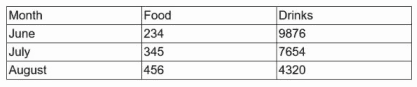
Which of the following is this data set an example of?
In the CompTIA Tech+ Study Guide (Exam FC0-U71, 3rd Edition, 2025), an array is described as:
''An array is a data structure that stores multiple values of the same data type under a single variable name. Each value in the array can be accessed using an index or key. Arrays are commonly used to organize related sets of data such as names, numbers, or records that share a common context.''
The guide illustrates how arrays can hold tabular data, similar to a spreadsheet or database table:
''Arrays let programmers store data in a table-like format, using rows and columns to represent related values, such as months and corresponding totals. This makes it easier to manage and manipulate structured data programmatically.''
In contrast:
A constant is a fixed value that cannot change during program execution.
A function performs an operation or returns a value based on parameters.
A variable holds a single value that can change.
Since the dataset represents multiple related values (Food and Drinks) across months in a table structure, it is an array.
Verified Reference from CompTIA Tech+ Study Guide, Exam FC0-U71 (3rd Edition, 2025):
Chapter 6: Software Development Concepts --- ''Data Types and Structures'' section (pages 371--372).
Exam Objective 6.2 --- Recognize basic programming structures such as arrays and variables.
An application stops working after 30 days and then prompts the user to input some information. Which of the following will fix this issue?
The CompTIA Tech+ Study Guide (Exam FC0-U71, 3rd Edition, 2025) explains that software requiring activation often stops working after a trial period---typically 30 days---until a valid product key is entered:
''Activating software is a different story---you have to do it. Either you will need to enter the product key before the app will work the first time, or it might work for a few times for free then ask you to activate. Some products... include activation features that lock the installed copy... Usually you have 30 days to do so, or a certain number of uses, before it stops working.''
This clearly identifies a product key as the required input to activate or continue using the software.
Verified Reference:
Chapter 5: Software Applications --- ''Registering and Activation'' (pp. 288--290).
A systems administrator requires access to a user's laptop over a VPN for troubleshooting. Which of the following software types should the systems administrator use?
When a system administrator needs to troubleshoot a user's laptop remotely, especially over a VPN, they would use remote assistance software. This allows full or partial control over the target system for diagnostic and support tasks.
''Remote assistance software enables support personnel to remotely access and control another computer to perform diagnostics or provide help, often used in IT support scenarios.'' --- CompTIA ITF+ Guide
Correct answe r: D
Which of the following actions would help a user validate a website's certificate on a browser?
Clicking the lock icon next to a website's URL allows users to view the security certificate, verify its issuer, expiration date, and encryption level---validating that the site is using HTTPS and is trusted.
''Browsers display a lock symbol for secure (HTTPS) websites. Clicking it reveals the SSL/TLS certificate details to verify the site's authenticity.'' --- CompTIA ITF+ Security Essentials
Correct answe r: A
Which of the following best represents the concept of data storage?
The correct answer is C. Company files saved on a hard disk. Data storage refers to keeping data so it can be used later. A hard disk drive provides long-term, nonvolatile storage and keeps files even when the computer is powered off. RAM is temporary volatile memory, Task Manager shows running processes and system information, and hardware IDs recorded on boards are not the best example of user data storage.
Exact Extract/Reference: The CompTIA Tech+ Study Guide explains that storage devices provide ''long-term, nonvolatile, or persistent storage options,'' meaning they do not lose data when powered off. It also states that HDDs are used for ''permanent storage and quick access'' and hold user data and files the system needs.
A user is unable to connect from one workstation to another workstation. Which of the following should be configured to fix this issue?
A firewall can block traffic between workstations if it's not properly configured. If a user cannot connect from one device to another on the network, it is likely that the firewall settings are preventing this communication.
''Firewalls control the incoming and outgoing network traffic based on predetermined security rules. If improperly configured, they may block legitimate access between devices.'' --- CompTIA ITF+ Study Guide
Other options:
B . Database -- Not related to connectivity
C . Anti-malware -- Protects from malicious software, not network configuration
D . Certificate -- Used for secure communication, but not basic connectivity
Correct answe r: A
A database administrator wants to retrieve recently updated entries. Which of the following functions should the administrator run to complete the task?
To extract specific information from a database, especially recently updated entries, a query is used. Queries filter and retrieve data based on conditions like dates, fields, or status.
''A query is a request for data or information from a database table or combination of tables.'' --- CompTIA ITF+ Data Management
Correct answe r: B
Exam domains verified against: Official CompTIA FC0-U71 exam guide, last checked October 2026.
Learn the language of IT including computing basics of input, processing, output and storage. Study binary, hexadecimal, decimal and octal notational systems and how they work in computer architecture. Understand units of measurement for storage capacity, processing speed and network throughput. Master troubleshooting methodology by learning to identify problems, test theories, implement solutions and document your findings.
Sample question from this domain above: Q5
Explore computing devices from smartphones and tablets to servers, IoT devices and gaming consoles. Learn internal components like motherboards, CPUs, RAM, storage devices and network interfaces. Understand volatile versus non-volatile storage, local networks versus cloud storage and how virtualization fits in. Study peripheral setup for printers and scanners, device interfaces like USB and Ethernet, networking basics including routers and firewalls, and wireless standards.
Study operating systems across mobile, desktop, server and embedded environments. Learn file systems like NTFS and FAT32, graphical and command-line interfaces, utilities and drivers. Examine software types including productivity tools, collaboration apps and web browsers plus their security features. Understand artificial intelligence applications like chatbots and generative AI tools.
Discover programming languages that are interpreted, compiled, scripted, markup-based and assembly-level. Learn data types including characters, strings, integers, floats and Boolean values. Study programming concepts like variables, constants, arrays, functions and objects. Explore organizational techniques such as pseudocode, flowcharts and object-oriented methods including branching and looping.
Sample question from this domain above: Q1
Understand why data matters for making decisions, generating reports and creating business value. Learn relational and non-relational database structures including tables, rows, fields and the keys that link them together. Study how to query databases, create reports and scale storage locally or in the cloud. Master backup concepts including file backups, system backups and choosing between local and cloud storage options.
Sample question from this domain above: Q7
Master the pillars of security including confidentiality, integrity and availability plus authentication and authorization. Learn device security practices like using anti-malware, firewalls, patches and physical security measures. Study password best practices including length, complexity and the role of password managers. Understand encryption for data at rest and in transit, HTTPS connections, VPNs and mobile device security.
Common questions about the exam itself

