At ValidExamDumps, we consistently monitor updates to the Citrix 1Y0-403 exam questions by Citrix. Whenever our team identifies changes in the exam questions, objectives, focus areas or requirements, We immediately update our exam questions for both PDF and online practice exams. This commitment ensures our customers always have access to the most current and accurate questions. By preparing with these up to date and 100% exam domain coverage questions, our customers can successfully pass the Citrix Virtual Apps and Desktops 7 Assessment. Design and Advanced Configurations exam on their first attempt without needing additional materials or study guides.
Other certification materials providers often include outdated or removed questions by Citrix in their 1Y0-403 exam. These outdated questions lead to customers failing their Citrix Virtual Apps and Desktops 7 Assessment. Design and Advanced Configurations exam. In contrast, we ensure our questions bank includes only precise and up-to-date questions. Our main priority is your success in the Citrix 1Y0-403 exam, not profiting from selling obsolete exam questions in PDF or Online Practice Test.
Scenario: A Citrix Architect is designing a new Citrix Virtual Apps and Desktops environment. The design will require three different StoreFront stores and three corresponding Citrix Workspace app for Web sites. Each different store and Citrix Workspace app for Web site will serve different business units. Each of these will also require its own branding and SSL certificate. The solution should remain supported by Citrix.
The architect has already installed StoreFront on a server.
How can the architect achieve the desired design while keeping cost and maintenance requirements to a minimum?
Scenario: A Citrix Architect is designing a new Citrix Virtual Apps and Desktops Service environment in Citrix Cloud. The customer previously installed all applications locally on managed laptops and desktops, but is willing to evaluate other application delivery methods as part of the new deployment. The environment will be standardized on Windows 10 and Windows Server 2016 for the Virtual Delivery Agent (VDA) machines.
As part of an application analysis performed earlier in the project, the information in the exhibit was collected regarding 1 of the required applications.
Click the Exhibit button to view the information.
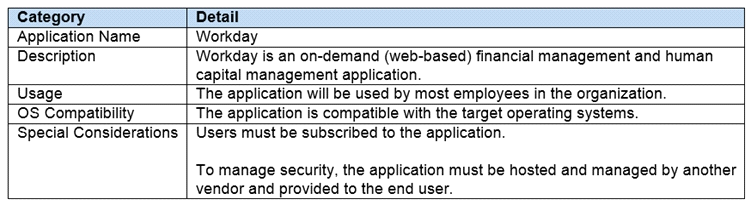
The customer has the additional objective of minimizing authentication cycles for users with no configuration efforts on user machines.
How should the architect publish the application?
Scenario: A Citrix Architect is designing a new Citrix Virtual Apps and Desktops environment for a marketing company. Several departments within the company utilize 3D applications based on OpenGL and Direct X. These applications run as hosted applications within 5 different virtual machines running on a single Citrix Hypervisor host. The host is configured with 1 single physical GPU running Intel Iris Pro technology.
Which HDX 3D Pro method should the architect utilize for these 3D applications?
Scenario: A Citrix Architect is designing a new Citrix Virtual Apps and Desktops environment. Management has requested dynamic distribution of users between the primary and backup data centers to ensure that all available hardware is utilized during normal operations.
What is the biggest risk the architect should highlight to the customer when designing the profile strategy?
Scenario: A Citrix Architect is designing a Citrix Virtual Desktops environment. The Graphic Designers Group uses graphic-intensive applications. Graphic designers will be provided with a Windows 10-hosted assigned desktop, with NVIDIA graphics hardware acceleration. HDX 3D Pro mode was selected during the installation of the Virtual Delivery Agent (VDA).
What is the maximum number of monitors supported for the Graphic Designers Group?

