Key details for this exam, checked against the published exam outline
Each question shows the correct answer and an explanation of why it is right
Refer to the exhibit.
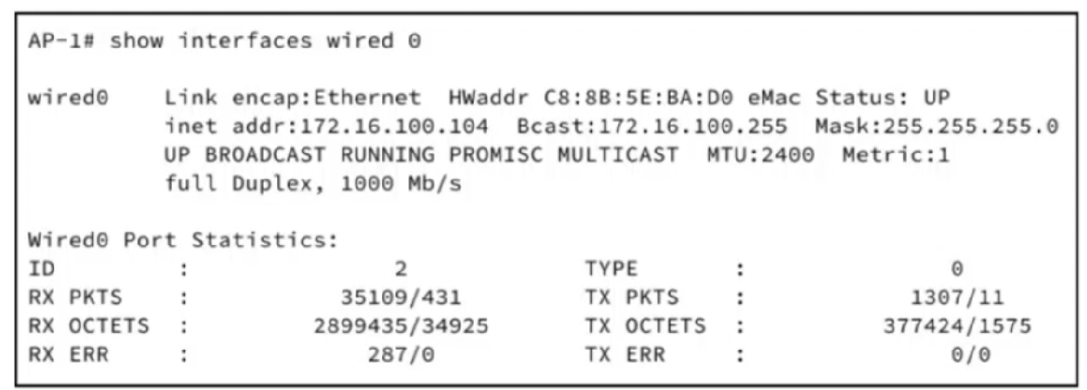
Refer to the exhibit. An engineer configured a static IP address on a LWAPP, but it is not reachable for management. The engineer configured the wrong gateway and must now change the default gateway to 172.16.100.1. Which CLI command must the engineer use?
When deploying a Lightweight Access Point (LWAPP) in a Cisco wireless network, proper Layer 3 configuration is essential for management and connectivity to the Wireless LAN Controller (WLC). Each LWAPP requires a valid IP address, subnet mask, and default gateway to communicate beyond its local subnet. In the exhibit, the AP is assigned 172.16.100.104/24, but the previously configured gateway was incorrect, preventing communication with the WLC. Cisco IOS XE requires that the AP's IP interface be configured with the correct default gateway to route traffic properly. The correct syntax is capwap ap ip <AP-IP> <Subnet-Mask> <Default-Gateway>. Option D matches the IP, subnet mask, and gateway for the given network, ensuring the AP can reach the WLC for LWAPP registration. Option A only changes the gateway without setting the IP explicitly, which is insufficient if the IP needs adjustment. Option B incorrectly configures the controller's IP, which does not affect the AP's default gateway. Option C uses an incorrect subnet mask (255.255.255.192), which would place the AP in a different subnet, breaking connectivity. Proper default gateway configuration is critical to avoid registration failures and management issues. Reference topics: Client Connectivity Configuration --- LWAPP AP IP configuration, default gateway, WLC communication, Layer 3 reachability.
Exhibit:
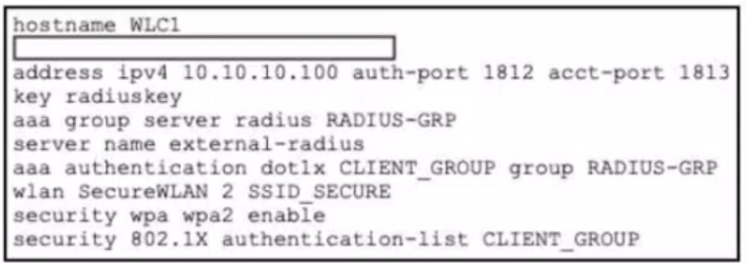
Refer to the exhibit. A network administrator is working on a WLC to enable user access for employee tablets using PEAP-MSCHAPv2 with a RADIUS backend. The administrator verifies the external authentication configuration and plans to test network connectivity. Which code snippet must be added to the configuration for the WLC to support authentication with an external server?
The missing command is radius server external-radius. On a Catalyst 9800 WLC, the external RADIUS server object must be declared first with radius server <server-name>. The following lines, address ipv4 10.10.10.100 auth-port 1812 acct-port 1813 and key radiuskey, are subcommands entered under that RADIUS server configuration mode. Cisco's Catalyst 9800 802.1X configuration workflow starts by declaring the RADIUS server, then adding it to a RADIUS server group, then creating the authentication method list, and finally mapping that list to the WLAN. Cisco's configuration guide example uses the same IOS XE structure: radius server <name>, followed by address ipv4 ... auth-port 1812 acct-port 1813 and key ....
The server group later references server name external-radius, so the RADIUS server object must be named external-radius exactly. Option C would incorrectly create a server named RADIUS-GRP, which is already the AAA server group name, not the RADIUS server object. Options B and D are invalid IOS XE syntax. PEAP-MSCHAPv2 itself is handled through the 802.1X/EAP exchange with the RADIUS server; the WLC acts as the authenticator and forwards authentication requests through the configured AAA method list. Reference topic: Client Connectivity Configuration --- WPA2-Enterprise, 802.1X, RADIUS server objects, AAA groups, and WLAN authentication-list binding.
An engineer has been tasked with configuring a Cisco Catalyst 9100 AP to join a WLC using a static configuration as DHCP and DNS discovery methods are not available. The engineer has set the AP hostname to 'AP053540555', and has configured the AP with a static IP address, subnet mask, and default gateway. The engineer must now configure the AP to discover the primary WLC with hostname 'WLC-PRIMARY' and IP address '192.168.100.10'. Which CLI command must the engineer use on the AP?
The correct AP-side command is capwap ap primary-base WLC-PRIMARY 192.168.100.10. Cisco's Catalyst AP command reference shows the syntax for configuring the primary controller as capwap ap primary-base <controller-name> <controller-ip-address>, and provides the same structure in its example: capwap ap primary-base wlc-5520 209.165.200.224. Cisco's Catalyst 9800 AP join documentation also identifies the primary controller discovery entry as capwap ap primary-base <wlc-hostname> <wlc-IP-address>.
This command statically primes the lightweight AP with the preferred WLC when DHCP option 43, DNS discovery, broadcast discovery, or prior learned controller information is unavailable. The hostname AP053540555 is only the AP's local identity and is not part of the WLC discovery command. Option A omits the primary-base keyword, so it is not valid syntax. Option B places keywords in the wrong order and does not match Cisco CAPWAP AP CLI. Option C omits the required controller name before the IP address. Reference topics: Wireless Network Implementation --- CAPWAP discovery, AP priming, Catalyst 9100 AP onboarding, static WLC discovery, and Catalyst 9800 AP join process.
A network administrator at a marketing company is deploying a Cisco Catalyst 9800 Series Wireless Controller running Cisco IOS XE 17.x. The corporate WLAN named XYZ-Guest supports visitor devices. To address intermittent connectivity issues due to client association limits and short session timeouts, the network administrator must optimize the WLAN to allow more client connections and extend session timeouts for the devices. The administrator must set the maximum number of clients for the XYZ-Guest WLAN to 50 and must set a session timeout to prevent frequent device disconnections. Which two commands must be configured on the controller? (Choose two.)
On Cisco Catalyst 9800 Series WLCs running IOS XE 17.x, WLAN-specific client management parameters are configured under the wlan configuration context. To increase the number of client connections on the XYZ-Guest WLAN, the correct command is wlan XYZ-Guest 1 XYZ-Guest client association limit 50 (or client max-association 50 depending on IOS XE version), which explicitly sets the maximum number of clients allowed per AP on this WLAN. To extend session durations and prevent frequent disconnections, the client session timeout command is applied under the same WLAN context with the desired timeout in seconds, e.g., wlan XYZ-Guest 1 XYZ-Guest client session timeout 2800.
Profile-based session commands (options B and D) are part of wireless policy profiles, which define broader policy elements like QoS, radio settings, and security, but do not directly enforce client association limits or session timeouts on the WLAN itself. Configuring these parameters at the WLAN level ensures that all APs associated with this WLAN apply the limits and timeout settings consistently. This approach aligns with Cisco best practices for Client Connectivity Configuration --- WLAN client limits, session management, and IOS XE WLC optimization for guest networks.
What is a benefit of using AI Enhanced RRM over traditional RRM?
AI Enhanced Radio Resource Management (RRM) in Cisco wireless networks improves upon traditional RRM by leveraging historical data in addition to real-time measurements to optimize network performance. Traditional RRM reacts primarily to instantaneous conditions, such as current interference or load, and adjusts parameters like transmit power and channel assignment accordingly. In contrast, AI Enhanced RRM uses historical telemetry to identify patterns, predict congestion, and preemptively adjust network parameters, providing a more stable and high-performing wireless environment. This predictive capability allows the system to make informed adjustments for channel reuse, load balancing, and interference mitigation before network degradation occurs. While real-time adjustments are still made, the inclusion of historical data allows for smarter decisions and more consistent client experience. Options A and B do not describe the core benefits of AI Enhanced RRM, as legacy client support or telemetry encryption are unrelated to predictive or adaptive resource management. Option C only highlights reactive behavior, which is a characteristic of traditional RRM, not AI Enhanced RRM. Cisco documentation and design guides emphasize that AI Enhanced RRM's key advantage is its predictive approach using historical analytics, enabling proactive network optimization across high-density or dynamic wireless environments. Reference topics: Automation and AI --- AI Enhanced RRM, predictive network management, historical telemetry, channel and power optimization.
Exhibit:
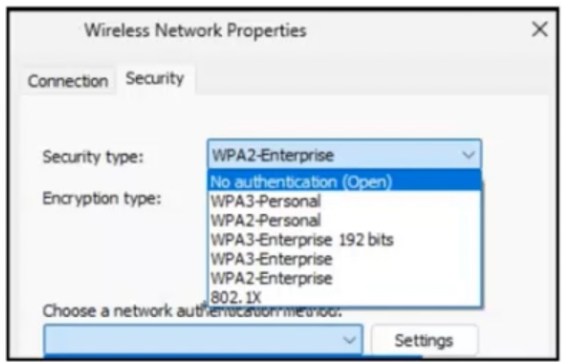
Refer to the exhibit. An onsite engineer is working to connect devices to the wireless network in a corporate environment. The network requirements dictate that WPA2-Enterprise security must be used with certificate-based mutual authentication to align with enterprise policy, which requires client and server certificates for secure access. After the initial wireless settings are applied on a Windows-based workstation, the engineer must select the appropriate authentication method in the client network properties to complete a successful enterprise Wi-Fi connection. Which option in the "Choose a network authentication method" dropdown meets this requirement?
The correct authentication method is EAP-TLS. WPA2-Enterprise uses 802.1X/EAP authentication rather than a pre-shared key, and the supplicant, authenticator, and RADIUS authentication server participate in the enterprise authentication exchange. Cisco documentation states that in enterprise WPA/WPA2 operation, 802.1X/EAP is used for authentication and provides strong authentication between the client and authentication server.
The decisive requirement in the question is certificate-based mutual authentication requiring both client and server certificates. Cisco explicitly describes EAP-TLS as requiring both server-side and client-side certificates, while PEAP requires only a server-side certificate and normally authenticates the client with password-based credentials inside the protected tunnel. Cisco Secure ACS documentation also states that EAP-TLS uses the certificates of the authentication server and the end-user client, enforcing mutual authentication.
MSCHAPv2 is a password-based inner authentication method, not certificate-based mutual authentication. PEAP protects credential exchange with a server certificate but does not inherently require a client certificate. TEAP can support flexible tunneled authentication, but the strict client-and-server certificate requirement maps directly to EAP-TLS. Reference topic: Client Connectivity Configuration --- WPA2-Enterprise, 802.1X supplicant configuration, EAP methods, certificates, and RADIUS authentication.
Exam domains verified against: Official Cisco 350-101 exam guide, last checked September 2026.
Understand radio wave propagation, signal measurements including RSSI and transmit power, RF mathematics principles, and antenna characteristics. You need to know how interference and noise affect signals and what performance different device types can deliver.
Master Wi-Fi governance through regional regulatory bodies, IEEE standards and Wi-Fi Alliance requirements. Learn usable channel and power combinations, frequency band limitations, and Radio Resource Management fundamentals.
Implement Cisco wireless architectures including fabric, mesh, local and cloud deployments. Set up physical infrastructure connections for access points, wireless controllers and dashboard management.
Configure initial setup of wireless infrastructures, manage AP discovery and join processes, and implement AP modes. Handle WLAN access for client connectivity and apply client management rules across WLC, Dashboard, Catalyst Center, ISE, Spaces and mobile device management platforms.
Configure authentication mechanisms both outside and on the controller. Set up client connectivity across different operating systems, manage roaming and wireless guest networking.
Manage wireless network maintenance and configure client monitoring. Troubleshoot client connectivity issues and describe device and platform integrations.
Interpret basic Python components and scripts for wireless automation. Understand NETCONF/YANG, wireless infrastructure APIs, and AI Analytics and AI Operations in Catalyst Center including AI-RRM.
Sample question from this domain above: Q5
Common questions about the exam itself

