Key details for this exam, checked against the published exam outline
Each question shows the correct answer and an explanation of why it is right
A Webex Contact Center engineer is configuring a new chat digital channel for their organization. Chat digital channel interactions will be handled by Webex Contact Center agents.
Which two actions must be taken as part of the configuration? (Choose two.)
A chat digital channel handled by Webex Contact Center agents needs a channel object of type Chat and an asset assigned to that channel. Cisco's digital channel setup model uses assets to represent external channel identities, such as a web chat asset, email asset, SMS asset, or social asset. The channel then connects that asset to Webex Contact Center routing so the conversation can be created, queued, and delivered to agents. Assigning a phone number is relevant to voice or SMS-style channel designs, not to a Web Chat asset. Creating an Email channel or Social Channel would build the wrong media type and would not make a chat widget route as chat. The two required steps therefore match the platform object model: create a channel with Chat as the channel type and assign the appropriate asset to that channel. Once that is done, flows and Queue Task nodes can route the chat to Webex Contact Center agents. Reference: Cisco Help, Set up digital channels in Webex Contact Center; Webex Connect Help, Livechat.
Which API scope is required for a REST PUT request to /organization/{orgid}/v2/contact-service-queue/{id}?
A REST PUT request that modifies a contact-service queue is an administrative write operation. Cisco's Webex Contact Center API model uses scopes to separate read-only access from configuration changes. The endpoint /organization/{orgid}/v2/contact-service-queue/{id} updates an existing queue object, so the integration must hold the organization-level administrative write scope. The read scopes, such as cjp:config_read or cjds:admin_org_read, are appropriate when an application only retrieves configuration data. They do not authorize mutation of queue configuration. The cjp:user scope is also not sufficient because queue configuration is a tenant or organization-level administrative resource, not a simple user-context operation. The scope cjds:admin_org_write is therefore the correct scope for a PUT operation on contact-service-queue. This matches the principle used throughout Cisco's API documentation: write methods require write-capable scopes, especially for configuration entities. Reference: Webex Contact Center Developer API Reference, Contact Service Queues; Webex Developer, Contact Center Service Apps.
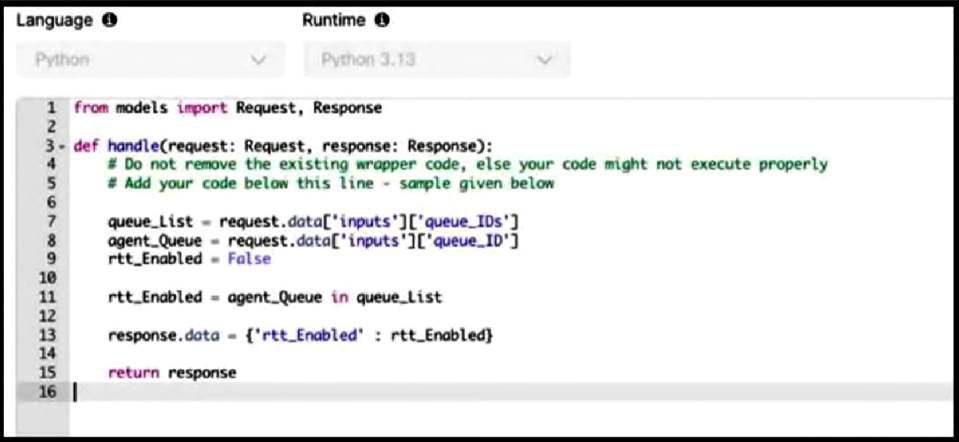
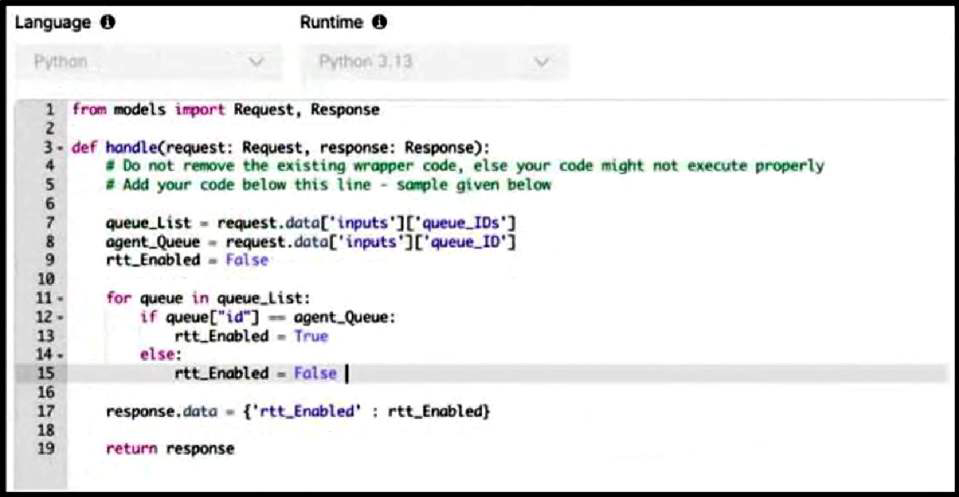
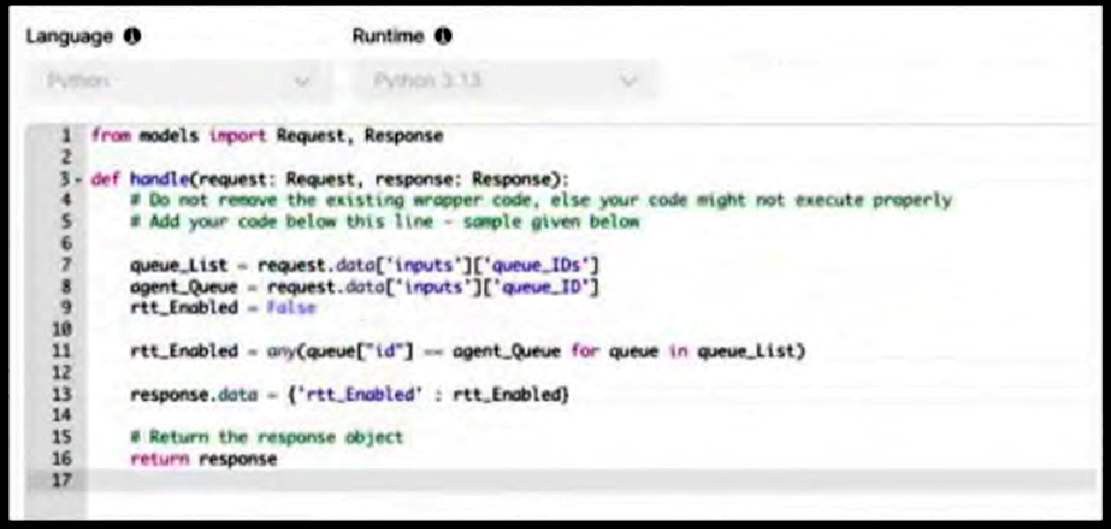
A customer wants to enable the Real Time Transcription (RTT) feature only for specific queues. This feature is enabled by using the Start Media Stream node in Flow Designer, so the administrator decides to control the enablement using a function. The function must check two input variables: queue_ID for the selected agent queue (a string) and queue_IDs for the list of queues that require the RTT feature (a list of dictionaries, where each dictionary has an id key for the queue ID). The function returns a boolean variable rtt_Enabled to the flow, which indicates whether RTT should be enabled.
Which function is correct when using Python?
A)
B)
C)
D)
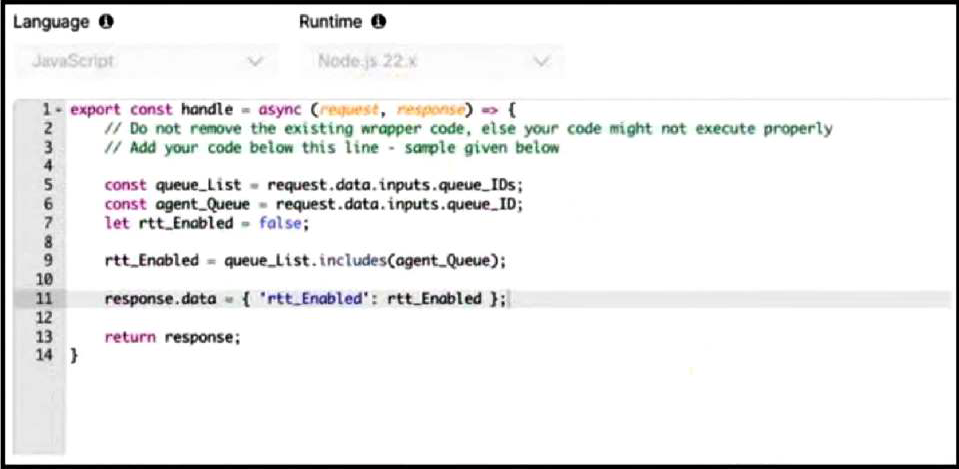
Option C is correct because it checks membership by comparing the selected queue_ID string to the id value in each dictionary in the queue_IDs list. The input structure says queue_ID is a string and queue_IDs is a list of dictionaries, with each dictionary containing an id key. A direct expression like agent_Queue in queue_List fails because it compares a string to whole dictionary objects, not to their id values. A loop that sets rtt_Enabled to False inside the else branch can also produce wrong results because a nonmatching later dictionary can overwrite a previous match. The Python any() expression is the cleanest correct logic: it returns True if at least one dictionary has an id equal to the selected queue. The function then writes rtt_Enabled into response.data for the flow to consume before deciding whether to start the media stream. Reference: Cisco Help, Build and manage flows with Flow Designer; Flow Designer function runtime documentation.
A customer using Webex Contact Center wants to transition from traditional agent-based routing to a skill-based routing model that uses skill criteria assigned to the queue functionality to enhance efficiency and customer satisfaction.
Which two essential configuration actions must the administrator complete to successfully take this transition? (Choose two.)
In Webex Contact Center, skill-based routing is built from two sides: the queue must express the skill requirement, and the agent must have the matching skill profile. Cisco's official routing and queueing documentation separates skill-based queues from non-skill queues and describes both skill criteria assigned directly to a queue and skill requirements assigned in a flow. Because the question specifically says the customer wants to use skill criteria assigned to queue functionality, the queue configuration must include the skill criteria. The agent side is handled through the skill profile assigned in the agent's settings; that profile carries the agent's skill values and proficiencies used by routing. Associating agents directly to the queue is a non-skill or agent-assignment model, and call distribution groups are for expanding team eligibility over time, not for defining agent skills. Assigning skill criteria to teams is also not the model Cisco documents. Reference: Cisco Help, Understand Routing and Queueing in Webex Contact Center; Create queues and configure routing patterns.
An engineer is configuring inbound telephony for a new Cisco Webex Contact Center deployment.
Which two configurations are needed to ensure that calls are routed to agents? (Choose two.)
Inbound Webex Contact Center voice routing needs an entry path and an agent distribution target. The DNIS or support number must be associated with the entry point and flow so that an incoming PSTN call reaches the proper Flow Designer logic. Inside that flow, the contact must be queued to a queue that has eligible teams or agents. Cisco's queue documentation describes queues as holding areas where contacts wait until they are distributed, and it explains that non-skill queues use team assignments or agent assignments while skill queues use skill matching. The wording in the option set refers to DNIS entries in Flow Designer; operationally, DNIS is tied to the entry point/channel and flow selection, and the flow then uses a Queue Contact activity. Script Editor is a legacy/on-premises contact center construct, not the modern Webex Contact Center Flow Designer model. A softphone registration alone does not route calls, and a skills-only queue is not mandatory unless the design requires skills. Reference: Cisco Help, Set up voice channels for Webex Contact Center; Understand Routing and Queueing in Webex Contact Center.
As per the policy, the business requires explicit permission from the caller before any interaction can be recorded in the contact center. To manage this, the flow includes a Menu IVR activity that presents recording consent options to the caller. The caller's choice is logged and then passed as input to the Recording Control activity element of the flow.
Which two statements are true based on the functionality and rules of the Recording Control activity? (Choose two.)
Cisco's Recording Control activity gives caller consent precedence over tenant, queue, and recording schedule settings. In the documented precedence order, if user consent is set to Yes in the flow, the call is recorded regardless of the recording configuration at those other levels. If the user does not consent, the call is not recorded, also regardless of those other settings. If the Recording Control activity is not configured in the flow, the system falls back to the normal recording hierarchy: if any applicable tenant, queue, or schedule configuration is Yes, the call is recorded; if all are No, it is not. That is why option B is true and option C is false. Option D is also true because removing the flow activity returns control to queue-level or other configured recording policy. Option E is false because explicit Yes consent in the flow takes precedence over a recording schedule set to No. Reference: Cisco Help, Understand Routing and Queueing in Webex Contact Center; Build and manage flows with Flow Designer.
An administrator is adding a custom connector to integrate a third-party application with their Webex Contact Center org using OAuth 2.0 for authentication.
Which two grant types must the administrator choose to accomplish this task? (Choose two.)
For OAuth 2.0 custom connector authentication in Webex Contact Center, Cisco documents client credentials using either a client secret or a private key/certificate method. The custom connector configuration supports Client credentials - client secret, where the administrator enters a client ID and client secret, and Client credentials - private key, where the private key corresponds to the certificate material used by the application. Those two choices are valid grant/authentication methods for service-to-service integration because a backend connector needs machine-to-machine authorization rather than a user authorization code flow. Client credentials - token is not a grant type; the token is the output of a successful OAuth exchange. Client credentials - certificate is too imprecise in the option set because Cisco's configuration wording identifies private key/certificate material. Server credentials - certificate is not a documented OAuth grant type for the Webex Contact Center custom connector. Reference: Cisco Help, Configure custom connector for Webex Contact Center; Webex Developer, Integrations and Authorization.
Exam domains verified against: Official Cisco 300-830 exam guide, last checked October 2026.
Configure and troubleshoot voice connectivity for Webex Contact Center through Webex Calling, local gateways, or Cloud Connected PSTN. Build call routing logic using channels, queues, teams, and Flow Designer components to direct inbound and outdial interactions to the right agent or team.
Provision Webex Contact Center users, teams, and skills. Configure agent and supervisor desktop layouts and profiles. Set up call recording and create real-time, historical, and customized reports using Analyzer dashboards to track operational and analytical performance metrics.
Sample question from this domain above: Q4
Design and configure chat, email, SMS, and social messaging channels for Webex Contact Center. Build digital flows to route customer contacts through queues and teams. Diagnose and fix channel routing and flow execution problems across multiple digital interaction types.
Sample question from this domain above: Q1
Implement advanced voice and digital flow features such as callback, HTTP requests, custom functions, post-call surveys, and webhooks. Configure prebuilt and custom connectors. Understand REST and GraphQL APIs, authentication, and AI assistant capabilities including summarization, topic analytics, agent wellness, and Webex AI agent.
Common questions about the exam itself

