At ValidExamDumps, we consistently monitor updates to the Cisco 300-720 exam questions by Cisco. Whenever our team identifies changes in the exam questions, objectives, focus areas or requirements, We immediately update our exam questions for both PDF and online practice exams. This commitment ensures our customers always have access to the most current and accurate questions. By preparing with these up to date and 100% exam domain coverage questions, our customers can successfully pass the Cisco Securing Email with Cisco Secure Email Gateway exam on their first attempt without needing additional materials or study guides.
Other certification materials providers often include outdated or removed questions by Cisco in their 300-720 exam. These outdated questions lead to customers failing their Cisco Securing Email with Cisco Secure Email Gateway exam. In contrast, we ensure our questions bank includes only precise and up-to-date questions. Our main priority is your success in the Cisco 300-720 exam, not profiting from selling obsolete exam questions in PDF or Online Practice Test.
An engineer deploys a Cisco Secure Email Gateway appliance with default settings in an organization that permits only standard H feature does not work. Which additional action resolves the issue?
Configuring the outbound firewall rule to permit traffic on port 3237 is the additional action that resolves the issue. AMP file reputation is a feature that allows Cisco ESA to check files attached to messages against a cloud-based database of known malicious files and apply appropriate actions, such as block, deliver, or quarantine.
By default, AMP file reputation uses TCP port 3237 to communicate with the cloud-based database. If this port is blocked by a firewall, AMP file reputation will not work properly.
To resolve this issue, the administrator can configure the outbound firewall rule to permit traffic on port 3237 from Cisco ESA.
The other options are not valid actions to resolve the issue, because they do not affect the port used by AMP file reputation.
When virtual gateways are configured, which two distinct attributes are allocated to each virtual gateway address? (Choose two.)
Virtual gateways are a feature that allows Cisco ESA to host multiple email domains on a single physical interface, using different IP addresses and hostnames for each domain.
When virtual gateways are configured, two distinct attributes are allocated to each virtual gateway address:
Domain, which is the email domain name that is associated with the virtual gateway address, such as mycompany.com or mydomain.com.
IP address, which is the IPv4 or IPv6 address that is assigned to the virtual gateway address, such as 199.209.31.X or 2001:db8::X.
The other options are not attributes that are allocated to each virtual gateway address on Cisco ESA.
Which of the following two steps are required to enable Cisco SecureX integration on a Cisco Secure Email Gateway appliance? (Choose two.)
one of the methods to enable Cisco SecureX integration on a Cisco Secure Email Gateway appliance is to use the Threat Response service1.This service allows the appliance to send telemetry data to the SecureX cloud and provide visibility and response capabilities across multiple security products1.To use this service, the administrator needs to perform the following steps1:
Enable the Threat Response service: The administrator needs to go to Network > Cloud Service Settings and enable the Threat Response service.This will generate a registration token that can be used to register the appliance with SecureX1.
Select the correct Threat Response Server: The administrator needs to select the appropriate Threat Response server based on the region where the appliance is located.The available regions are North America, Europe, and Asia Pacific1.
Refer to the exhibit.
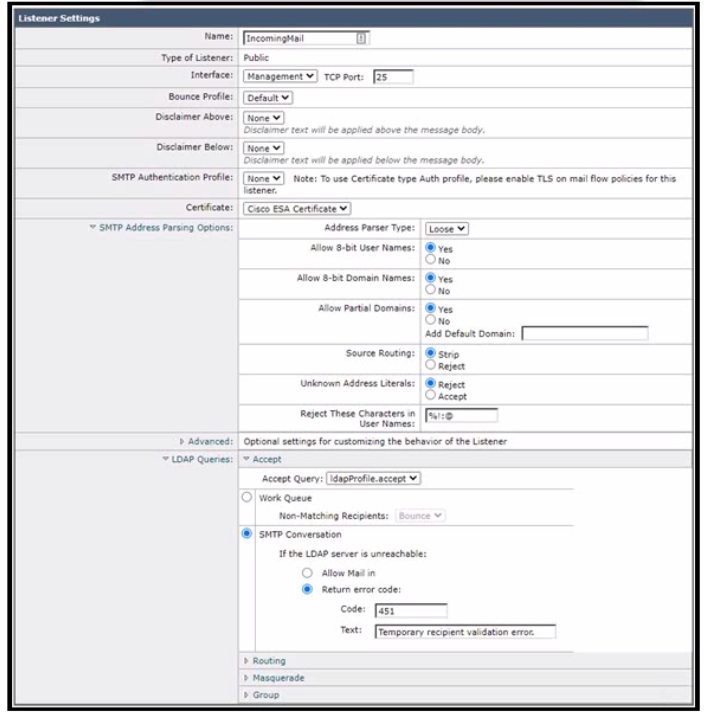
Which additional configuration action must be taken to protect against Directory Harvest Attacks?
To protect against Directory Harvest Attacks, the administrator must configure Directory Harvest Attack Prevention in the mail flow policy that applies to the listener. This will enable the Cisco Secure Email Gateway to reject or throttle messages that are sent to invalid recipients by checking the LDAP server for valid email addresses.Reference: [Cisco Secure Email Gateway Administrator Guide - Configuring Directory Harvest Attack Prevention]
A security administrator deployed a Cisco Secure Email Gateway appliance with a mail policy configured to store suspected spam for review. The appliance is the DMZ and only the standard HTTP/HTTPS ports are allowed by the firewall. An administrator wants to ensure that users can view any suspected spam that was blocked. Which action must be taken to meet this requirement?
Enabling End-User Quarantine Access and pointing to an LDAP server for authentication is the action that must be taken to meet this requirement. End-User Quarantine Access is a feature that allows users to access their personal quarantine on Cisco ESA using their email address and password, without requiring an administrator account or access to Secure Email and Web Manager.
To enable End-User Quarantine Access on Cisco ESA, the administrator can follow these steps:
Select Security Services > IronPort Anti-Spam > End User Safelist/Blocklist Settings and click Edit Settings.
Under End User Quarantine Access, select Enable End User Quarantine Access.
Under Authentication Server, select LDAP Server from the drop-down menu and choose an LDAP server profile from the drop-down menu.
Click Submit.

