Key details for this exam, checked against the published exam outline
Each question shows the correct answer and an explanation of why it is right
Employees and customers of a retail company are experiencing performance issues with the store website, such as slowness during the login process or failure when adding items to the cart. Which test type is the most useful for identifying the root cause of these problems?
In the Designing and Implementing Enterprise Network Assurance (300-445 ENNA) curriculum, selecting the appropriate test type is essential for isolating performance bottlenecks in complex web applications. When users report issues with specific multi-step workflows---such as logging into a portal or interacting with a shopping cart---the Transaction test type (Option C) is the most effective tool.
A Transaction test is a specialized Web-layer test that utilizes a script (typically written in JavaScript/TypeScript) to mimic real user interactions with a website. Unlike a simple HTTP Server test (Option A) that only checks for a 200 OK response from a single URL, or a Page Load test (Option B) that measures the rendering of a single page, a Transaction test follows a predefined user journey. For this retail scenario, the test can be configured to navigate to the homepage, enter credentials, click the login button, search for a product, and add it to the cart.
The primary advantage of this approach is that it provides granular, step-specific timing. It allows the engineer to identify precisely where the latency or failure occurs---for example, if the backend database takes too long to process the login or if an API call fails during the 'add to cart' action. While Agent-to-server (Option D) and DNS Server (Option E) tests provide valuable network and infrastructure data, they cannot validate the functional logic of a web application. Agent-to-agent (Option F) is used for measuring throughput between two managed points and is irrelevant for public-facing website testing. Therefore, for troubleshooting interactive web processes, the Transaction test type is the definitive choice for pinpointing the source of the issue.
Which deployment option should a network administrator use to deploy the ThousandEyes Endpoint Agent to all users on their internal domain using a Microsoft Domain Controller?
For the Designing and Implementing Enterprise Network Assurance (300-445 ENNA) exam, understanding enterprise-scale deployment of the Endpoint Agent (EPA) is vital for ensuring comprehensive user-centric visibility. When an organization utilizes a Microsoft Domain Controller to manage its internal domain, the standard mechanism for automated software distribution is Group Policy Objects (GPOs) (Option B).
Deploying the ThousandEyes Endpoint Agent via GPO allows a network administrator to push the .msi installer package to all Windows-based workstations joined to the domain. This method is highly effective for large-scale environments because it ensures that the agent is installed automatically upon machine startup or user login, without requiring manual intervention from the end-user or the IT staff at each individual machine. The GPO can be configured to perform a 'silent installation,' which runs in the background, ensuring a seamless experience for the employees while providing the IT team with the necessary performance metrics.
While Microsoft Intune (Option A) is a modern cloud-based endpoint management solution, the question specifically references a Microsoft Domain Controller, making GPO the most direct and traditional choice for that specific infrastructure. JAMF (Option C) is specifically for Apple (macOS/iOS) device management and would not be used for a Windows domain deployment.8 PowerShell (Option D) can be used for scripting, but it lacks the centralized policy enforcement and automatic compliance checking provided by GPOs in an Active Directory environment. Therefore, Group Policy Objects is the verified deployment method for this scenario.
You want to monitor Microsoft Teams using ThousandEyes endpoint agents. Which tests are available for this type of application monitoring?
According to the Designing and Implementing Enterprise Network Assurance (300-445 ENNA) best practices for collaboration monitoring, Microsoft Teams (as well as Webex and Zoom) is monitored using a combination of Scheduled and Dynamic tests (Option D).
Scheduled Tests: These are used to proactively monitor the reachability and performance of the Microsoft Teams infrastructure. The Teams template typically includes scheduled HTTP Server tests to teams.microsoft.com and login.microsoftonline.com, along with network-layer tests to the Teams Transport Relay (e.g., worldaz.tr.teams.microsoft.com). These provide a continuous baseline of connectivity regardless of whether a user is currently in a call.
Dynamic Tests: These are a unique feature for collaboration monitoring. When an Endpoint Agent detects that the Teams application has initiated a real-time media session (audio or video call), it automatically triggers a Dynamic Test to the specific IP and port being used for that call. This allows IT teams to see the exact network path---including hop-by-hop latency and loss---of the actual call traffic while the session is active.
Real User Tests (Option C) are generally not used for Teams monitoring in the same way they are for web-based SaaS apps. Because most users utilize the Teams desktop client rather than the browser, the RUM browser extension cannot capture the rich telemetry of the desktop application's internal signaling and media streams. Therefore, the specialized 'Automated Session Testing' provided by Dynamic Tests, combined with the proactive health checks of Scheduled Tests, constitutes the complete assurance strategy for Microsoft Teams.
A company is noticing sporadic slowdowns in their web application performance, impacting user experience. They suspect it might be related to high CPU utilization on employee laptops, potentially caused by background processes. Which ThousandEyes alert type and condition combination would be most effective in identifying if endpoint CPU performance is contributing to this issue?
In the Designing and Implementing Enterprise Network Assurance (300-445 ENNA) curriculum, isolating performance issues on end-user machines requires a combination of application-layer experience data and local system telemetry. When an architect suspects that local hardware constraints, such as high CPU usage, are degrading the digital experience, the Endpoint Agent is the required vantage point.
The correct combination is Real User Tests > Endpoint, CPU utilization % (Option C). This alert configuration is effective for several reasons:
Targeted Visibility: It directly monitors the user's device (Endpoint) where the hardware bottleneck is suspected to reside.
Real-Time Context: By utilizing Real User Tests (RUM), the agent gathers performance data during actual user activity (e.g., browsing the web application). This ensures that the CPU spikes are correlated with active application usage, providing a representative view of the impact on experience.
Threshold Alerting: The condition monitors for CPU utilization exceeding a defined percentage threshold ( %). This allows IT teams to be notified only when the CPU load reaches problematic levels that are known to cause application sluggishness or browser 'freezing'.
Alternative options are less effective for this specific troubleshooting goal:
Option A: Monitors network loss, which would not identify a local CPU bottleneck.
Option B: Monitors path length (hops), which is a routing metric irrelevant to local hardware performance.
Option D: Monitors memory load during scheduled tests. While memory is a factor, the specific suspicion in this scenario is CPU utilization, and scheduled tests do not always capture the same load impact as a real user interacting with the browser.
The alert shown in the exhibit is designed to detect which of the following network security issues?
As shown in Exhibit 4.1-1 (image_6e19fb.png), the alert rule is configured for the BGP layer with the name 'AS origin AS 1234'. The critical logic is defined in the Alert Conditions section, which specifies: BGP Origin meets all of: ASN not in 1234.
This specific configuration is the standard method used in ThousandEyes to detect BGP hijacking (Option C). BGP hijacking occurs when an unauthorized Autonomous System (AS) announces a network prefix that it does not own, effectively stealing the traffic meant for the legitimate owner. By setting an alert that triggers when a monitored prefix is seen originating from an Autonomous System Number (ASN) that is not the expected authorized ASN (in this case, AS 1234), ThousandEyes provides immediate notification of a routing takeover.
Identifying this via BGP Origin alerts is superior to simple connectivity checks because it catches the issue at the routing control plane.
DNS Issues (Options B and D): These involve the translation of names to IPs and would be detected via DNS-specific tests rather than BGP Origin checks.
Route Poisoning (Option A): This is a generic term often referring to the manipulation of distance-vector protocol metrics to make a route unreachable; while related to routing, BGP Origin checks are the specific tool for detecting external prefix hijacks.
By monitoring the ASN origin, network engineers can quickly distinguish between a local ISP outage and a global security event where their traffic is being misdirected to an illegitimate network.
Refer to the exhibits.
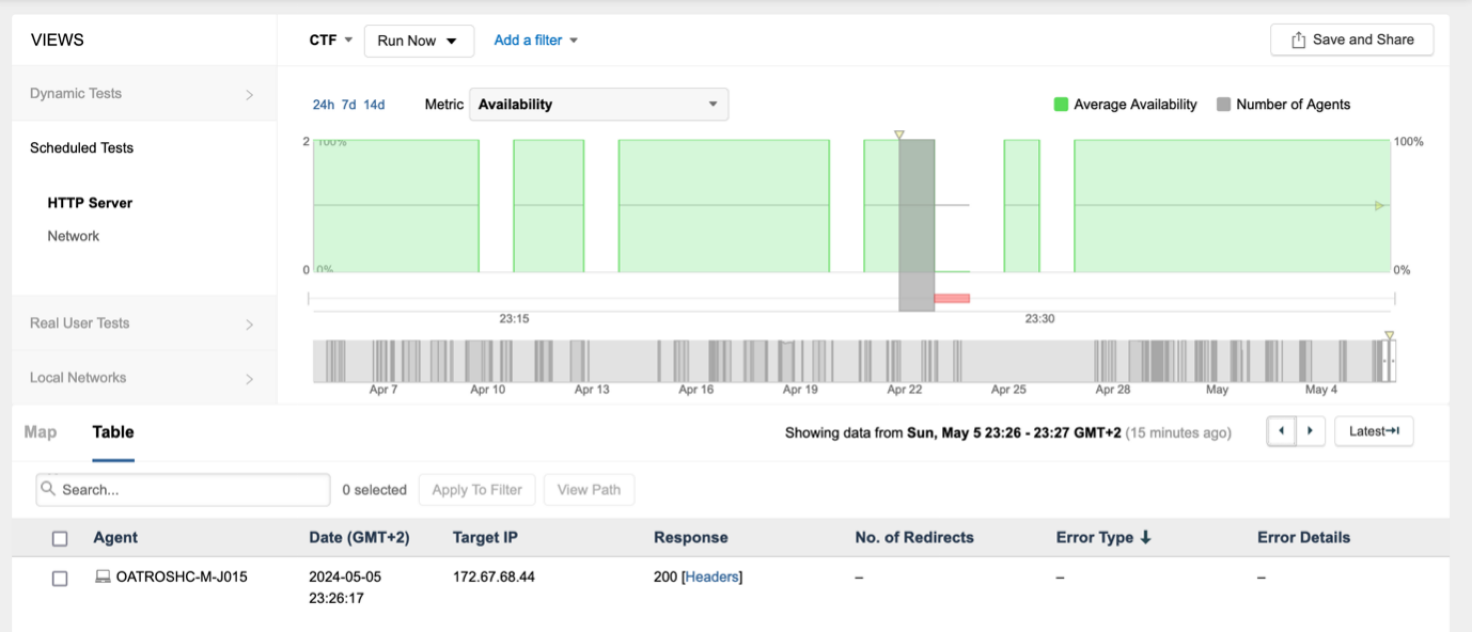
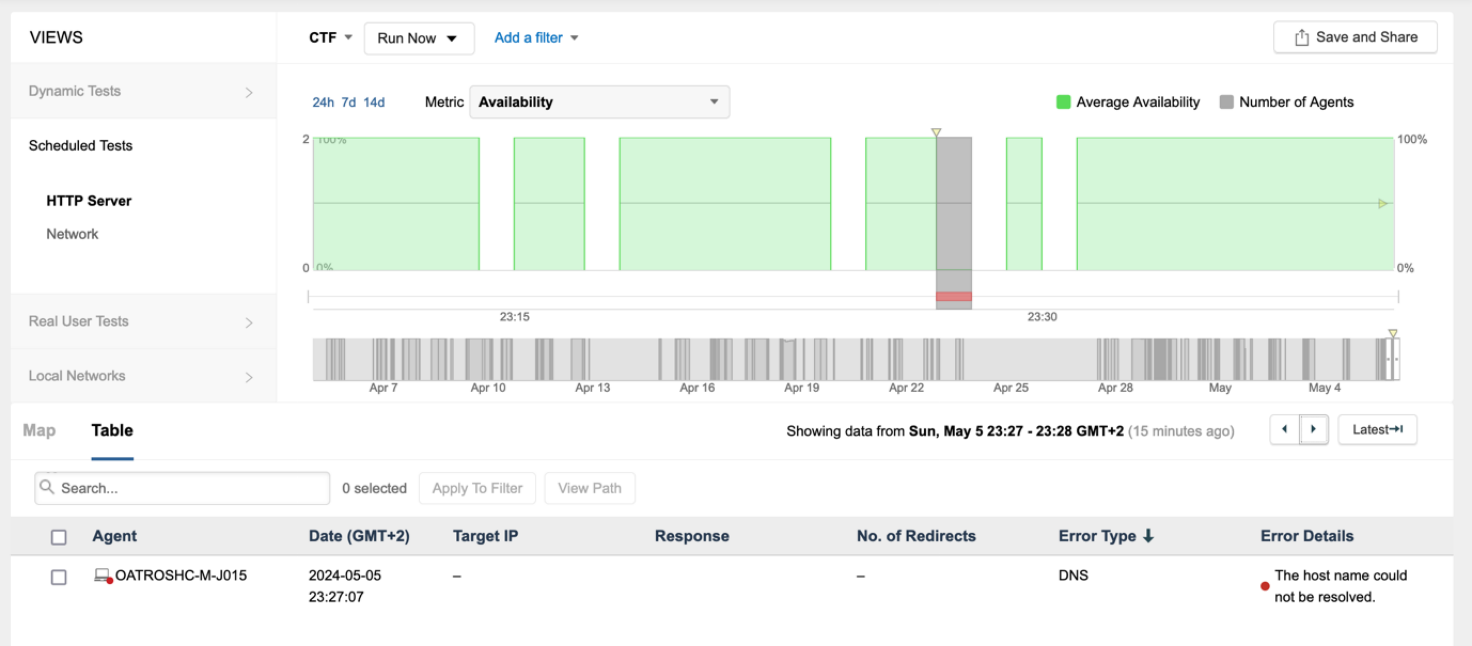
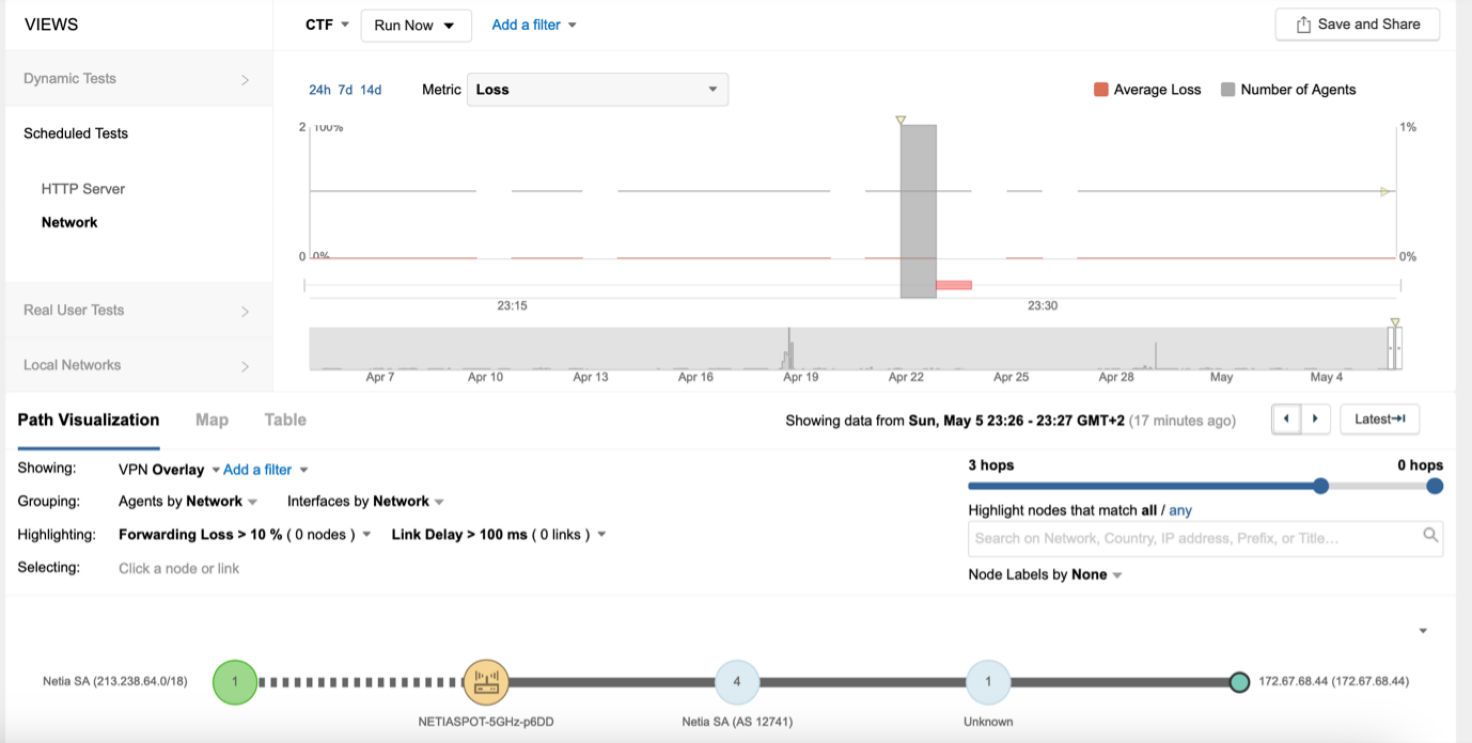
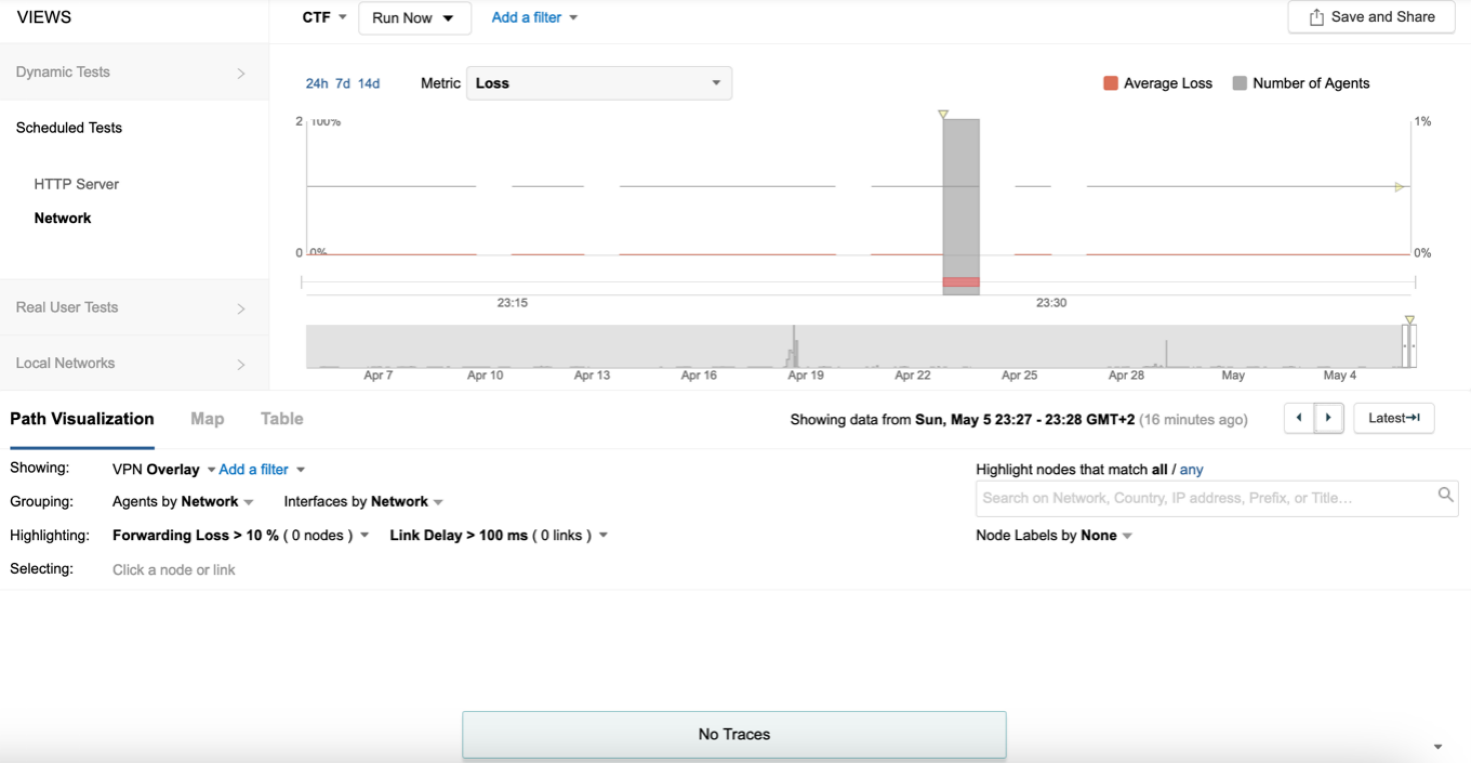
The endpoint has the following IP credentials:
192.168.100.9/24, DNS: 8.8.8.8, 8.8.4.4, GW: 192.168.100.1
Based on the views presented in the exhibits, what led to the error occurring on Sun, May 5 23:27 GMT +2?
A network engineer needs to monitor the performance of a business-critical web application accessed by remote employees connecting through a Cisco AnyConnect VPN. Which two agent deployment methods are most suitable for this scenario? (Choose two)
For the Designing and Implementing Enterprise Network Assurance (300-445 ENNA) exam, monitoring remote workforces requires a strategy that captures both the user's local environment and the regional internet health. In a scenario involving Cisco AnyConnect VPN, the 'last mile' connectivity of the employee is often the most significant variable in application performance.
Utilizing the ThousandEyes Endpoint Agent (Option D) is the most effective way to monitor this environment. Because the agent resides directly on the remote employee's machine, it can monitor the performance of the web application both 'inside' and 'outside' the VPN tunnel. It provides visibility into the local Wi-Fi signal strength, the health of the AnyConnect client, and the latency experienced as traffic traverses the VPN headend. This allows engineers to differentiate between a slow home internet connection and an issue with the VPN concentrator.
Deploying ThousandEyes Cloud Agents (Option A) serves as a critical baseline. By running tests from Cloud Agents in the same regions as the remote employees, the engineer can determine if the 'internet' in that region is healthy. If a Cloud Agent in London shows a perfect response time while an Endpoint Agent in London shows high latency, the engineer can immediately isolate the problem to the user's specific setup or the VPN path, rather than a regional ISP outage.
Other options are less suitable for monitoring the remote employee's experience:
AppDynamics (Option B) provides server-side code visibility but cannot see the user's home Wi-Fi or local network path.
Enterprise Agents on the VPN concentrator (Option C) can monitor the path from the data center to the app, but they cannot see the path from the user to the concentrator.
Enterprise Agents in the data center (Option E) provide an 'inside-out' view of the app's health but miss the entire remote access experience.
Exam domains verified against: Official Cisco 300-445 exam guide, last checked October 2026.
Determine the right agent types and locations to deploy, whether synthetic, scripting, or local collection agents. Understand active and passive monitoring approaches and how to integrate Cisco technologies like ThousandEyes, Catalyst SD-WAN Manager, Catalyst Center, and Meraki into your architecture.
Configure enterprise and endpoint agents across application servers and end-user devices at scale. Set up network, DNS, voice, and web tests in ThousandEyes and Meraki Insights, and implement web authentication methods including basic, digest, bearer tokens, OAuth, SAML, and SSO.
Diagnose network problems such as packet loss, congestion, routing, and jitter. Identify end-device issues affecting connectivity and resolve web application performance problems using browser waterfalls and collected telemetry data.
Configure alert rules based on TCP behavior, congestion, error counters, BGP state, and end-user experience metrics like CPU and connectivity changes. Select appropriate dashboards and alerts for different audiences and validate configurations work correctly.
Sample question from this domain above: Q2
Common questions about the exam itself

