Key details for this exam, checked against the published exam outline
Each question shows the correct answer and an explanation of why it is right
Which protocol allows you to securely upload files to another computer on the internet?
SFTP, or Secure File Transfer Protocol, is a protocol that allows for secure file transfer capabilities between networked hosts. It is a secure extension of the File Transfer Protocol (FTP). SFTP encrypts both commands and data, preventing passwords and sensitive information from being transmitted openly over the network. It is typically used for secure file transfers over the internet and is built on the Secure Shell (SSH) protocol1.
* What Is SFTP? (Secure File Transfer Protocol)
* How to Use SFTP to Safely Transfer Files: A Step-by-Step Guide
* Secure File Transfers: Best Practices, Protocols And Tools
The Secure File Transfer Protocol (SFTP) is a secure version of the File Transfer Protocol (FTP) that uses SSH (Secure Shell) to encrypt all commands and data. This ensures that sensitive information, such as usernames, passwords, and files being transferred, are securely transmitted over the network.
* ICMP (Internet Control Message Protocol) is used for network diagnostics and is not designed for file transfer.
* NTP (Network Time Protocol) is used to synchronize clocks between computer systems and is not related to file transfer.
* HTTP (HyperText Transfer Protocol) is used for transmitting web pages over the internet and does not inherently provide secure file transfer capabilities.
Thus, the correct protocol that allows secure uploading of files to another computer on the internet is SFTP.
* Cisco Learning Network
* SFTP Overview (Cisco)
During the data encapsulation process, which OSI layer adds a header that contains MAC addressing information and a trailer used for error checking?
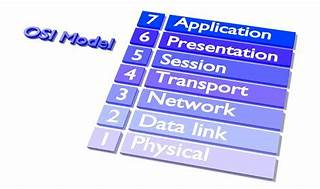
The Data Link layer ensures that messages are delivered to the proper device on a LAN using hardware addresses and translates messages from the Network layer into bits for the Physical layer to transmit. It also controls how data is placed onto the medium and is received from the medium through the physical hardware.
The OSI Model -- The 7 Layers of Networking Explained in Plain English
What is the purpose of assigning an IP address to the management VLAN interface on a Layer 2 switch?
The primary purpose of assigning an IP address to the management VLAN interface on a Layer 2 switch is to facilitate remote management of the switch. By configuring an IP address on the management VLAN, network administrators can access the switch's Command Line Interface (CLI) remotely using protocols such as Telnet or Secure Shell (SSH). This allows for convenient configuration changes, monitoring, and troubleshooting without needing physical access to the switch1.
* Understanding the Management VLAN
* Cisco - VLAN Configuration Guide
* Remote Management of Switches
Assigning an IP address to the management VLAN interface (often the VLAN 1 interface by default) on a Layer 2 switch allows network administrators to remotely manage the switch using protocols such as Telnet or SSH. This IP address does not affect the switch's ability to route traffic between VLANs but provides a means to access and configure the switch through its Command Line Interface (CLI).
* A: The switch does not act as a default gateway; this is typically a function of a Layer 3 device like a router.
* B: The switch does not resolve URLs; this is typically a function of DNS servers.
* C: The switch can relay DHCP requests but does not typically provide DHCP services itself; this is usually done by a dedicated DHCP server or router.
Thus, the correct answer is D. To enable access to the CLI on the switch through Telnet or SSH.
* Cisco VLAN Management Overview
* Cisco Catalyst Switch Management
A user initiates a trouble ticket stating that an external web page is not loading. You determine that other resources both internal and external are still reachable.
Which command can you use to help locate where the issue is in the network path to the external web page?
The tracert command is used to determine the route taken by packets across an IP network. When a user reports that an external web page is not loading, while other resources are accessible, it suggests there might be an issue at a certain point in the network path to the specific web page. The tracert command helps to diagnose where the breakdown occurs by displaying a list of routers that the packets pass through on their way to the destination. It can identify the network segment where the packets stop progressing, which is valuable for pinpointing where the connectivity issue lies. Reference := Cisco CCST Networking Certification FAQs -- CISCONET Training Solutions, Command Prompt (CMD): 10 network-related commands you should know, Network Troubleshooting Commands Guide: Windows, Mac & Linux - Comparitech, How to Use the Traceroute and Ping Commands to Troubleshoot Network, Network Troubleshooting Techniques: Ping, Traceroute, PathPing.
* tracert Command: This command is used to determine the path packets take to reach a destination. It lists all the hops (routers) along the way and can help identify where the delay or failure occurs.
* ping -t: This command sends continuous ping requests and is useful for determining if a host is reachable but does not provide path information.
* ipconfig /all: This command displays all current TCP/IP network configuration values and can be used to verify network settings but not to trace a network path.
* nslookup: This command queries the DNS to obtain domain name or IP address mapping, useful for DNS issues but not for tracing network paths.
* Microsoft tracert Command: tracert Command Guide
* Troubleshooting Network Issues with tracert: Network Troubleshooting Guide
An engineer configured a new VLAN named VLAN2 for the Data Center team. When the team tries to ping addresses outside VLAN2 from a computer in
VLAN2, they are unable to reach them.
What should the engineer configure?
When devices within a VLAN are unable to reach addresses outside their VLAN, it typically indicates that they do not have a configured path to external networks. The engineer should configure a default gateway for VLAN2. The default gateway is the IP address of the router's interface that is connected to the VLAN, which will route traffic from the VLAN to other networks12.
* Understanding and Configuring VLAN Routing and Bridging on a Router Using the IRB Feature
* VLAN 2 not able to ping gateway - Cisco Community
* VLANs: Virtual Local Area Networks (VLANs) logically segment network traffic to improve security and performance. Devices within the same VLAN can communicate directly.
* Default Gateway: For devices in VLAN2 to communicate with devices outside their VLAN, they need a default gateway configured. The default gateway is typically a router or Layer 3 switch that routes traffic between different VLANs and subnets.
* Additional VLAN: Not needed in this scenario as the issue is related to routing traffic outside VLAN2, not creating another VLAN.
* Default Route: While a default route on the router may be necessary, the primary issue for devices within VLAN2 is to have a configured default gateway.
* Static Route: This is used on routers to manually specify routes to specific networks but does not address the need for a default gateway on the client devices.
* Cisco VLAN Configuration Guide: Cisco VLAN Configuration
* Understanding and Configuring VLANs: VLANs Guide
Which two statements are true about the IPv4 address of the default gateway configured on a host? (Choose 2.)
Note: You will receive partial credit for each correct selection.
* Statement B: 'The same default gateway IPv4 address is configured on each host on the local network.' This is true because all hosts on the same local network (subnet) use the same default gateway IP address to send packets destined for other networks.
* Statement D: 'The default gateway is the IPv4 address of the router interface connected to the same local network as the host.' This is true because the default gateway is the IP address of the router's interface that is directly connected to the local network.
* Statement A: 'The IPv4 address of the default gateway must be the first host address in the subnet.' This is not necessarily true. The default gateway can be any address within the subnet range.
* Statement C: 'The default gateway is the Loopback0 interface IPv4 address of the router connected to the same local network as the host.' This is not true; the default gateway is the IP address of the router's physical or logical interface connected to the local network.
* Statement E: 'Hosts learn the default gateway IPv4 address through router advertisement messages.' This is generally true for IPv6 with Router Advertisement (RA) messages, but not typically how IPv4 hosts learn the default gateway address.
* Cisco Default Gateway Configuration: Cisco Default Gateway
Which standard contains the specifications for Wi-Fi networks?
The IEEE 802.11 standard contains the specifications for Wi-Fi networks. It is a set of media access control (MAC) and physical layer (PHY) specifications for implementing wireless local area network (WLAN) computer communication in various frequencies, including but not limited to 2.4 GHz, 5 GHz, and 6 GHz1. This standard is maintained by the Institute of Electrical and Electronics Engineers (IEEE) and is commonly referred to as Wi-Fi. The standard has evolved over time to include several amendments that improve speed, range, and reliability of wireless networks.
* The Most Common Wi-Fi Standards and Types, Explained
* 802.11 Standards Explained: 802.11ax, 802.11ac, 802.11b/g/n, 802.11a
* Wi-Fi Standards Explained - GeeksforGeeks
Exam domains verified against: Official Cisco 100-150 exam guide, last checked October 2026.
Understand the TCP/IP and OSI models, packets and frames, and network addressing. Differentiate between bandwidth and throughput using speed tests and performance tools. Identify LAN, WAN, MAN, CAN, PAN, WLAN and their topologies. Compare cloud and on-premises services including SaaS, PaaS, and IaaS. Recognize common protocols like TCP, UDP, HTTP, HTTPS, DHCP, DNS, and ICMP.
Sample question from this domain above: Q2
Compare private and public IPv4 addresses and understand NAT. Identify IPv4 subnet formats, masks, slash notation, and broadcast domains. Identify IPv6 addresses and prefix concepts. Use subnet calculators to solve addressing problems in practical scenarios.
Identify copper and fiber cables, coax, RJ-45, and RJ-11 connectors. Differentiate Wi-Fi standards on unlicensed bands and cellular on licensed bands. Recognize sources of interference. Describe IoT devices, computers, mobile devices, IP phones, printers, and servers. Demonstrate connectivity setup and troubleshooting on Windows, Linux, Mac OS, Android, and iOS.
Sample question from this domain above: Q7
Interpret Cisco device status lights and their meanings. Use network diagrams to attach patch cables to switches, routers, and power supplies correctly. Identify console ports, serial ports, fiber ports, Ethernet ports, SFPs, USB ports, and PoE. Explain default gateways, layer 2 and layer 3 switches. Describe MAC address tables, filtering, and VLAN basics.
Sample question from this domain above: Q3
Apply troubleshooting methodologies and help desk best practices including ticketing and documentation. Capture packets with Wireshark and save .pcap files. Run ping, ipconfig/ifconfig, tracert/traceroute, and nslookup. Interpret results and understand how firewalls influence them. Access devices via RDP, SSH, telnet, console, and cloud management systems like Meraki.
Sample question from this domain above: Q4
Describe how firewalls filter traffic and enforce rules. Understand CIA triad, AAA, MFA, encryption, certificates, and password complexity. Recognize threats like phishing, malware, spam, and denial of service. Configure WPA, WPA2, WPA3 security on home routers choosing Personal or Enterprise modes.
Sample question from this domain above: Q1
Common questions about the exam itself

