Key details for this exam, checked against the published exam outline
Each question shows the correct answer and an explanation of why it is right
While configuring the Performance Review business process, you added a Complete Additional Manager Evaluation step. However, when testing, the manager is not receiving the Inbox task to select other managers.
What do you configure on the employee review template to route this step to the manager's Inbox?
When you add a Complete Additional Manager Evaluation step in the Performance Review BP, the system only generates the Inbox task if the employee review template is configured to allow it.
This is controlled in the Other Reviewer Options section of the template.
You must enable ''Additional Manager Evaluation for All Sections'' for the task to route correctly.
Incorrect options:
A . Adding a competencies section is unrelated to routing.
B . Requiring comments in the Overall section doesn't trigger the step.
D . Applies To field rules limit applicability but won't control routing to the direct manager.
Workday Employee Review Template configuration guide.
Workday Pro exam material: ''Enable Additional Manager Evaluation for All Sections in the template to activate the BP step.''
A worker is providing feedback and they only want it to be visible to the feedback recipient.
What kind of feedback allows for this?
In Workday, Private Feedback is visible only to the feedback recipient.
Confidential Feedback is visible to both the recipient and their manager.
Anonymous Feedback hides the identity of the feedback giver but may still be visible to managers or admins depending on configuration.
Public Feedback is broadly visible across the organization or workgroup.
Therefore, the only feedback type that ensures visibility only to the recipient is Private Feedback.
Workday Talent & Performance study material on feedback types.
Workday Pro Talent & Performance training notes: ''Private feedback is restricted to the recipient alone; confidential feedback includes the manager, while public feedback is visible more broadly.''
When a position has a succession plan, what talent attribute identifies the timeframe that you expect a specific worker to move into that position?
In succession planning, the Readiness talent attribute represents the timeframe in which a worker is expected to be ready to move into a position (e.g., ''Ready Now,'' ''1--2 Years,'' ''3--5 Years'').
Incorrect options:
A . Achievable Level indicates the highest role/level a worker may reach, not timeframe.
B . Retention risk of employee leaving, not succession readiness.
D . Potential overall growth capacity, not time-based readiness.
Workday Succession Planning documentation: ''Readiness specifies the timeframe for potential successors.''
Refer to the following scenario to answer the question below.
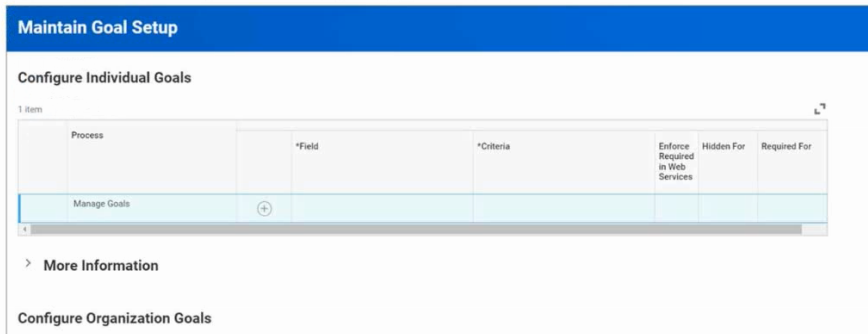
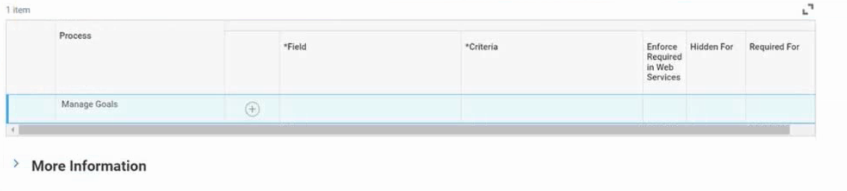
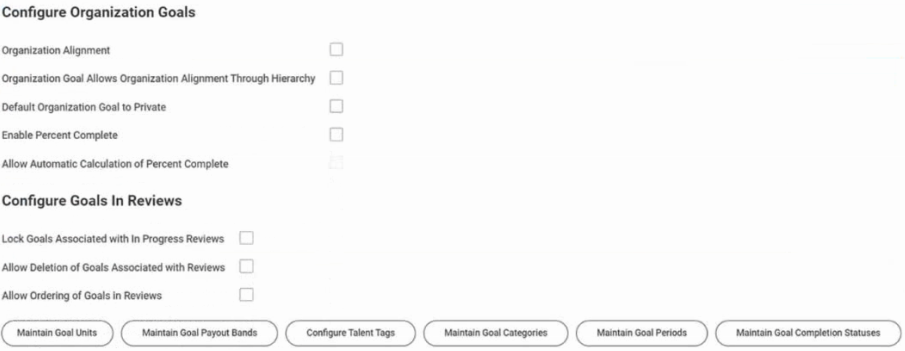
An enterprise creates organizational goals that include the following criteria:
The organizational goals span five years.
Workers can align their individual goals with the organizational goals.
Workers must provide a description for each individual goal.
Each individual goal must fall within one of three groupings.
Workers' individual goals fall within one of three groups: Innovation, Financial, or Productivity.
Where do you configure the groupings?
In the scenario, each worker's goal must fall under one of three groupings: Innovation, Financial, Productivity.
These groupings are set up using Goal Categories.
The Maintain Goal Categories task allows administrators to define these categories and enforce categorization for goal entry.
Incorrect options:
Configure Goals in Review section affects reviews, not groupings.
Configure Organization Goals section applies to enterprise-level goals, not categorization.
Configure Talent Tags task defines tags used for reporting, not enforced groupings.
Workday Goal Management admin setup: ''Use Maintain Goal Categories to define groupings for goals.''
Workday Pro Talent & Performance certification material: Goals must be categorized via categories, not talent tags.
You want to create an organization goal for the workers in a supervisory organization.
When creating the organization goal, what most recent period defaults into the Goal Period field?
Comprehensive Detailed Explanation
When creating an organization goal, Workday defaults the Goal Period field to the most recent goal period used in the specific supervisory organization.
It does not inherit from superior organizations, worker records, or the first goal period created in the tenant.
This ensures consistency within the supervisory organization's existing goal cycles.
Workday documentation on Goal Period defaulting behavior.
Workday Pro Talent & Performance guide: ''For new organizational goals, the Goal Period defaults to the most recent goal period assigned within that supervisory organization.''
50 questions covering all exam domains, starting from $20
5 domains from the Workday Workday-Pro-Talent-and-Performance exam outline, with approximate weightings. Every sample question above is tagged with the domain it comes from
Configure and optimize workflows for talent processes. Understand how to map business rules to system logic and troubleshoot process failures in production environments.
Set up role-based access controls and data security policies for talent and performance data. Manage field-level permissions to protect sensitive HR information.
Align employee performance with organizational objectives using Workday tools. Configure performance reviews, goal management, and ongoing feedback mechanisms to boost workforce productivity.
Create and manage operational reports that provide real-time insights into HR and business activities. Develop data-driven dashboards to support talent and performance decisions.
Anticipate and plan for organizational talent needs using Workday Talent Management tools. Recruit, develop, and retain high-performing employees to support long-term business goals.
Common questions about the exam itself

