Key details for this exam, checked against the published exam outline
Each question shows the correct answer and an explanation of why it is right
Which of the following is an item that should be included in an incident report as part of the post-incident debrief?
A high-quality incident report captures what the adversary did in a way that enables prevention and detection improvements. Including adversary tactics and techniques (C) is essential because it translates raw artifacts (emails, URLs, headers, click events) into actionable security engineering outcomes: which initial access method was used (credential phishing vs BEC), which impersonation technique (display name, lookalike domain, supplier compromise), what persistence was attempted (mailbox rules/forwarding, OAuth consent), and what objectives were pursued (invoice fraud, data theft, lateral phishing). In Proofpoint-centered IR, mapping tactics and techniques supports targeted control tuning: URL Defense policy, attachment sandboxing, impostor rules, DMARC enforcement, and TRAP automation; it also improves analyst playbooks (what pivots to run next time, what indicators to hunt). The incident response plan (B) is a reference document, not an incident-specific report item. Network diagrams (A) may be helpful in some incidents but are not always relevant for email-led events. Threat landscape reporting (D) is contextual intel, but the report must focus on what occurred in this incident and what to change to reduce recurrence, which is best captured via tactics/techniques.
What type of threat does the Cloud Security Report help identify in connected environments?
The Cloud Security Report is designed to highlight risks and suspicious activity across connected cloud environments, with a strong focus on indicators consistent with account takeover (ATO) (B). In Proofpoint cloud-connected contexts (e.g., cloud email and SaaS integrations), ATO manifests through patterns such as unusual sign-in behavior, suspicious mailbox activity, anomalous sending, unexpected forwarding rules, OAuth application consents, and risky access from new locations/devices. For IR, this is critical because modern phishing frequently targets credentials and sessions rather than delivering executable malware, and compromised cloud identities enable fast lateral movement through internal phishing, invoice fraud, and data access. Proofpoint reporting helps analysts identify which users and accounts show the strongest compromise signals so they can prioritize containment: force password reset, revoke refresh tokens/sessions, remove malicious inbox rules and forwarding, disable suspicious OAuth grants, and validate MFA posture. While ransomware, insider risk, and BEC can be related outcomes, the Cloud Security Report's connected-environment emphasis is on identity compromise signals and cloud account misuse---core ATO detection and investigation drivers.
Exhibit:
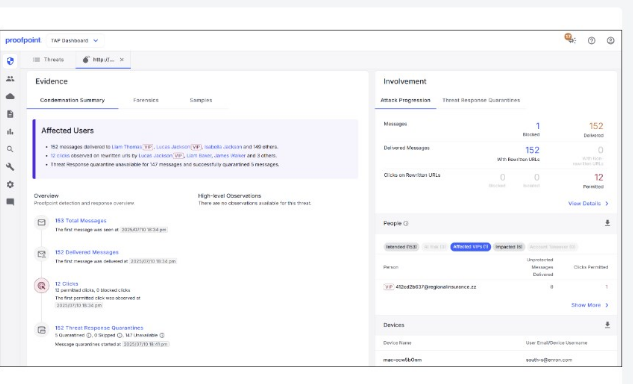
What can be determined by the threat information shown in the exhibit?
The exhibit's threat detail indicates that a VIP user clicked and that the click occurred on a non-rewritten URL (D). This determination is significant in Proofpoint IR because non-rewritten clicks can bypass URL Defense's time-of-click protections and logging, reducing both prevention and visibility. It often happens when a user accesses the link outside the protected path (e.g., copying/pasting the URL into a browser, using a client/app that didn't preserve rewriting, or receiving the URL through a channel where rewriting wasn't applied). For responders, this elevates urgency: the VIP user should be prioritized for compromise assessment (credential reset, token/session revocation, MFA verification, mailbox rule/forwarding review, suspicious login checks) because the protective block page may not have been enforced. It also drives containment improvements: ensure URL Defense rewriting is applied broadly (body links), verify supported clients and configurations, and consider additional controls such as isolation or stricter policies for VIP cohorts. The other options (A--C) require explicit remediation or message-count indicators that are not definitively implied by the ''VIP clicked non-rewritten URL'' exhibit signal.
An analyst is reviewing the Threats page in the TAP Dashboard.
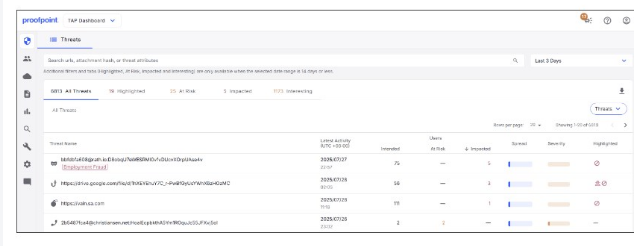
Which of the top four threats seen in the exhibit should be prioritised for investigation?
In Proofpoint-driven triage, threats are prioritized by likelihood of immediate compromise and blast radius. Credential phishing typically ranks highest because a single successful credential submission can lead to account takeover (ATO), which then enables follow-on attacks: internal phishing, mailbox rule abuse, OAuth consent abuse, wire-fraud/BEC escalation, and data access. Proofpoint TAP surfaces credential phishing with strong indicators (URL defense verdicts, rewritten URL clicks, campaign clustering, and known phishing kits/landing pages), making it actionable for containment. Compared to malware delivery, credential theft often bypasses endpoint controls and produces fewer immediate artifacts, so rapid response is critical: password reset, token revocation, MFA enforcement, and mailbox audit. TOAD and BEC can be high impact, but in many environments they require human interaction outside email controls (phone/social steps) and may not always show definitive technical IOCs early. The TAP ''Threats'' view is designed for quick pivoting (Intended/At Risk/Impacted) and credential phishing typically correlates strongly with ''Impacted'' activity (clicks/submissions), which is why it should be investigated first when competing items are present.
What is the first action a security analyst should take when beginning to review and prioritize alerts from Targeted Attack Protection (TAP)?
The first step in a scalable TAP-driven workflow is to reduce the alert set into an actionable queue using built-in filtering on the Threats page (time range, severity, threat type, campaign grouping, Intended/At Risk/Impacted, VIP targeting, and ''Highlighted'' categories). This aligns with SOC operational procedures: triage is a funnel, and TAP's dashboards are optimized for sorting by risk and user impact so analysts can quickly identify what is most likely to represent an active incident. Jumping straight into .eml review or false-positive adjudication is inefficient before you know which threats have user interaction (clicks), broad distribution, or high severity. Likewise, false-negative root cause analysis is a later-stage improvement activity, typically triggered after an incident or quality review. In Proofpoint IR practice, you filter first to find: (1) threats with ''Impacted'' users (clicks/interaction), (2) high severity (credential theft/malware), (3) VIP targeting, and (4) campaign clusters. Only then do you pivot into forensic details, message artifacts, URL/attachment detonation results, and---if necessary---remediation actions (blocklists, TRAP pulls, user resets).
52 questions covering all exam domains, starting from $20
Exam domains verified against: Official Proofpoint PPAN01 exam guide, last checked September 2026.
Learn the Threat Protection components including Email Protection, TAP, TRAP, CTR, and NPRE, along with the Incident Response Life Cycle and NIST SP800-61 r2 Computer Security Incident Handling Guidelines. Understand the key responsibilities of an incident responder in your organization's security program.
Develop security infrastructure, define roles and responsibilities for incident responders, and establish incident response procedures and runbooks. Learn to identify event logging locations, escalation paths, and investigate how changes to threat landscapes impact your organization's analysts.
Identify tools and detection mechanisms for analyzing security incidents and perform operational checks on Threat Protection components. Learn to investigate at-risk users, analyze system logs for suspicious activities, monitor alerts, and identify common threats such as spam, virus, malware, BEC, and phishing.
Arrange threat patterns into unified investigations and assign threat urgency based on context and target. Explain manual remediation steps and verify automated actions, eliminate false positives, and make recommendations for threat protection including custom rules, VIP user configurations, and blocklists.
Prepare incident reports showing trends over time and recommend security tool installation, configuration, and maintenance. Present completed incident reports with timelines, users, devices, and tactics involved, then suggest ways to prevent similar events in the future.
Common questions about the exam itself

