Key details for this exam, checked against the published exam outline
Each question shows the correct answer and an explanation of why it is right
Click the Exhibit button.
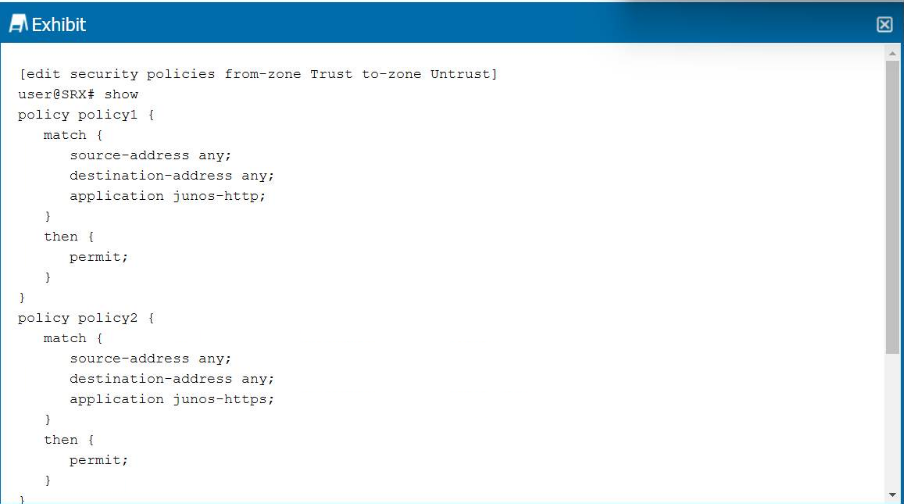
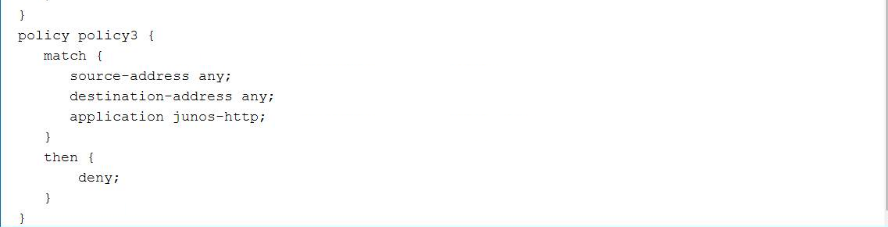
Referring to the exhibit, which statement is correct?
Juniper SRX evaluates security policies in order, top to bottom. The first matching policy determines the action, and no further policies are evaluated. This behavior can lead to shadowed policies if later policies match the same conditions as earlier ones.
From the exhibit:
Policy1: Matches application junos-http and permits traffic.
Policy2: Matches application junos-https and permits traffic.
Policy3: Matches application junos-http again, but denies traffic.
Since policy1 already matches all HTTP traffic and permits it, traffic never reaches policy3. This makes policy3 shadowed because it has the same match condition as policy1 but is evaluated later in the list.
Other options:
Policy1 is not shadowed because it is evaluated first.
Policy2 is independent (application = HTTPS) and therefore unaffected.
Only policy3 is shadowed by policy1.
Correct Statement: Policy3 will be shadowed because it matches the same application as policy1.
Content filtering supports which two of the following protocols? (Choose two.)
Content filtering on SRX devices inspects and controls specific file types transferred across certain application protocols:
SMTP (Option A): Supported. Content filtering can block specific file attachments in emails.
HTTP (Option D): Supported. Content filtering can block downloads of specific file types over web traffic.
SNMP (Option B): Not supported; SNMP is a management protocol, not a content delivery protocol.
TFTP (Option C): Not supported by content filtering.
Correct Protocols: SMTP and HTTP
What are three requirements for creating a custom application? (Choose three.)
A Junos custom application is a security policy object used when a predefined Junos application does not match the traffic requirement. To create one, you must define an application name, the transport protocol, and port information such as the destination port. Juniper documentation describes custom application attributes as including the name, transport protocol, and source or destination port numbers for TCP or UDP applications. The security policy itself is not a required attribute of the custom application object; it is where the object is later referenced. The source address is also not part of defining the application object. Therefore, the valid requirements are the port number, application name, and protocol.
Which security policy action will cause traffic to drop and a message to be sent to the source?
Security policies on SRX support several actions:
Permit: Allows traffic to pass according to the rule.
Deny: Silently drops the traffic without notifying the source.
Reject: Drops the traffic and sends a TCP RST (for TCP) or ICMP unreachable (for UDP/other protocols) back to the source. This provides feedback to the sending host.
Next-policy: Allows policy chaining to evaluate the next policy set.
Therefore, the action that causes traffic to drop and a message to be sent to the source is reject.
Which two statements are correct about security zones? (Choose two.)
Option B: Correct. Interfaces in the same security zone must belong to the same routing instance; zones cannot span multiple routing instances.
Option D: Correct. A security zone can contain multiple interfaces, allowing grouping of similar trust levels (e.g., multiple LAN subnets in a trust zone).
Option A: Incorrect. An interface can belong to only one zone at a time.
Option C: Incorrect. Interfaces within the same zone cannot be split across routing instances.
Correct Statements: Interfaces in the same zone must share the same routing instance, and a zone can contain multiple interfaces.
Which two criteria would be used for matching in security policies? (Choose two.)
Security policies in Junos OS match traffic based on specific criteria:
Source and destination addresses (Option B).
Application (Option D), which may be defined as services (e.g., tcp/80) or recognized through AppID.
Other options:
MAC addresses (Option A) are not used in policy matching; policies operate at Layer 3/4.
Interface name (Option C) is used in firewall filters, not in security policy definitions.
Correct Criteria: Source address and Applications
You are modifying the NAT rule order and you notice that a new NAT rule has been added to the bottom of the list.
In this situation, which command would you use to reorder NAT rules?
In Junos OS, NAT rules are evaluated in top-down order. When a new rule is added, it is placed at the bottom of the rule set by default.
To move a rule to the top of the rule set, the command is:
set security nat source rule-set <name> rule <rule-name> top
Option A (top): Correct. Moves the specified rule to the top of the list.
Option B (run): Used to execute operational commands, not rule reordering.
Option C (up): Not valid for reordering NAT rules.
Option D (insert): Not a supported NAT reordering command in Junos.
Correct Command: top
Exam domains verified against: Official Juniper JN0-232 exam guide, last checked October 2026.
Understand the foundational architecture and capabilities of SRX devices, including their role as unified threat management platforms. Learn about interfaces, hardware specifications, initial configuration, and the packet flow through security processing stages. Covers both physical SRX Series devices and the Juniper vSRX Virtual Firewall.
Master the core building blocks of security configuration on Junos OS. Study security zones, screen configurations for attack prevention, address objects for traffic identification, and application definitions including Application Layer Gateways that inspect and control specific application protocols.
Design and implement access control rules that protect network resources. Understand zone-based policies that control traffic between security zones, global policies that apply across the device, and unified security policies that provide a streamlined configuration model. Learn how policies determine which traffic is allowed or denied.
Configure IP address translation to manage address space and enhance security. Study source NAT to hide internal addresses, destination NAT to expose internal services to external networks, and static NAT for one-to-one address mapping. Learn when and why each translation type is used in network design.
Deploy unified threat management features to inspect and control traffic content. Implement content filtering to block unwanted material categories, web filtering to restrict web access, antivirus scanning to detect malicious files, and antispam to filter email threats. These features work together to protect against modern network threats.
Sample question from this domain above: Q6
Diagnose and resolve security issues using Junos OS tools and logs. Troubleshoot security policies to ensure traffic flows as intended, validate configured behaviors to confirm the device operates correctly, and monitor packet flow through the security processing pipeline. Learn to interpret logs and use command-line diagnostics to identify problems.
Common questions about the exam itself

