Key details for this exam, checked against the published exam outline
Each question shows the correct answer and an explanation of why it is right
Succeed Insurance allows field Adjusters to write checks directly to the insured to cover damage costs for minor claims such as:
Personal auto claims involving cracked windshields
Homeowners claims involving minor glass breakage
The Adjuster uses the Manual Check Wizard to record the check number and amount against a reserve line. Succeed requires Supervisor approval for all manual checks to ensure that the paper checks are verified against the payment information in ClaimCenter.
Which two limits or rules must be configured in ClaimCenter to ensure that these manual payments are sent to the correct person for approval? (Choose two.)
To enforce an approval workflow for a specific type of financial transaction (like 'Manual Checks') regardless of the dollar amount, a Business Analyst must leverage both Authority Limits and Transaction Approval Rules.
Authority Limits (D): These are the primary controls for financial exposure. While typically used for amounts (e.g., 'Limit of $5,000'), they are the foundational mechanism that triggers the system's 'Pending Approval' state. For this scenario, an authority limit could be set to $0 for the specific payment method of 'Manual Check' to force all such payments into the approval workflow.
Transaction Approval Rules (C): These rules allow for more granular, logic-based approval triggers beyond simple amounts. Since the requirement specifies 'all manual checks' (implying a condition based on the method of payment, not just the amount), a Transaction Approval Rule is the best practice configuration. The rule would be written to state: 'If Payment Method is Manual, then Approval is Required.'
Why not A (Approval Routing)? While Approval Routing rules determine who receives the request (the 'correct person'), the default behavior in ClaimCenter is to route approvals to the user's Supervisor. Since the requirement is simply 'Succeed requires Supervisor approval,' the standard routing logic likely suffices without needing new custom configuration. The critical configuration needed is the trigger (C and D) to stop the payment in the first place.
Succeed Insurance has a requirement to add a new high-risk indicator to the Claim Status screen for property claims that have a lien on the property. A new icon will be added to the configuration to provide a visual indicator making it easier for Adjusters and other ClaimCenter users to determine that a claim has a lien.
Which two common areas of the user interface (UI) can display the new lien icon? (Choose two.)
In the standard Guidewire ClaimCenter User Interface architecture, high-priority alerts and claim indicators are displayed in two primary locations to ensure visibility:
The Info Bar (Option D): This is the persistent strip located at the top of the claim file (just below the Tab Bar). It remains visible regardless of which specific claim sub-screen (Medical, Financials, Notes) the user is navigating. It is designed specifically to host 'High Risk Indicators' such as Litigation, Fatalities, Coverage issues, and in this scenario, a 'Lien' indicator. This ensures the adjuster is aware of the critical status immediately upon opening the claim.
The Screen Area (Option A): Specifically, the Claim Status (or Summary) screen---which resides in the main Screen Area---contains a dedicated section for 'Claim Indicators.' Here, the icon is displayed along with a text description and potential toggle status (On/Off). The prompt explicitly mentions the requirement to 'add a new high-risk indicator to the Claim Status screen,' confirming the Screen Area as the second location.
Why other options are incorrect:
Sidebar (B): The sidebar (left panel) is used for the 'Actions' menu and navigation links (steps) to move between screens. It does not typically host status icons for the claim object itself.
Workspace (C): While 'Workspace' can refer to the application frame, in UI terminology, it often refers to the specific worksheets (bottom pane) or the container, not the specific UI element for indicators.
Tab Bar (E): The Tab Bar is for high-level navigation (Claim, Desktop, Administration, Search) and does not display claim-specific data icons.
Which two components are necessary to create the check(s) using the wizard? (Choose two.)
The Check Wizard in Guidewire ClaimCenter enforces strict financial integrity rules. To successfully create a check, the user must define the source of funds and the recipient.
Payment tied to a Reserve Line (Option A): Every payment must be allocated to a specific Reserve Line (combination of Exposure, Cost Type, and Cost Category). This ensures that the payment consumes the correct financial reserves and maps to the correct coverage on the policy. You cannot create a 'floating' payment; it must be tied to a reserve line.
Payee (Option C): A check is a legal instrument that must be payable to a specific entity. Selecting a Payee (from the claim contacts) is a mandatory step in the wizard.
Why other options are incorrect:
B (Activity): While payments can be linked to activities (e.g., Service Requests), it is optional. Most indemnity payments are made directly without an underlying activity.
D (Date of claim): The Loss Date is a property of the claim, but it is not a component selected or created during the check wizard process. The relevant dates in the wizard are the 'Service Period' or 'Scheduled Send Date.'
Whenever the Total Loss Calculator determines that a vehicle is a total loss, Succeed Insurance wants to create a custom history event with the exposure name and total loss score.
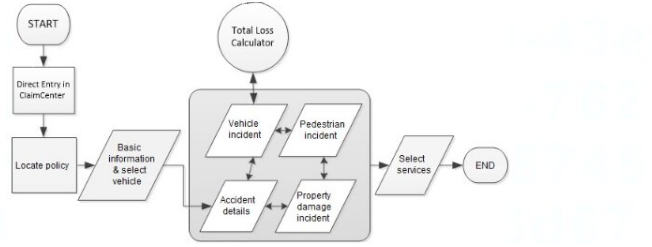
Which step in the claim setup process flow must be completed before the history event can be created?
250 to 350 words From Exact Extract of Guidewire ClaimCenter Business Analyst documentation:
In Guidewire ClaimCenter workflow analysis and configuration, defining the correct sequence of operations is critically dependent on Data Availability and Data Dependency.
The specific requirement here dictates that the custom history event must capture the Total Loss Score. In the context of the ClaimCenter object model and process flow, the Total Loss Score is an output value generated specifically by the Total Loss Calculator engine. Before this calculator runs, the score attribute is effectively null or non-existent.
Therefore, to satisfy the business requirement, the step that writes the history event must be placed after the step that generates the data it needs to record.
Process Logic: If the Business Analyst were to place the history event creation step before the Total Loss Calculator (Option B) or before the Vehicle Incident (Option D), the system would attempt to write a record containing a score that has not yet been calculated. This would result in either a system error or a history event with a blank/zero value, failing to meet the business requirement.
Dependency Chain: The workflow dependency is: Vehicle Data Entry -> Total Loss Calculation -> Score Generation -> History Event Creation.
Implementation Note: In a typical Guidewire implementation, this logic is often handled via 'Event Fired' rules or specific 'Exit Points' in the workflow. The system waits for the confirmation that the Total Loss calculation service has successfully returned a result. Once that transaction is committed and the score is persisted on the Vehicle or Exposure entity, the subsequent rule to generate the History Event can trigger successfully.
Consequently, Option C is the only viable placement in the process flow. It ensures that the prerequisite action (calculation) is complete and the required data payload (the score) is available for the subsequent action (logging the history event).
A claim for an auto accident in Tampa, Florida has been reported and recorded in ClaimCenter. The ClaimCenter base product Global Claim Assignment Rule is utilized for automatic assignment to Adjusters regardless of complexity of claims.

What is the likely path of assignment for this claim?
Claim Assignment in Guidewire ClaimCenter follows a two-step logic: Global Assignment (finding the right Group) and Group Assignment (finding the right User).
Group Identification (Global Assignment): The first step relies on the geography of the loss. According to the provided organization table, the Southeastern Auto Adjusters group is responsible for 'Georgia, Florida, Alabama, South Carolina, North Carolina.' Since the accident occurred in Tampa, Florida, the Global Assignment rule will route the claim to the Southeastern Auto Adjusters group.
User Assignment (Group Assignment): The prompt specifies the use of 'automatic assignment... regardless of complexity.' In ClaimCenter's base configuration, the standard method for distributing claims automatically within a group is Round Robin (or Cyclical) assignment. This method assigns the claim to the next available adjuster in the list, ensuring an even distribution of volume without complex weighting calculations.
Why other options are incorrect:
Option B (Midwest): Incorrect geography. The Midwest group covers IL, MI, OH, IN, WI, not Florida.
Option C (Weighted Workload): While 'Dynamic Assignment' (workload balancing) is a feature, the standard 'automatic assignment' described implies a simple cyclical rotation (Round Robin). Weighted assignment is a more advanced configuration typically used when complexity is a factor (e.g., assigning fewer claims to junior adjusters).
Option D (Supervisor): Assigning to a Supervisor is a manual fallback or 'Assign to Supervisor' rule, usually triggered when no suitable adjuster is available or for complex exceptions. It is not the primary path for standard automatic assignment.
50 questions covering all exam domains
Exam domains verified against: Official Guidewire ClaimCenter-Business-Analysts exam guide, last checked September 2026.
Covers driving quality throughout the development lifecycle, integrating quality from inception, assessing and mitigating risk, running appropriate tests at the right time, and managing the defect process from identification through resolution.
Explains behavior-driven development principles and their application in Guidewire implementations. Focuses on how BDD practices help write clear requirements and bridge business and technical understanding.
Sample question from this domain above: Q4
Introduces the InsuranceSuite technology stack including the user interface, data model architecture, application logic, and integration mechanisms. Includes practical workshop guidance and hands-on exercises.
Sample question from this domain above: Q5
Covers the end-to-end claims process flow, claim maintenance operations, organizational structure alignment, line of business coverage configuration, and claim intake procedures.
Sample question from this domain above: Q3
Examines claim setup procedures, the underlying data model structure, adjudication rules and workflows, financial terms and concepts, and the payment creation process.
Focuses on constraining payments through approval workflows and financial holds, managing contacts and vendors, handling service requests, and setting permissions and access control lists.
Common questions about the exam itself

